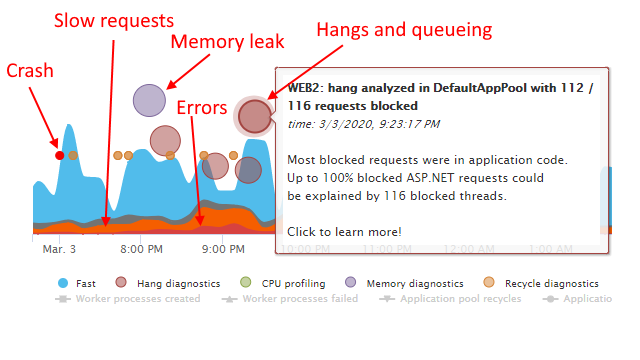
If you manage IIS websites, you’ve probably asked these questions many times:
- Should I use IISRESET to restart IIS services?
- Should I recycle my IIS application pools when the website is slow, failing, queueing, or is consuming too much CPU/memory?
- How can I reduce application pool recycling, or application restarts, to improve my website availability?
If so, this guide is for you. Read on to learn what happens when you restart IIS services, when you should recycle your application pools, and how to do it in the safest and most efficient way possible.
I’ll also show you how to restart IIS applications with ZERO downtime. And how to set up high availability, recycle tolerant, always warm websites that experience ZERO startup delays even when they recycle.
How to reset IIS the right way
Your IIS website is designed for always-on usage. Still, there seem to be many reasons why you may need to restart parts of your IIS web stack.
During the last 10 years at LeanSentry, we’ve seen more than a fair share of customers restarting their web servers. Including using IISRESET, or recycling their application pools to try to solve performance and reliability problems. In many of these cases, restarting did not ultimately help, and in some of them, actively hurt the website’s availability.
Here are the top reasons we’ve seen:
- You want to make sure that the web server has picked up new application or configuration changes.
- Your website is not responding/is slow.
- Your application pool’s worker process (w3wp.exe) has high CPU usage.
- Your application pool’s worker process (w3wp.exe) has high memory usage.
- You are getting the HTTP 503 Service Unavailable, or Queue Full errors.
- Your application is not loading at all, or throwing errors.
In this guide, we’ll dig into each case and find how to reset IIS the best way. The answer often is NOT to restart it. If a restart is actually desired, we’ll look at the smart ways to do it without negatively impacting your website's availability.
Before we do, let’s get one thing out of the way.
IISRESET: the IIS restart command to avoid
Whatever your goal, resetting IIS or stopping IIS services is not the right answer.
I wish we had removed the IISRESET command when we shipped IIS 7.0 in Windows Server 2008. Unfortunately, too many people were already relying on iisreset as their main iis restart method. The team did not want to create a breaking change for people’s scripts, so they kept it around.
History of the IISRESET command
IISRESET is a dinosaur from the before-times, specifically before IIS 6.0 shipped in Windows Server 2003. With IIS 5.0 and earlier versions of IIS, the web server was a monolith. An IIS reset tool was needed for restarting the web server process to resolve performance issues that may have developed in the application.
IIS 6.0 introduced the application pool architecture. This separated the website application code (hosted by the IIS worker process, w3wp.exe) from the IIS system framework (Http.sys kernel driver, and W3SVC listener service) responsible for receiving requests.
Therefore, iisreset.exe was no longer needed to restart the application. Still, it remained in the product as the "easy" but entirely excessive way to reset IIS.
IISRESET is a rusty hammer that inflicts a lot of damage on your server, but has little precision. The vast majority of the scenarios for restarting IIS are centered on restarting a misbehaving application or worker process. Because of this, recycling the application pool wins every time.
Which means resetting IIS this way is always completely unnecessary.
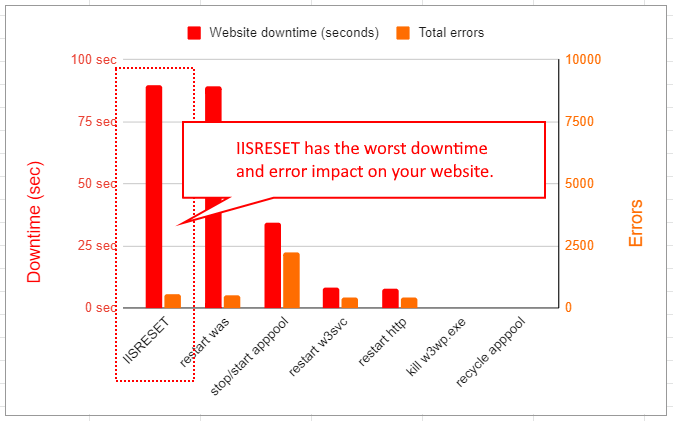
Worse, using the IIS reset command causes significant impact to your website’s availability.
This includes:
- Shutting down all application pools, and terminating all incoming requests. This will make ALL your websites unavailable for the entire duration of the shutdown. Compare this with IIS application pool recycle, which affects only a single apppool and maintains 100% availability.
- Stopping other system services (which may make your server unstable or unavailable).
- Potentially failing to bring those services back, leaving your server inoperable.
For a detailed explanation of the problems caused by IISRESET, and the comparative benefits of using targeted application pool recycling, please see Dangers of using IISRESET to restart IIS services.
Stopping IIS services
Before we dig into each scenario, it’s important to understand the key parts of the IIS website stack. We’ll also look at when and why you may need to restart them, and when you really don’t.
If you already know all of this, feel free to skip ahead.
IIS services you can reset
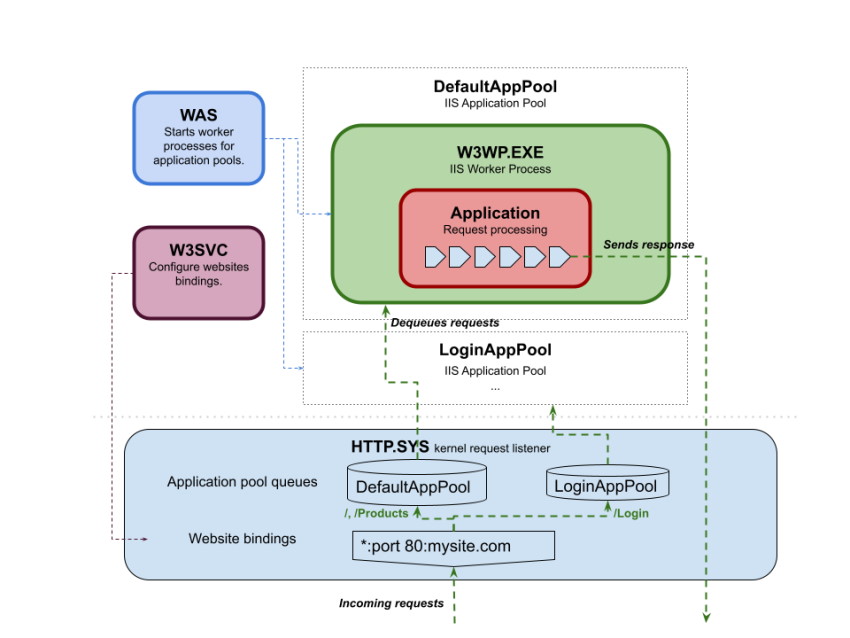
These services comprise the system infrastructure of IIS, helping it receive and dispatch incoming requests to the IIS worker process. The worker process then actually hosts your application code and request processing.
- Http.sys. Kernel listener that receives the requests by listening on website binding endpoints. It then allows IIS worker processes to dequeue these requests for processing.
- W3SVC. The IIS web service that configures Http.sys to listen for requests based on your IIS website configuration.
- WAS/WPAS. The IIS service that coordinates the creation of worker processes based on your application pool configuration.
- Application pool. This is a logical container, not a physical process. The application pool routes request processing for a set of applications in your website to a specific IIS worker process.
- IIS worker process (w3wp.exe). This is the actual runtime host for the application, where request processing takes place. When we talk about restarting or recycling the application pool, we are actually talking about starting a new fresh worker process.
- Application. An IIS application maps a url in your website to a physical ASP.NET application domain that’s hosting your application code. When you are having performance issues, it’s the application code and its memory state that is usually causing the trouble. It could be a hang, high CPU, or a memory leak ... the application is the piece we really need to restart.
Let’s get this out of the way.
The core IIS services (Http.sys, W3SVC, WAS) never need to be restarted. Instead, they automatically detect any relevant configuration changes (e.g. new website being created, or a change in your application pool settings) and apply them on the fly.
You should not, but COULD restart these services as follows:
| Service | How to restart it | What happens when you restart it |
| Http (Http.sys) | net stop http && net start w3vc | All current requests aborted, downtime during W3SVC
restart. All application pools recycle when w3svc re-starts. Risk of kernel driver getting stuck in a stopping state, requiring server reboot. |
| W3SVC | net stop w3vc && net start w3svc | All current requests aborted, downtime during W3SVC
restart. All application pools recycle when w3svc re-starts. |
| WAS/WPAS | net stop was && net start w3svc | All current requests aborted. All application pools shut down, downtime until WPAS restarts. |
The IISRESET command is roughly equivalent to restarting the WAS service. This triggers the stopping of the W3SVC service, and the shutdown of ALL IIS application pools. All of that can take a very long time on a production server, causing extended downtime.
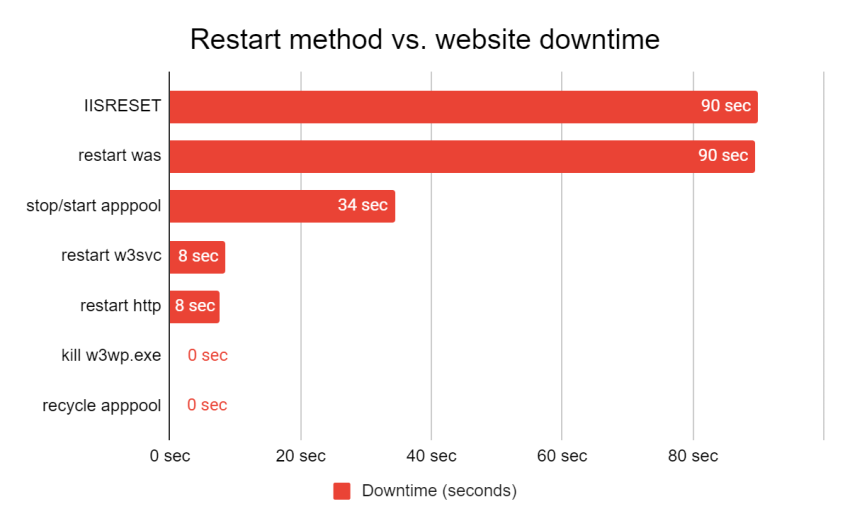
Downtime test of IISRESET, WAS restart, application pool stop and recycle
We performed a production downtime test to illustrate the relative impact of all the different ways you can restart or recycle your IIS services.
In this test, we applied a mixed load to a simple web application, which included 50 requests-per-second to a fast page and 2 active requests to a slower page that took ~10 seconds to execute. We then attempted to reset IIS or shutdown/recycle the test application pool, measuring downtime, and any errors experienced by our test client.
At the same time, the server continued to serve two other production websites supporting LeanSentry services.
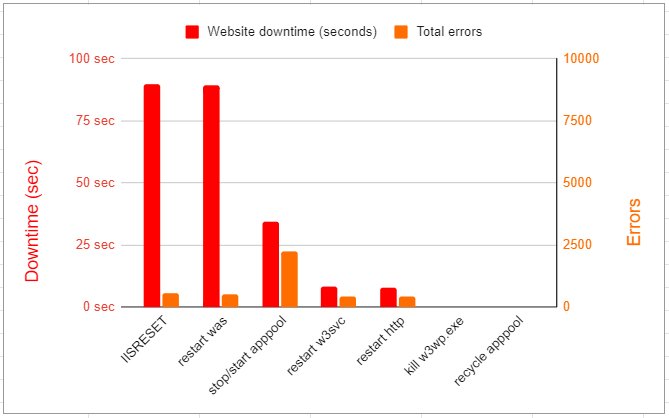
As you can see in the results, IISRESET and WAS restart caused the most downtime, due to stopping the application pool and being forced to wait for all application pools to shut down. In contrast, recycling the test application pool caused zero downtime!
Recycling IIS application pools, and worker processes (w3wp.exe)
The IIS worker processes in each apppool are the ones hosting your application code and processing requests. They are also the ones consuming server resources (e.g. CPU or memory).
IIS automatically applies changes to the application pool configuration by doing an “overlapped recycle”. This swaps the current application pool’s worker process with a new fresh one.
You can manually trigger an overlapped apppool recycle from IIS Manager, or with AppCmd as follows:
Appcmd recycle apppool POOLNAME
The MASSIVE advantage of recycling a specific application pool
Separating websites and applications into different application pools enables you to restart the exact part of your site that needs it.
This has the following key advantages:
- No server-level impact for other sites and pools.
- No extended downtime due to waiting for ALL other application pools to stop. This is huge on a server with multiple apppools.
- No downtime due to waiting for the target application pool to stop.
- (If you have it configured) full warmup/zero startup time for the new worker process.
Bottom line, the targeted overlapped recycle method offers ZERO downtime for the target application pool. We’ll explore this in detail next.
Compared to this, iisreset or restarting WAS causes the shutdown of ALL application pools. This includes waiting for requests in all application pools to finish, up to the shutdown time limit. This could mean up to a minute and 30 seconds of downtime from each application pool.
Not to mention, that all other application pools will need to come up again after the restart. They will then experience the initialization overhead and startup delay. This can place an intense load on the server, resulting in additional downtime.
Overlapped recycle to the rescue
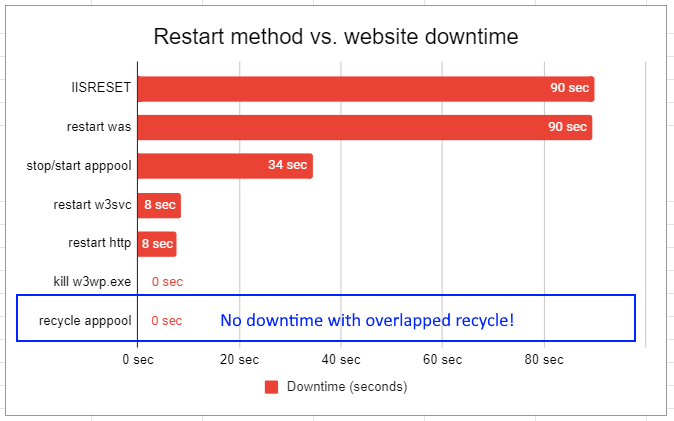
When the application pool recycles, it uses a process called “overlapped recycle” or what I call “graceful recycle”. This process allows IIS to start up a new worker process, with zero downtime and zero requests failing across the transition.
The process works roughly like this:
- Start a new IIS worker process.
- Wait for the process and the application to initialize (requires IIS 8.0 and application initialization)
- Start sending NEW requests to the new worker process.
- Tell the current worker process process to shut down, finishing out any existing requests (until a timeout).
As a result, whenever the application pool is gracefully recycled, no requests are lost.
Let me repeat this key point.
During the overlapped recycle, NO REQUESTS ARE LOST. This means that you can handle most cases requiring a recycle without any impact to your website’s availability.
Overlapped recycle vs. IISRESET
Comparing the overlapped recycle to IISRESET is like comparing apples to ... apples that have been bashed into oblivion by a rusty hammer. The key difference is that the overlapped recycle makes sure all requests are handled by either the new or the old worker process, resulting in zero downtime.
By comparison, IISRESET, restarting WAS, as well as starting/stopping the application pool, all stop the application pool. During the stop, all new requests are rejected while we wait for existing requests to finish (up to the shutdown time limit, 90 sec by default).
IISRESET and WAS restart also shut down EVERY application pool, so the downtime can be as long as the longest application pool stop ... AND affects every single application pool on the system.
Even with the overlapped recycle, there are some potential impacts to consider. This includes cold starts, long startup delays, and state loss issues. We’ll look at that next.
That said, as you’ll see below, you should aim to use the overlapped recycle in almost all cases. It definitely gives you the lowest impact of any other approach. To take it up a notch, use our Maximize IIS Application pool availability guide to enable recycling with full warmup and no startup delay.
Recycle the right application pool
To get the advantage of zero-downtime benefits, you need to recycle the right application pool. Sometimes, this requires you to find the pool to recycle.
Say you have a w3wp.exe that is experiencing an issue. You can quickly find and recycle it’s application pool like this:
appcmd list wp /wp.name:PID /xml | appcmd recycle apppool /in
Or, say your website is hanging and you want to recycle the corresponding pools. This command will recycle the application pools where requests are taking more than 10 seconds:
appcmd list requests /elapsed:10000 /xml | appcmd recycle apppool /in
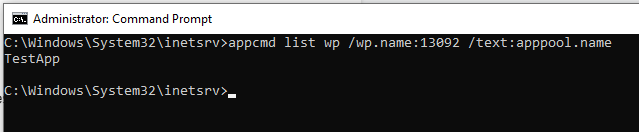
You can run the same commands to show you the application pool names instead of recycling right away, e.g.:
appcmd list wp /wp.name:PID /text:apppool.name
The hidden costs of recycling IIS application pools
Despite the no-downtime promise of the graceful application pool recycle, recycling still carries costs. These costs can be severe for some applications.
It’s important to be aware of these costs when planning your recycle strategy.
Loss of state
Some applications maintain in-memory state, which can be lost during a recycle. This can cause an interrupted user experience (such as a lost shopping cart, an aborted data entry session, or a logout). This is most common with ASP.NET applications that use InProc session state.
When the application pool recycles, and the new worker process/application comes up, it no longer has the user state.
Applications that maintain in-memory state are not recycle tolerant.
Unfortunately, this also means they are not tolerant of application restarts, worker process crashes, and server restarts.
Finally, in-process state applications cannot easily scale. Some applications implement per-user or per-session load balancer affinity … which creates single points of failure and uneven scaling. Ultimately, in-memory state is a poor application architecture and should be avoided.
Instead, we recommend migrating to durable “out of process” state e.g. such as SQL or ASP.NET state service based session state.
Initialization overhead
When the application pool recycles, a new application comes online. Many applications require an initialization process to build up the data and caches they use for operation. This process can take some time, and introduce processing overhead.
This is one reason why recycling under traffic-induced high CPU is not a good idea. Read more on this in the IIS worker process has high CPU scenario below.
Startup delay
Similar to the initialization overhead, the startup delay is the time it takes for the application to fully initialize. During the overlapped recycle, the old worker process stops processing new requests as soon as the new process starts. This happens even though the new worker process has not completed application startup.
As a result, the new application may take a long time to complete its initialization process. During this time, the application effectively appears hung and incoming requests wait for the app init lock.
Requests blocked in application initialization
If this is happening, you'll see a lot of requests queueing up in the IIS Web Core, BeginRequest stage. These requests are waiting for a single request to complete the application startup code, typically in the Global.asax Application_Start event.
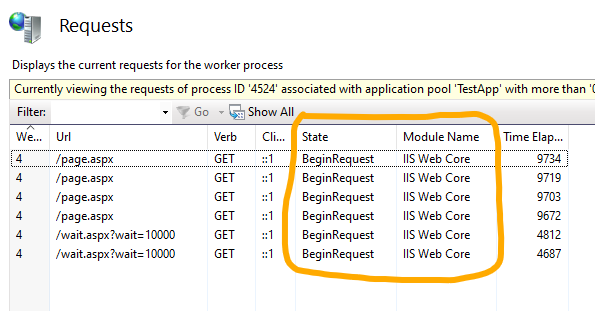
This is a serious problem for bigger production applications, which can require a lot of cached data. That in turn causes a pretty considerable startup delay.
The good news is that you can achieve a zero downtime, zero startup delay model with IIS 8.0+. To do this, you’ll need to use a proper application initialization strategy. This works by setting your application to complete its startup BEFORE IIS switches incoming requests to the new worker process. Until then, the existing worker process will continue serving those requests.
To see how to implement this step by step, please see our Maximum IIS application pool availability with Application Initialization guide.
Loss of cache/cold start
The final problem to be aware of is cold start. This results from application caches being empty after startup. Empty caches can cause your application to experience slower performance until the caches build up again.
If your application experiences poor performance after a cold start, it’s time to consider preloading the cache on application start. This is what happens with most applications that have a startup delay … they are preloading the caches!
If you want to have the best of both worlds: warm caches on startup, and low startup delays, consider two strategies:
- Application warmup (see previous section). This makes sure your application is warm before it goes into service.
- Background cache preload. This is a hybrid approach where the application preloads the cache after starting, but in the background. This way, new requests are not blocked. We use this approach at LeanSentry quite a bit.
Thankfully, this problem too is solvable. You can configure application initialization to warm up your app with zero startup delay. For the step by step process, see Maximum IIS application pool availability with Application Initialization.
When to restart or recycle
Let’s dig into each restart scenario to explore the pros/cons of recycling, and the best way to handle it.
Here we go.
Make sure that IIS has picked up website, application pool, or configuration changes
IIS 7.0+ is designed to automatically pick up configuration changes. This happens whenever you deploy a new website, change website bindings, or modify any other server-level configuration. IIS automatically applies your changes to:
| Change | How it’s applied |
| IIS website and application pool changes (applicationHost.config) | WAS and W3SVC automatically detect changes to website and application pool definitions, and reflect them into the Http.sys listener configuration on the fly. |
| IIS feature configuration (applicationHost.config) | IIS modules that implement the features automatically detect feature changes. |
| .NET framework configuration (framework.config, root web.config) | Any changes to these global files cause ALL ASP.NET applications loaded by any worker process to restart. |
| Web.config (application level) | IIS triggers a restart of the affected application. |
| Web.config (url level) | Changes are detected/reflected automatically by the configuration system for each subsequent request. |
| Application file changes | Changes to key application files (web.config, BIN, App_Code, etc) are
detected automatically and cause application restart.
Changes to compiled content files, e.g. ASP.NET pages, are detected automatically and trigger dynamic recompilation. This can also cause application restart after so many recompiles to reduce assemblies loaded in the app. |
| CLR configuration (for application pool)
E.g. Aspnet.config in
c:\Windows\Microsoft.NET\
Framework64\v4.0.30319
|
Changes are NOT detected automatically, must recycle affected application pool to pick up. |
| IIS registry keys | Changes are NOT detected automatically, must recycle affected application pool to pick up. |
| Trusted root certificates (affects trust for SSL certificates configured). | Changes are NOT detected automatically, must restart W3SVC to take effect. |
So, as you can see, restarting to pick up configuration changes is normally not necessary.
It’s also undesired, because you are probably going to cause your application pool to recycle multiple times. This triggers additional, unnecessary initialization overhead. Worse, you may end up recycling more than necessary, e.g. restarting all the applications in the application pool instead of just the affected application.
Deploying multiple changes without multiple restarts
If you are making many content and config changes, you run the risk of causing multiple application or application pool restarts. There are a few tricks to manage this, including dropping the App_Offline.htm file into the application directory during your publishing process.
You can also set the WaitChangeNotification and MaxWaitChangeNotification properties to delay application restarts (this does not work for web.config unfortunately because IIS detects that change and restarts the app right away):
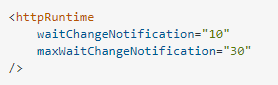
In the worst case, you can always stop the application pool and restart it after deployment is made. In fact, deploying thousands of websites may be the only legitimate use case I can find for stopping WAS during the deployment.
Website is not responding, or is slow
This is the most common “production” cause of restarts and recycles. When the website hangs, most people panic, because they usually lack any information about what is causing the problem.
So, they often reach for the reset button and hope for the best.
This does sometimes help, although temporarily, and the problems usually return. Sometimes right away! Most importantly, restarting your website makes sure that you will continue to have performance problems! Simply because restarting prevents you from being able to determine WHY the site is hanging or slow and eliminating that root cause.
Here is what to do instead:
- 10x better: Diagnose the cause of the hang or slowdown, e.g. by using LeanSentry Hang diagnostics.
- Recycle the right application pool (if desperate).
(If you don't fix the hangs, they are sure to keep returning.)
Why do some hangs return after recycling?
Recycling can temporarily relieve thread blockage, but it does not address the underlying problem. So, there is a high risk that the hang will quickly return.
For example.
If you are having a hang during peak traffic, due to threads being blocked (e.g. by a slow SQL query), bad times can return quickly. The new worker process will often rapidly hit the same hang condition. This happens because the new worker process will usually start with fewer threads. The large burst of incoming requests will make sure that the those new threads will all get blocked in the same code and much more quickly than before.
We’ve helped over 30,000 websites resolve hangs with LeanSentry. From this experience, we do SOMETIMES see emergency value in recycling hung application pools. But, since most hangs are caused by slow external resource retrieval, or thread pool exhaustion, recycling is usually not helpful :(.
Bottom line, you should always prefer to diagnose/resolve hangs to recycling the application pool.
You can learn to troubleshoot IIS and ASP.NET hangs manually in our Hang troubleshooting guide, but I would advise using LeanSentry hang diagnostics to get it done quickly and reliably.
How to diagnose IIS website hangs with LeanSentry
You can use LeanSentry Hang diagnostics to automatically detect and analyze IIS and ASP.NET website hangs:
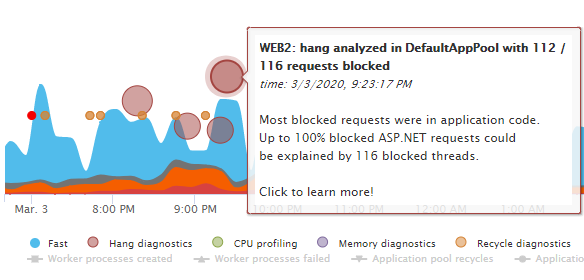
LeanSentry will then identify the application code causing the hang so you can resolve it quickly:

IIS worker process has high CPU usage
Your pool’s worker process is consuming too much CPU, resulting in slower responses. Perhaps it’s causing the server CPU to become overloaded.
This is another common reason for recycling application pools in production.
Go to the Diagnose w3wp.exe high CPU usage guide for the step-by-step for resolving high CPU usage correctly.
However, recycling these overworked worker processes can have a strong downside. The higher usage is almost always due to a confluence of higher load and heavier than desired processing by the application.
When you recycle the pool, the system will end up working even harder. This happens because the new worker process will be processing the same load, but without the benefit of full caches. And this is on top of any initialization overhead costs.
In other words, recycling is likely to make a production CPU problem worse.
Here is what to do instead:
- Reduce load on the server, or spin up another server (if in a cloud environment).
- Diagnose the code causing the CPU usage.
- Optimize this code to make your application more CPU-efficient.
Again, using the issue as an opportunity to diagnose the root cause always wins over temporary recycling.
How to diagnose high w3wp.exe CPU usage with LeanSentry
You can use LeanSentry CPU diagnostics to track down the application code causing high CPU usage in production websites. LeanSentry automatically detects and diagnoses high CPU incidents, so you can get to the root of the issue quickly.
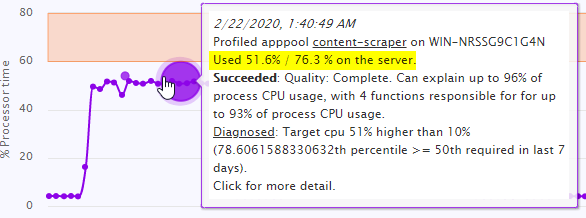
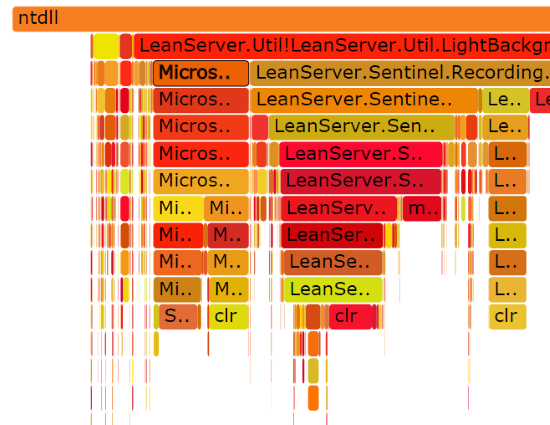
You can use the CPU diagnostics reports to determine the exact code pathways that are causing elevated CPU usage, so they can be optimized.
IIS worker process has high memory usage
This one is a bit different. This is because memory leaks usually take place over time, due to accumulation of objects that are not properly released (e.g. cache explosion).
As a result, recycling the application pool can be an effective bandaid for applications with memory leaks.
See the Diagnose w3wp.exe high memory usage guide for a step-by-step on fixing IIS memory leaks.
At LeanSentry, we see that roughly 60% of .NET applications experience elevated or leaky memory usage in production. Because production memory optimization has been historically difficult, it’s usually not done until it becomes a serious problem. The downside of this is that many websites require memory-based recycling to keep the server from running out of memory.
Another downside is cost. Sites with memory issues often experience a 2-4x increase in cloud costs (due to needing to run EACH instance with more memory).
Of course, we recommend diagnosing and optimizing memory usage regularly to keep your costs low. This will also help you reduce need for recycling, and increase overall performance by lowering Garbage collection overhead. You can read more about this in our IIS worker process memory optimization guide. These are all great benefits for sure and well worth it.
How to diagnose high w3wp memory usage with LeanSentry
Use LeanSentry Memory diagnostics can help you determine the code in your application that is causing high IIS memory usage/w3wp memory leaks in production.

While you work on diagnosing/optimizing your code, you can configure automatic memory-based recycling. This will make IIS recycles your application pool when it exceeds a certain memory threshold.
To automatically recycle the worker process when it reaches a problematic memory threshold:
appcmd set apppool POOLNAME /recycling.periodicRestart.privateMemory:PRIVATEMEMORY-IN-KB
We recommend recycling well before you exceed 80% of available RAM on the server.
Your website is returning HTTP 503 errors
There are many reasons why IIS may return 503 errors, including “Service Unavailable” and “Queue Full”. These errors usually have to do with WAS failing to allocate a worker process for the application pool in question. Or, the worker process failing to dequeue requests from the application pool queue.
You need to know what kind of problem you are dealing with to know if a recycle will help. For example:
- If WAS is failing to start the IIS worker process due to a persistent error, e.g. mis-configuration, recycling will not help.
- If the application pool queue is full, recycling the worker process is unlikely to help in most cases.
There is one specific case to be aware of, and that is Rapid Fail Protection. RFP kicks in when the IIS worker process crashes more than 5 times in 5 minutes. When it does, WAS will disable the application pool to prevent future failures. This now means that your applications in the pool are permanently down.
To recover, you can START the application pool again. However, then you are likely to have more crashes. The right solution here, as always, is to diagnose the crash itself and remove the root cause.
Diagnose 503 Service Unavailable outages with LeanSentry
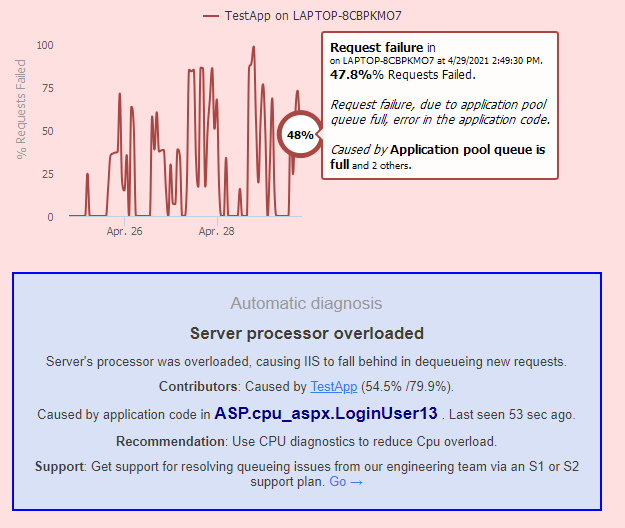
LeanSentry Error diagnostics automatically diagnose causes of Service Unavailable and Queue full incidents in production. Look for critical error alerts that identify the code-level root causes of 503s including crashes, CPU overloads, and many others.
Your website is not loading, or returning errors
Does “not loading” refer to requests that are hanging? Then see the Website is not responding or is slow section earlier in this guide.
If you are receiving errors, a recycle will help only if the error is due to a bad state. And only if that state is cleared when your application restarts. If the error is due to a persistent issue (misconfiguration) or external problem (SQL server is down), recycling will not help. In fact, it could make things worse by triggering the additional overhead of application startup.
Because the right answer depends on the specific error, the best thing to do is
get the full error details. This will allow you to directly address it instead
of hoping it goes away after the restart.
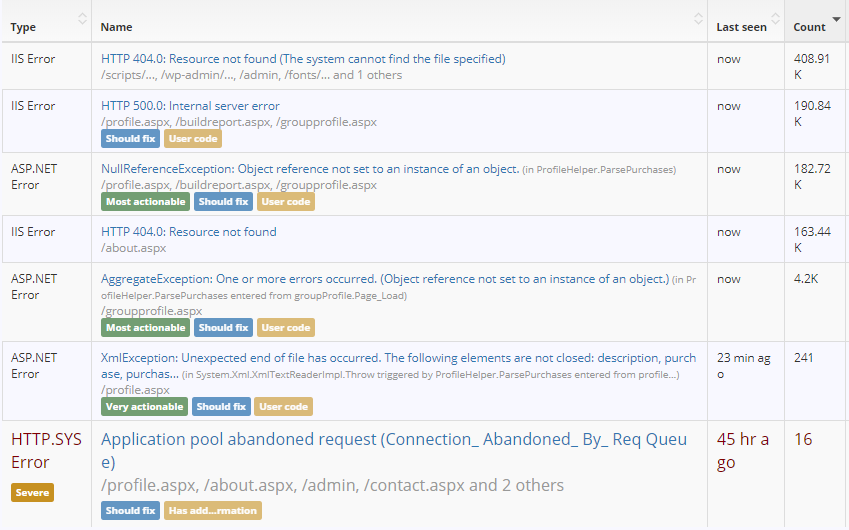
If you are using LeanSentry, you can use it to get production error details for all production errors across the entire IIS stack.Resolving production errors with LeanSentry
Conclusion
In conclusion, you can take the following actionable steps to deal with recycling in your production IIS site:
- Do not use IISRESET. It’s unnecessary, and causes extended downtime. For the gory details, see Dangers of using IISRESET to restart IIS services.
- If you must, identify and recycle the application pool instead. This can restart your IIS application with zero or minimal downtime.
- Be aware of the costs of recycling. Particularly if your application relies on a full cache or in-memory state to provide a session-full experience.
- Implement recycle resilience strategies, including external state, application warmup, and proper automatic recycle schedules. For details, see Maximum IIS application pool availability with Application Initialization.
- If your website is having problems, diagnose first, recycle
last.
- If you are are having hangs, they’ll likely return. Diagnose and resolve the hangs instead.
- If you are having high CPU, recycling is likely ineffective and likely harmful. Diagnose and optimize CPU-intensive code instead.
- Use memory-based recycling triggers for memory leaks. To do it right, diagnose and optimize memory usage.
- If you are having 503 service unavailable errors, determine their root cause to resolve.
Most importantly: resolving the issues causing you to recycle is ALWAYS better than restarting.
If you are recycling because of hangs, CPU overloads, memory leaks and the like, deploy LeanSentry to diagnose and fix those issues the right way.