In the previous post, I covered the “server not found” error that is a common and frustrating problem that may occur for a number of reasons after a configuration change, or when deploying a new server machine. Another common “what the hell just happened” error is the plain 503 “service available” error that looks like this:

Update: We recently launched a service that significantly helps you understand, troubleshoot, and improve IIS and ASP.NET web applications. If you regularly troubleshoot IIS errors, manage Windows Servers, or tune ASP.NET performance, definitely check out the demo at www.leansentry.com.
What is it?
This error is generated by the WAS (formerly W3SVC) service, which is responsible for creating IIS worker processes to handle incoming http requests. When WAS fails to create a worker process, it will generate this error.
Why does it happen?
There are a number of reasons why WAS may fail to start an IIS worker process. These include invalid application pool configuration, failure to create the process due to incorrect application pool identity settings, bad IIS configuration that causes the worker process to fail to initialize, or a process crash due to application logic. I will list the most probable reasons and how to investigate / fix them below.
How do I get rid of it?
Let’s get rid of it in 4 easy steps:
STEP 1: Check whether your application pool is stopped
Once WAS fails to start your worker process a set number of times, it goes into Rapid Fail Protection Mode and stops the application pool. This prevents application crashes from taking down the machine by going into a start process / fail loop when a persistent error exists. By default, Rapid Fail Protection is set at 5 times in 5 minutes.
Once the application pool that contains your application has been stopped, all requests to applications in it will result in that plain 503 error. So, that’s the first thing we check:
> %systemroot%windowssystem32inetsrvAppCmd.exe list apppools
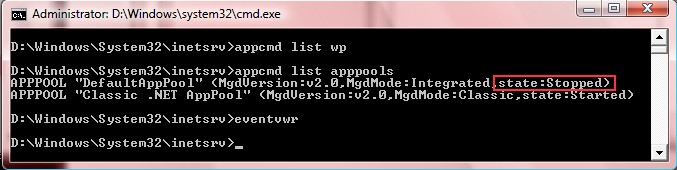
If your application pool is stopped, then we are on the right track. The next step is to check the event log for information about why your worker process could not be started.
STEP 2: Check event log
If IIS inside the worker process fails to initialize, or WAS is unable to create the worker process, it will log an event to the “Application” or “System” windows event log respectively. Let’s check this next:
> eventvwr
Navigate to the “Application” event log first. Look for error events from IIS-W3SVC-WP source.
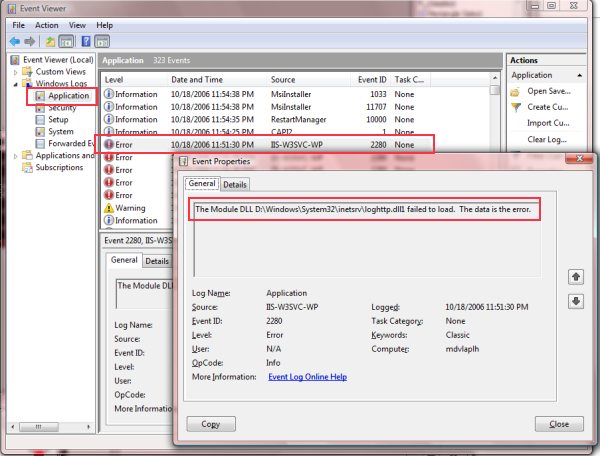
In this case, the IIS worker process could not initialize because it failed to load a module DLL (the path of which I “accidentally” misspelled in my configuration).
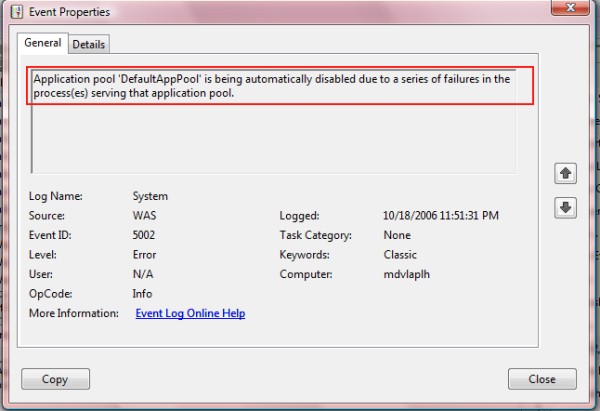
If the error occurred before the worker process could be started, such as with WAS failing to create the process, the error will be in the “System” event log. In my case, the IIS worker process had the initial error, and WAS eventually disabled the application pool after triggering rapid fail protection, leaving the following in the “System” event log:
—————————————————————-
UPDATE 12/10/2007:
The IIS 7.0 Health Model has been published, containing details about all Event Log error codes that are logged for worker process and service (WAS) level conditions. It also includes the suggested diaagnostics and workaround steps for each error condition: http://technet2.microsoft.com/windowsserver2008/en/library/b19873a2-9f72-40c8-b73d-89f39cda62781033.mspx?mfr=true.
When confronted with event log messages from IIS, use this document to find and resolve the error using the health model as reference.
—————————————————————–
STEP 3: Fix the error condition
This step of course depends on the specific error condition that you are experiencing, as indicated by the event log errors from the previous step.
Be sure to use the health model link above as reference for most of IIS error conditions that result in EventLog errors.
The following are common:
WAS failed to start the worker process:
- The configuration is invalid.
- The application pool identity has wrong account name or password.
- The maximum number of worker processes is reached or out of resources.
IIS initialization failed:
- The configuration section is invalid
- A module DLL listed in has invalid path, or failed to load
- A module failed to initialize, returning an error from its RegisterModule entrypoint
Application crash:
- A module, or application component has generated a debug break, or memory access violation, causing the process to terminate abruptly.
Assuming you were able to correct the underlying error condition, you should be able to re-start the application pool and try again.
STEP 4: Re-start application pool
Now that the error is fixed, we can start the application pool and try the request again:
> %systemroot%windowssystem32inetsrvAppCmd.exe start apppool DefaultAppPool
(Replace DefaultAppPool with the name of your application pool).
You should see that the application pool successfully started.
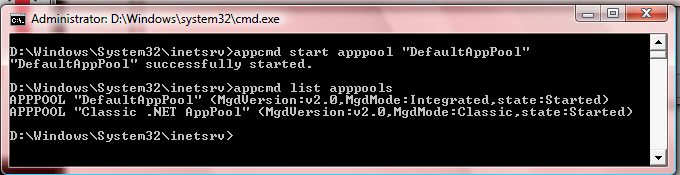
Now, you should be able to re-try your request and verify that the error has gone away. If not, rise and repeat.
In the case of an application crash, you may need to debug the worker process to get to the bottom of the error. You can read about this here: Troubleshooting IIS7 503 “Service unavailable” errors with startup debugging.
You can find the first post about the timeouts and “server not found” errors here: Where did my IIS7 server go? Troubleshooting “server not found” errors.
Also, you can find a post about general IIS7 error diagnostics here: Troubleshoot IIS7 errors like a pro.
I hope you find that this takes some of the mystery out of these problems, and helps you get going quickly when you hit this on your server.
I will cover some other useful troubleshooting techniques in future posts – as always, feel free to suggest topics you care about.
Any recommendations in troubleshooting Classic ASP application pool crashes?
Depends on what kind of problem you are experiencing … are you seeing ASP application errors, or experiencing worker process crashes from custom COM components you are using from the ASP scripts?
The event log is a good source of data in the case of worker process crash, and should contain an event mentioning the offending DLL that caused the crash. If its your COM DLL, you may choose to debug it to see further why the error occurs.
thank you, your article was helpful in managing my problems with IIS7 and ASP.NET!
Service Unavailable Errors in IIS 7 Are Killing Me
Hi there, I tried everything in this article and nothing seems to work for me. I think something got fubar’d in my installation and I can’t seem to figure out how to know for sure. Here’s a post on everything I tried.
http://tinyurl.com/2uuw8m
Any ideas?
I am at my wits end trying to get IIS 7 to work on my Vista Ultimate box and I have tried everything
In a previous post titled Where did my IIS7 server go? Troubleshooting "service unavailable"
In a previous post titled Where did my IIS7 server go? Troubleshooting “service unavailable” errors ,
In a previous post titled Where did my IIS7 server go? Troubleshooting “service unavailable” errors
So you just moved your application to an IIS7 server, and now you are getting an error when you make
I am having similar problems but my error is different. I am getting the following Application error just trying to browse the default web site:
The worker process for application pool ‘Integrated AppPool’ encountered an error ‘Cannot read configuration file
‘ trying to read global module configuration data from file ‘?C:Windowssystem32inetsrvconfigapplicationHost.config’, line number ‘0’. Worker process startup aborted.
Source: IIS-W3SVC-WP
Event ID: 2297
… and then the dreaded 503 Service Unavailable error appears on the page.
I am working on a fairly shiney new computer that shipped with Windows Vista Home Premium that was upgraded to Vista Ultimate last week. I tried getting IIS7 to launch a web page about a month ago and gave up but now I need to install and use Virtual Server 2005 R2 SP1 and I am stuck!
I took a look at my applicationHost.config and administration.config files and I’m seeing squiggles under some of the attributes (that should be defined in DotNetConfig.xsd.
For example, in applicationHost.config, in the System.webServer area, this line has a squiggle under overrideMode:
When you mouse over it, “The overrideMode attribute is not declared” appears.
In the area, forthe provider IISWASOnlyRSAProvide, all of the attributes are appearing as not declared:
description, keyContainerName, cspProviderName, useMachineContainer, useOAEP
This lead me to my machine.config file for a peek and there I noticed that the RSA provider stuff had squiggles. I had a backup copy of machine.config that was clean when I looked at it, but as soon as I made another copy of it my machine.config file, the squiggles came back.
My ‘clean’ install files for applicationHost.config and machine.config are squiggleless.
Any ideas??
As far as I know I had the same problem before the Ultimate upgrade, I just didn’t drill down into the problem this far.
If I can provide you with any other inforation, please let me know!
Thanks a million…
Deb
Deb,
The Visual Studio schema for configuration files has not yet been updated for VS 2005 (it will be in Visual Studio codenamed Orcas), so its expected to see attributes in applicationHost.config that are not recognized by VS.
The error you are getting suggests that the worker process is completely failing to access the applicationHost.config file, due a permission or invalid XML problem. Copy applicationHost.config to applicationHost.xml and see if you can open it in IE without an error.
Also, please use ProcMon (http://www.microsoft.com/technet/sysinternals/utilities/processmonitor.mspx) to make sure that there arent any access denied errors while reading the file.
If you are still having issues after that, please post your applicationHost.config file and the eventlog error contents on forums.iis.net and we’ll look at it further.
Thanks,
Mike
Hi Mike,
Thanks for the info. I will try your suggestions and post on forums.iis.net if I’m still having trouble.
Deb
Just go to Turn Windows Features On/Off and reinstall IIS and other related components.
If else fails please contact Microsoft’s IIS.NET and ASP.NET
Hi Mike I’m getting the following problem. Im running vista business ediition
This is the error im seeing in the application log
The Module DLL ‘C:WindowsSystem32inetsrvcompstat.dll’ could not be loaded due to a configuration problem. The current configuration only supports loading images built for a x86 processor architecture. The data field contains the error number. To learn more about this issue, including how to troubleshooting this kind of processor architecture mismatch error, see http://go.microsoft.com/fwlink/?LinkId=29349.
Hi Mike
I get the same error messages you were getting. When I checked my spelling, it was all fine.
Any suggestions please?
R
I have the exact same problem as Deb above. Deb did you find a solution? The config file can be displayed in IE and I don’t see anything off hand in procmon. Same issue – Had Vista Premium, upgraded to Ultimate and suddenly IIS goes kablooey.
I recieve an initialization problem regarding this dll:
The Module name iisfcgi path C:Windowssystem32inetsrviisfcgi.dll returned an error from registration. The data is the error.
I believe it is related to “FastCGI” an addon for IIS which is supposed to improve performance particularly for PHP. The file is there, but, how would i go about diagnosing this problem further?
Alex,
Go to the Details tab when viewing the event in the event viewer, and find the X value. “X” will be the win32 error code that corresponds to the issue you are hitting – you should post it on the iis.net forums for us to take a look.
Thanks,
Mike
Craig,
What exact error are you seeing when you make the request to the server? Are there any errors in the application event log?
Thanks,
Mike
This is by far the most useful info I have found so far on this error. My problem is I am being hosted on a shared server. Therefore, no OS or IIS solutions will work. Can anyone point to particular coding issues (I am using ASP with vbscript) that I can modify to minimize this error? The apps that cause it have been running for years without a problem prior to IIS7. I can change the code any way I need to, just not sure what might cause it. I am closing and setting to nothing each object I used.
Any help appreciated.
Darryl,
The 503 error is typically caused by changes to server-level configuration (such as native modules being loaded in the worker process). It should not occur from any page code or web.config errors (unless those errors are causing an AV).
Another possible cause is your application being overwhelemed with requests to the point where the http.sys queue is completely filling up.
There isn’t really much you can do if you are on a shared server, because this is a server-level condition. You have to ask for support from the hoster to diagnose and track down the issue.
Thanks,
Mike
Hi Mike,
I happened on to this thread because I”m researching how to fix the ”503 Service Unavailable” error.
We”re creating a virtual test environment mirroring a production site we have. In order to make sure we had IIS set up the same, I exported the configuration from the production server and imported it to the virtual test environment server. Both are Windows 2008 R2 Standard OS with IIS 7.0. I”ve changed the host header to for the test environment server to point to that server – a DNS entry was made for test.ourdomain.com (generic name shown here) and that”s what the host header was changed to in our test environment.
I keep getting the 503 error. I looked in the event viewer and I get Event ID 2280 – iis_ssi.dll failed to load (in the application logs) and Event ID 5002 AppPool auto disabled due to series of failures in process serving AppPool (paraphrased from the System logs)
I”ve looked at a couple of the articles you”ve provided in this thread but so far, nothing has helped.
Would you have any other suggestions?
Mike,
I’m also getting the “worker procesas failed to initialize correctly….” message.. My event viewer shows
–
2276
0
2
0
0
0x80000000000000
6857
Application
blue
–
Any ideas?
Thanks
Kevin
That didn’t seem to paste correctly.. I’m guessing it parsed the XML.. here it is again with < and > replaced with # so hopefully it works.
– #Event xmlns=”http://schemas.microsoft.com/win/2004/08/events/event”#
– #System#
#Provider Name=”Microsoft-Windows-IIS-W3SVC-WP” Guid=”{670080D9-742A-4187-8D16-41143D1290BD}” EventSourceName=”W3SVC-WP” /#
#EventID Qualifiers=”49152″#2276#/EventID#
#Version#0#/Version#
#Level#2#/Level#
#Task#0#/Task#
#Opcode#0#/Opcode#
#Keywords#0x80000000000000#/Keywords#
#TimeCreated SystemTime=”2007-10-29T20:34:55.000Z” /#
#EventRecordID#6875#/EventRecordID#
#Correlation /#
#Execution ProcessID=”0″ ThreadID=”0″ /#
#Channel#Application#/Channel#
#Computer#blue#/Computer#
#Security /#
#/System#
– #EventData#
#Binary#00171380#/Binary#
#/EventData#
#/Event#
Mike:
Thanks for maintaining this helpful blog. I followed the process down to the event viewer (as shown above), but the error message reported isn’t on the list, and I’m not sure what to do next.
The error was:
The worker process for application pool ‘DefaultApplicationPool’ encountered an error ‘Cannot read configuration file
‘ trying to read global module configuration data from file ‘?C:Windowssystem32inetsrvconfigapplicationHost.config’, line number ‘0’. Worker process startup aborted.
Can you please advise?
Thanks.
SJS
C:WindowsSystem32inetsrv>appcmd list apppools
ERROR ( message:Configuration error
Filename: ?C:Windowssystem32inetsrvconfigapplicationHost.config
Line Number: 0
Description: Cannot read configuration file
. )
in my iis i got 503 error.
Mike,
I had the exact same issue as Deb and Craig above. I upgraded from Vista Home Premium to Vista Ultimate, and IIS stopped working. Did you ever find a solution for them?
The error I get is “The worker process for application pool ‘Default’ encountered an error ‘Cannot read configuration file
‘ trying to read global module configuration data from file ‘?C:Windowssystem32inetsrvconfigapplicationHost.config’, line number ‘0’. Worker process startup aborted.”
Thanks,
-Darren
I had the same problem, the above solution was not understandable, so looked for other solution and found the following post and it worked…..
Can you check if you have leftover directory for pe-release version of framework in %windir%Microsoft.NetFramework (anything like v2.0.* other than v2.0.50727) – if so, delete those directories and restart the app-pool.
Thanks
Steven, Hyper, Darren,
The error you are getting indicates that the worker process failed to read server configuration. In the corresponding event log error message, look in the details tab for the element, which will contain the HRESULT error code.
Most likely this will be 0x80070005, which means that the worker process was denied access to the applicationHost.config file. Check the permissions on the file and make sure that the IIS_IUSRS group has access (dont do this on Windows Server 2008 and Windows Vista SP1, where each worker process will have a separate copy of the applicationHost.config configuration file and wont have access to the main file).
If its another error, please post. If your problem is caused by the presence of pre-release versions of the .NET framework as per Alim’s post, please let us know so we can investigate further.
Thanks,
Mike
Mike, Setting the permissions worked for me. Thank you very much for your help. As an FYI, I didn’t have any residual directories from a previous version of .NET. -Darren
I am trying to run a PHP script that calls a MySQL database file on IIS7 and Error 500.0 is displayed. I tried to grant some permissions on the WindowsSystem32inetsrv folder but it doesn;t allow me to make changes (Access Denied). I ticked off the Users Account and rebooted but still it doesn’t allow me to change security settings. I’m on my own machine at home so of course I am the admin and owner of the equipment. What can I do to revert this situation? Thanks a lot in advance. Rod
Hi,
I had the same problem as Darren: IIS returned Error 503 on Vista Ultimate. The App error log showed this message: The worker process for application pool ‘Classic .NET AppPool’ encountered an error ‘Cannot read configuration file trying to read global module configuration data from file ‘?C:Windowssystem32inetsrvconfigapplicationHost.config’, line number ‘0’. Worker process startup aborted.
The Event ID is 2297.
I do have .Net 1.1, 2.0.* and 3.0 in C:WindowsMicrosoft.NETFramework. It does not make a difference whether I delete all the non 2.* or not.
What made it work eventually was what Mike suggested i.e. add the IIS_IUSRS to the list of users for file applicationHost.config.
Thanks Mike,
Niculae
In Windows 2008 Server I am getting an error as ‘IIS not installed’ though IIS is installed. The installscript which contains the check for IIS does the following
set objIIS_Root = CoGetObject(“IIS://localhost/W3SVC/1/Root”, “”);
if (IsObject(objIIS_Root)) then
blnRetVal = TRUE;
endif;
Is there a workaround to skip this error in Windows 2008 Server?
For Vista also we faced similar issue for which we selected the ‘IIS6 Metabase Compatibility’ from ‘Windows Features on or off’.
LJacob,
You need to install the Metabase Compatibility role service in Windows Server 2008 for the legacy WMI provider to work, just like you do on Vista.
Thanks,
Mike
As many of you know, IIS 7.0 provides the ability to start and stop Web sites, and application pools.
[quotation]
Most likely this will be 0x80070005, which means that the worker process was denied access to the applicationHost.config file. Check the permissions on the file and make sure that the IIS_IUSRS group has access (dont do this on Windows Server 2008 and Windows Vista SP1, where each worker process will have a separate copy of the applicationHost.config configuration file and wont have access to the main file).
[/quotation]
And what is supposed to do on Vista 64 SP1 ? I get 0x80070005 error after installing SP1 and VS 2008.
Thanks!
503 – applicationHost.config Was there a solution for Debs problem on 10th August She was getting the 503 error and in the event viewer recieved the event error id 2297 'Cannot read configuration file ' trying to read global module configuration data from file '?C:Windowssystem32inetsrvconfigapplicationHost.config', line number '0' I am having this exact problem. I have also, (like Craig – Oct 4th – who was also experiencing this problem) upgraded from Vista Premium to Ultimate. I have tried the suggestion you gave of changing the applicationHost.config to .xml to ensure the xml is valid (by opening in IE ). It opens fine. Is there anything else I can try? Thanks Chris
Thanks, that worked. My apppool was stopped…Now everything works…
very very good article…
Mike, excellent article and it helped me greatly. I started getting 503 “service unavailable” errors on my IIS 7.0 box and ended up needing to re-enable 64-bit mode through the command prompt. Details here: http://blog.evonet.com.au/post/2008/08/22/503-service-unavailable-errors-when-IIS-running-in-32-bit-mode-on-64-bit-Windows-Server-2008.aspx
With id event 2276 and error code 80131700 i resolved my problem simply with the removal of all 2.0.* framework version in “C:WindowsMicrosoft.NETFramework”, with the exception for only the v2.0.50727. And so It works! Thank U everyone!
Excellent! A++++ Will read again
Thanks for helping me solve my problem
hi,
i am new to IIS world and know nothing about it and will b very grateful if anyone can help me with the error mentioned below….i am using iis7 ….every time i try to connect to localhost following error arises….
failed to connect (this is the caption of error)
there was an error when trying to connect. do you want to retype your credentials and try again?
details:
‘Microsoft.Web.Administration,Version=7.0.0.0,culture=neutral,PublicKeyToken=31bf3856ad346e35’ or one of its dependencies. the system cannot find the file specified.
plzzzz help!!!
new,
The error you describe doesnt quite make sense. Please provide a screenshot. Post to forums.iis.net for more help.
Thanks,
Mike
Thank you Mike!
I am looking for answer from everywhere.
I have another question….it may be very stupid to ask but I said that I dont have any know-how about it.
My question is when we are connecting to localhost, through IIS 7.0 Manager, what do we write in localhost textBox?…is it the IP or any name or it remains as localhost???
and in the password textBox which password is to written??..I didnt put any password….
Okay!
Thank you Mike.
Hi Mike,
I am encountering “server error 503” into which causes my server to slowing down. This error can also make the iis totally stopped and hanged. I have search the solution about this problems and they suggested that it might be a memory leak on my server side, I am using Windows Server 2008, can you help me resolve this error, or does anyone can help me.
Thanks,
Charles
Hi Mike
I have 2 websites in IIS7, one for MOSS 2007 and another for WCF service. Both of them use different app pools. When I set the Managed pipeline mode to Integrated, both the websites don’t come up, but works fine in Classic mode.
The MOSS web site throws the error “Server application unavailable” . I don’t see any error in event log either.
When I try to browse the wcf service I get the error “HTTP Error 500.24 – Internal Server Error
An ASP.NET setting has been detected that does not apply in Integrated managed pipeline mode.” and most likely causes as “system.web/identity@impersonate is set to true”.
I have checked the status of apppool, they are all started. I did restart them again, but still the same error. I did not see errors in event log except for this information:
A request mapped to aspnet_isapi.dll was made within an application pool running in Integrated .NET mode. Aspnet_isapi.dll can only be used when running in Classic .NET mode. Please either specify preCondition=”ISAPImode” on the handler mapping to make it run only in application pools running in Classic .NET mode, or move the application to another application pool running in Classic .NET mode in order to use this handler mapping.
Any help is highly appreciated. Are there any significant advantages that I get when using Integrated vs Classic. If there’s no performance benefits, then probably I would stick with Classic mode.
Thanks
Thank you so much!
Can the Apache installation be the reason why it was stopped?
Sadly I have to use both servers and its a pain in the … cause the services. Thank you!
Mike, u r sexy!! i like ur pic 🙂 u r so cute!! though I hate IIS!!!
This link helped me to resolve the Service Unavailable problem
http://haacked.com/archive/2007/05/21/the-iis-7-team-rocks.aspx
Hey, this artical helped me a ton!! it was linked on a different random forum.
but wondering if u can help me with this new problem, im running a classic ASP virtual directory on IIS7 and to get it working i had to change a line in my ‘applicationhosts.config’ file, the line was “
but the error i got now is my OWAAUTH failing or summin, this is stoppping my external mail access and well all external access that i used to get on SBS03..
If u can help me please e-mail me any hints,tips,solutions to [email protected] i would greatly appreicate all help possible in this situation
(PS my spelling is really bad so ignore the mistakes lol)
I have a problem with IIS 7 and framework 1.1. I have an old application (framework 1.1) My application run when I use framework 2 but when I trying to use framework 1.1 i get the error “Internet Explorer cannot display the webpage”. I need to use framework 1.1 because when I try it to compile the application I get errors. The error of course because I need to compile with framework 1.1. I don’t know why the application run using framework 2 and no 1.1 because the application is on 1.1.
Please help
IIS7, right, the savior? All I ever got, on my fresh new install, was “HTTP Error 503. The service…
There are many things that caused this. read here for Step by Step and more accurate. Check Security
There are many things that cause this. read here For more detail and accurate step.a Check Security,
Need help!!! I got this error on vista Ultimate 32bit
and i cant find “iisfcgi.dll” on my system …..help plz
C:WindowsSystem32inetsrv>appcmd list apppools
ERROR ( message:Configuration error
Filename: ?C:Windowssystem32inetsrvconfigapplicationHost.config
Line Number: 0
Description: Cannot read configuration file
. )
C:WindowsSystem32inetsrv>
Hi
I am on a shared hosting service. These days I am getting 503 error quite frequently. I am not able to know the exact reason. how could I Know the exact reason why it is happening?
I know about rapid fail protection which cause application pool to shut down for a particular number of error in a fixed time. but what type of error these can be for example these are not html errors obviously, not complilation error, then what type of errors/failures can cause application pool shutdown.
I have installed blog on my site and generaly when i view blog oages I get 503 error so what type of error/failure we could think of which can cause application pool to shutdown….
I also have IIRF filter but none of the rule is broken. Ichecked in IIRF log file
Hi, I want to redirect the user to a different page on the server whenever the application pool for the site is stopped.
How do I configure this?
Thanks
Someone referenced this post to answer question “How do i get rid of a .netframework error?”…
hello
i have this problem my iis7 don’t start
when i try to http://localhost i have this issues
Detailed Error Information
Module
IIS Web Core
Notification
BeginRequest
Handler
Not yet determined
Error Code
0x80070002
Requested URL
http://localhost:80/
Physical Path
C:inetpubwwwroot
Logon Method
Not yet determined
Logon User
Not yet determined
Failed Request Tracing Log Directory
C:inetpublogsFailedReqLogFiles
C:WindowsSystem32inetsrv>appcmd.exe list apppools
ERROR ( message:Configuration error
Filename: redirection.config
Line Number: 0
Description: Cannot read configuration file due to insufficient permissions
. )
C:WindowsSystem32inetsrv>appcmd list wp
ERROR ( message:The WAS service is not available – try starting the service firs
t. )
We’re having a baffling problem. We’re running 15 servers in a server farm, all on IIS6/.NET 2.0. We took one of the servers out of the server-farm rotation, upgraded to IIS7/.NET 4.0 and put it back into the rotation.
It worked fine for about 24 hours. Fridays are our busy day. On that day, the “Current Requests” counter skyrocketed and we started getting intermittent “Service Unavailable” errors. “Queued Requests” were normal, as was CPU usage. There are no errors in the event log. There were no other unusual errors in the application.
We took the server out of the rotation, and the queued requests eventually went away after 20+ minutes.
We put it back in the rotation today (Tuesday), and it’s been normal all day. But we haven’t discovered the cause of the problem and it’ll likely happen again on our next busy day.
Anyone have any ideas how to diagnose this one?
This article is really good. It has helped me to resolve the issue.
Thanks a lot.
thanks,it is very helpful
Finaly! This is just what I was looking for.
Thanks for the guide! In my case my was an out-of-memory problem. I tried to build my web service ,but there was no free space on disc(something I didn’t notice). Restarting the app pool fixed it 🙂
Make a different app pool and select it while installing the service.
It resolved the issue in my case.
Thanks
Avnish
Very very thanks! You saved my day while Event Viewer was near me 😉
in my case i just restart my domain pool and it worked
Thanks!
My password of computer was changed and I had to change it in the application pool. After changing it all works.
Service Unavailable
HTTP Error 503. The service is unavailable.
i cant get rid of it!
I have a new installation of Win 2008 Server R2 and was trying to setup IIS7. I was getting the above errors and hitting localhost would give me a 503 error. After trying many different things, I finally changed
the Identity on the DefaultAppPool to LocalSystem (from ApplicationPoolIdentity)
and that fixed the problem. Now this is a develop box behind a firewall, so security-wise, the solution might not work for everyone.
Thanks for sharing your info. I really appreciate your efforts and I will be waiting for your further write ups thanks once again.
Thank you for sharing this info , this helps me alot……I really appreicate your efforts to do this..
Thank you again..
AFAICT, the listed command is wrong.
The correct command is: %systemroot%system32inetsrvAppCmd.exe list apppools
thank you so much (_ _)(^ ^)
This article was help full, it worked fine
Thanks a lot!!! It worked brilliantly!
Hi Mike Volodarsky,
I have strange 503 error, locathost/Reports/somefile.aspx does not work, every other folder name works fine, if i rename it to localhost/PPReports/somefile.aspx then it works well, could not find what is stopping “Reports” folder. Hope you may have answer.
We setup a subdomain recently which sometimes struggles to resolve. The error has been reported to the necessary people, however so far the following is happening: I can access the website perfectly from my desktop, iPad and HTC Desire HD. When someone on Blackberry views the website they sometimes get a 503: service unavailable. No errors are logged in the event viewer and the application pool is started. Could it be that the intermittent sub-domain issue could be causing this or is can it be something to do with my code?
for me all the app pool has been started and there is no error log in the event viewer but still am getting service unavailable http 503 error? how to troubleshoot this case
still i am found an error
hy Mike
I install your dll “debugassistant” on win7, and than my iis7 stop to work,
now i get this massage in the eventvwr – “The Module DLL C:Windowssystem32inetsrvdebugassistant.dll failed to load. The data is the error.”
i try to do all you say, cant you help me??
Really helpful
When trying to install a web site on my test machine (IIS Server) I got Error 503 Service Unavailable, after a long discussion with my seniors and searching on the Internet I found the solution to this problem. Thanks for sharing with us. Following links also helped me to complete my task.
http://www.mindstick.com/Articles/c7eb99f0-5876-43ad-9ece-f8f633ebdb74/?Solving%20IIS%207%20Error%20503%20Service%20Unavailable
http://social.technet.microsoft.com/Forums/windowsserver/en-US/acbe683b-dd3b-4b6f-8b28-d020ed02edfa/http-error-503-the-service-is-unavailable-with-iis-7
Hey there! This is my 1st comment here so I just wanted to give a quick shout out and tell you I genuinely enjoy reading your posts.
Can you recommend any other blogs/websites/forums that cover the
same subjects? Thank you so much!
My site was also faiing (503 error) on the /reports folder as was Balaji Musaboyina’s site. I found that SQL Reporting Services had reserved the URL /Reports for my web server. Use the SQL Report Services Configuration Manager to change that URL to something else. 503 error fixed!
The 503 error was occurring for me because the Application pool failed to start. This was because the password was changed recently for the Identity under which the application pool was trying to run. Fix was to go to the Application Pool -> Advanced Settings -> Process Model -> Identity and set the password to the new one.
Been up all night debugging this with no luck. Stumbled across your page and solved it in 2 minutes.. Thanks for saving my a.. 😉
HI All,
Iam facing the below error please help me.
Error Summary
HTTP Error 500.0 – Internal Server Error
Calling GetProcAddress on ISAPI filter “C:inetpubwwwrootias_relay_serverclientrs_client.dll” failed Detailed Error InformationModule IIS Web Core
Notification Unknown
Handler StaticFile
Error Code 0x8007007f
Requested URL http://localhost:80/
Physical Path C:inetpubwwwroot
Logon Method Not yet determined
Logon User Not yet determined
Most likely causes:
The ISAPI Filter has dependencies that are not available on the Web server.
IIS received the request; however, an internal error occurred during the processing of the request. The root cause of this error depends on which module handles the request and what was happening in the worker process when this error occurred.
IIS was not able to access the web.config file for the Web site or application. This can occur if the NTFS permissions are set incorrectly.
IIS was not able to process configuration for the Web site or application.
The authenticated user does not have permission to use this DLL.
Things you can try:
Try running Reskit tool “depends” on the ISAPI DLL.
Ensure that the NTFS permissions for the web.config file are correct and allow access to the Web server’s machine account.
Check the event logs to see if any additional information was logged.
Verify the permissions for the DLL.
Create a tracing rule to track failed requests for this HTTP status code. For more information about creating a tracing rule for failed requests, click here.
Links and More InformationThis error means that there was a problem while processing the request. The request was received by the Web server, but during processing a fatal error occurred, causing the 500 error.
View more information »
Microsoft Knowledge Base Articles:
294807
To resolve the problem 503 “service unavailable” errors: you must add the IIS_USRS to the v2.0.050727 and v4.0.3.0319 folders.
Very helpful. Thank you so much.
Very usefull tips in this post, just using the event monitor viewer I track my trouble, in my case was a bad identity configuration for the pool.
thx
The worker process for application pool ‘ASP.NET 1.1’ encountered an error ‘The configuration section ‘configProtectedData’ cannot be read because it is missing a section declaration
‘ trying to read global module configuration data from file ‘\?C:inetpubtempapppoolsASP.NET 1.1.config’, line number ‘127’. Worker process startup aborted.
The worker process for application pool ‘ASP.NET 1.1’ encountered an error ‘The configuration section ‘configProtectedData’ cannot be read because it is missing a section declaration
‘ trying to read global module configuration data from file ‘\?C:inetpubtempapppoolsASP.NET 1.1.config’, line number ‘127’. Worker process startup aborted.
I am getting HTTP Error 503. The service is unavailable.
when i checked Event Viewer i found error is follow:
” The worker process for application pool ‘ASP.NET 1.1’ encountered an error ‘The configuration section ‘configProtectedData’ cannot be read because it is missing a section declaration
‘ trying to read global module configuration data from file ‘\?C:inetpubtempapppoolsASP.NET 1.1.config’, line number ‘127’. Worker process startup aborted.” Please give me solution for this..its urgent for us.
Thanks
The link to the TechNet site in the 12/10/2012 “update” above no longer works. I was getting a “rewrite.dll failed to load” in my event viewer (windows logs/application) so I googled that error message and found this site that told me how to uninstall and reinstall the rewriter and this solved my problem. I am running Window 8.1.
http://stackoverflow.com/questions/18714709/windows-8-1-breaks-my-asp-net-iis-service-unavailable
Http Error 503 The Service Is Unavailable Iis |
[…] Where did my IIS7 server go? … – What is it? This error is generated by the WAS (formerly W3SVC) service, which is responsible for creating IIS worker processes to handle incoming http … […]
Thank you…Thank you..Thank Tou!!
HI Mike,
I’ve got an issue where the Application pool keeps getting stopped. The even log says
“There was an error while performing this operation
Details
Filename:
\\?\C:Windows\Microssoft.Net\Framework64\v4.0.30319\config\machine.config
Error:Configuration file is not well-formed XML
Can you please give me a hint as to how to fix this issue??? Your reply in this would be highly appreciative.
Thanks
Ahmed
Thank you for the article. Over the past 3 months, the 503 error has been on my site 5 times. Now I think that I need to change hosting in order to avoid problems in the future.
Yesterday I spent half a day looking for information about why the 503 error occurs and how to solve the problem. Today I got the information I needed from your article. Everything is clear and accessible for a beginner. Thank you!