This month, TechNet Magazine published my article about the top IIS 7.0 features you can use to unlock the performance potential of your web server. You can read it at Top 10 Performance Improvements in IIS 7.0.
IIS 7.0 improves on the already solid performance of its predecessor in quite a few places. However, this article is not about features where IIS 7.0 performs better than IIS 6.0 … Rather, it is about new capabilities IIS 7.0 provides that can significantly improve performance, scalability, and reduce operational costs of running web applications.
Some of these include reducing bandwidth costs with dynamic compression and media bitrate throttling, creating efficient application topologies with specialized web servers, using new more efficient server APIs, and utilizing output caching.
In addition to the features I discuss in the article, which you must proactively leverage, IIS 7.0 offers a number of performance improvements out of the box. Here are some of the areas where you’ll reap performance improvements just by moving to IIS 7.0:
-
Windows Authentication (NTLM/Kerberos) – now done in the kernel by HTTP.SYS
-
SSL – also done in the kernel by HTTP.SYS (I’ve seen 150%+ improvements for SSL scenarios in some tests)
-
Default documents (i.e. http://yoursite/ -> http://yoursite/index.html) – now kernel-cacheable (for an order of magnitude improvement)
-
Better scalability on multi-proc and multi-core machines
-
FastCGI instead of CGI for PHP apps (see below)
For example, the new FastCGI support offers tremendous potential for improving performance of application frameworks like PHP that previously needed to use CGI for stability reasons. In one of my tests, helloworld.php throughput jumped more than 100 times from 22 to 2239 RPS when moving it from CGI to FastCGI, and removing the process per request overhead. With FastCGI, the platform is no longer a bottleneck:
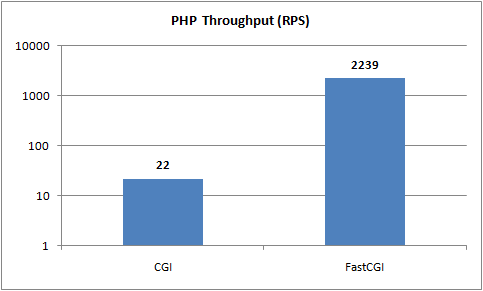
Hello.php throughput using FastCGI vs. CGI on IIS 7.0 shown on a log(10) scale.
Most of the things mentioned in Top 10 Performance Improvements in IIS 7.0 deserve their own articles to describe them in depth. This article should point you in the right direction for making the most out of the IIS 7.0 platform performance-wise. As always, feel free to ask questions, and I’ll look to cover more specifics in upcoming blog posts.
Now, go read all about it.
Thanks,
Mike
IIS 7.0 improves on the already solid performance of its predecessor in quite a few places. But the real
My favorite links from the last week – 1st Week of August 2008
You Had Me At EHLO… : Understanding Exchange 2007 Memory Usage and its use of the Paging File SeanDaniel.com
Good explanation of the performance improvements in IIS 7, they look very promising …
Microsoft people usually speak about bottlenecks in their product only in the next release of that product. They will say "xyz feature was a performance bottleneck in previous version and in our new version it is amazingly performing"… Whyis it so
Some of it is marketing (I am not at MS anymore, so I can admit it :)) … But most of it is the fact that it often takes years to accumulate solid feedback around performance from real-life deployments of platform software. So, its definitely easier to point out the problems in hindsight, and get them addressed in the future release.
That said, IIS doesn't have many places where it creates performance bottlenecks – in 99% of the cases, the bottleneck lies in the application (CGI being a notable exception to this …). It doesnt matter if the server can do 60,000 requests per second if the application makes 10 database queries on each request and can only do 20 requests per second.
This is why I chose not to focus on the platform performance in this article, but instead focus on features you can proactively leverage to proactively improve application performance.
Is there any client side performance improvement’ list? I mena how to enable gzip (static or dynamic), how to setup caching, how to maybe combine multiple css/js files on server side?
I’ve found that in our network WAN accelerators have made a big difference
Thank you for submitting this cool story – Trackback from NewsPeeps
Ciao,
IIS 7.0 has great performance but we have just encounter a big issue. Running a large web site, composed by a large number of folder, from a centralized storage accessed using CIFS shares we do see IIS 7.0 just killing the storage by looking for a web.config file for each and every folder, subfolder and file users do ask for.
Just to make a simple idea: this drives to have more than 80.000 Cifs Op per second on the central storage during a very standard activity day.
Is there a way to prevent IIS from doing this? If you have an idea: [email protected]