*************************************************
(NEW) Update – 2/1/09:
Clarified installation instructions (see post).
Fixed bugs:
– Occasional icons missing / icons missing during heavy load due to MTA problems with SHGetFileInfo (http://connect.microsoft.com/VisualStudio/feedback/ViewFeedback.aspx?FeedbackID=337530)
– Directory listing template has broken icons in some configurations
*************************************************
Update – 4/26/08:
IconHandler 2.0 released. Use IconHandler to build your own directory listing,
or any other app that needs file icons.
**************************************************
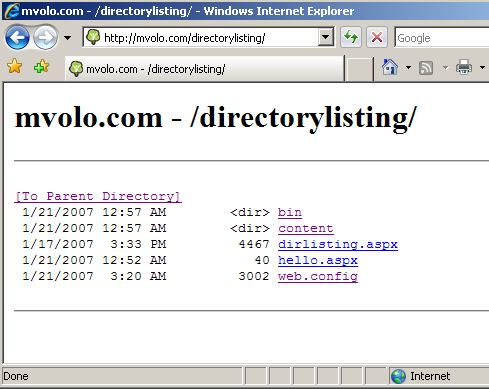
Do you hate bland directory listing pages that most web servers have these days? The Internet has gone through many evolutions, yet web directory listings somehow got left out to the point where sometimes they appear to predate the http protocol itself (gopher, anyone?). Here is the default IIS7 directory listing:
Almost two years ago, this exact emotion led Bill Staples to write a sample directory listing module for our first set of early IIS7 demos. This module read the directory contents of a url, and generated a nice-looking gallery view of the images in that directory. It was a much needed improvement!
Since then, several other people on the team modified and re-wrote the module, adding visual bells and whistles and otherwise changing the way it looked. Everyone thought it looked best their way. The module grew and grew into a mess of c# code and HTML fragments, to the point where noone ever wanted to show the code for it, just how cool it made the site look. For fun, here is a code excerpt from the original module:
//write out links to paths leading up to directory
Response.Write("<h3>g a l l e r y : ");
for (int i = 0; i<strpaths.Length-1;i++) {
strURL = strURL + strpaths[i] ;
Response.Write("<a href="" + strURL + "/" + "">" + strpaths[i] + "/" + "</a>");
strURL = strURL + "/";
}
Response.Write("</h3>n");
I've always wanted to take the module, and rewrite it so that it provided complete separation of the module infrastructure / directory reading code, and the actual HTML content. This way, a designer could go in and change the layout and the look and feel of the directory listing without having to change the code itself … And since I try to stay away from actual website design as much as possible, this would give me all the pleasure of writing some server code and none of the pain of trying to make it look good. That's the designer's job!
With that in mind, I wrote this directory listing module that uses an ASPX page as a template for generating the actual output, so the look and feel is entirely in the designers control. The module simply provides the directory listing as a bindable collection of directory entries, each of which contains useful properties that can be used inside the the page to generate the UI.
In a nutshell, here is what the module does:
- Intercepts requests to "directory" urls within your application, like "http://example.com/files/"
- Reads the directory contents, and creates a collection of DirectoryListingEntry objects
- Stores this collection inside the HttpContext.Items collection
- Executes the configured template page, which databinds to the directory listing collection and produces the desired UI for your custom directory listing
- Hardcodes Absolutely No HTML content in the module …
The sample page I wrote has a DataList control that I databind to the collection inside Page_Load():
void Page_Load()
{
DirectoryListingEntryCollection listing =
Context.Items[DirectoryListingModule.DirectoryListingContextKey] as DirectoryListingEntryCollection;
DirectoryListing.DataSource = listing;
DirectoryListing.DataBind();
}
<asp:DataList id="DirectoryListing" runat="server">
<ItemTemplate>
<a href="<%# ((DirectoryListingEntry)Container.DataItem).VirtualPath %>"><%# ((DirectoryListingEntry)
Container.DataItem).Filename %></a>
</ItemTemplate>
</asp:DataList>
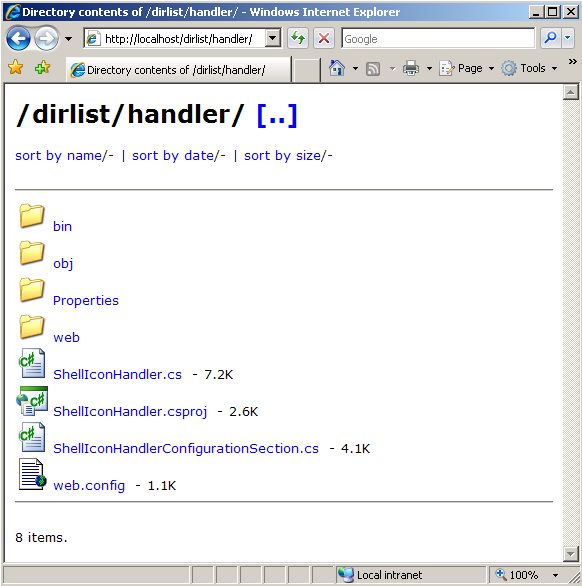
On top of this, I threw in some sorting capabilities (The DirectoryListingEntry object provides a number of IComparer delegates that can be used to sort the collection on date modified, file size, and file name, but you can of course implement your own), and nice looking file icons using the IconHandler. With minimal HTML design, here is what I got:
I want it!
You can view this app running live on my server here: https://mvolo.com/directorylisting/ (since I dont have VS installed on the server, ASPX shows with text icons).
Download the sample app containing both the DirectoryListingModule, my simple template, and the IconHandler.
Installation instructions:
IIS7:
0. Install ASP.NET if you havent already (DUH?)
1. Run the following from a command prompt (open it with the "run as Administrator" option):
%windir%System32inetsrvappcmd set module DirectoryListingModule /lockItem:false
(this is done to unlock the built-in DirectoryListingModule for removal in the application, so that it can be replaced with our custom one)
2. Create an application, and unzip the contents of the app into its root directory. That's it!
IIS6:
0. Install ASP.NET if you havent already (DUH?)
1. Create an application, and configure ASP.NET 2.0 to be a wildcard mapping for it.
2. Unzip the contents of the app into the root directory of your application, and you are good to go.
What else is there to do?
Right now, the module is only aware of the physical file system directory structure for the directory you are viewing. So, if your directory has a virtual subdirectory that maps to a physical location somewhere else, it won't show up in the directory list. For example, if your application http://example.com/myapp has a root in c:myapp, and you have a virtual directory http://example.com/myapp/files that points to c:files, you are not going to see "files" in the directory listing for /myapp. To fix this, the directory listing module needs to be Virtual Path Provider aware, which will also have a bonus in being able to provide directory listings of sharepoint sites. This is coming soon …
Also, since I am sure you are a better designer then me, if you end up making a cool directory listing template you want to share, please post it here. If you make the coolest one, there may even be a prize involved …
That is really cool! I am bored and snowed in today and played with this a bit. I love it. Thanks!
Thanks! That's really cool… but without the source for these things I can't use them… can't really base a production system on random unsupported DLLs downloaded from blogs. So throwing the source up with the samples would be very much appreciated, otherwise it's just something that's cool but that i'll have to re-implement before I can think about using it for anything…
Like several people have said this is a nice bit of code but without source code it is just a nice trick. There is no way to begin to depend on something without being able to
A. Pay for support from a reliable vendor or
B. Count on internal developers to provide support for the code base
I have several areas where we publish files and being able to customize the listings is valuable but the effort vs hard coding has not been authorized. A simple module like this could be a solution but not without source code.
Hi Mike,
very nice!
Maybe you should also check if directory browsing is enabled before you show the listing…
cheers,
dominick
Good point, Dominick – allowing directory browing on the server by default is generally not a good idea.
The module actually comes with its own configuration section, which has an enabled attribute just like the built in directory browing feature. The default value for this attribute is false, so you have to explicitly enable it for the directories for which you’d like to allow browsing.
This would really be much better if you published the source. That’s the interesting bit…
Hi mike, nice module…
While trying it i stumbled on a issue, somehow all shows exactly as yours minus the icons, what do i do wrong?
Have to admit these is one of my first .net application installations i try so it can easily be a configuration issue.does the /bin folder need special read permissions?
RvdH,
Try making a request directly to your handler, /geticon.axd?file=.txt, and see if you are getting the text icon or not. If you dont, check your web.config file to make sure it has both the icon handler registered in AND the iconhandler configuration section declared at the top of the file. Download and consult the IconHandler sample application for reference.
When making a request directly to iconhandler, if you get a 404, that probably means the handler is not installed, and if you get a 500, it most probably means you have some configuration wrong or missing, and it should give you the details (be sure to have custom errors turned off or test on a local server to get the error details).
Got it working now, at first i got a 404 error.
After turning custom errors off and restarting it somehow worked.
Mike, maybe it would be valuable to add a feature so one can choose the /root directory he/she likes to share, additional benefit would be that the script /bin & config itself can not be accessed/viewed/opened directly (or does it have such feature?)
I’m having trouble getting to this to work on IIS6.
When i add the asp.net wildcard mapping, the iconhandler doesnt work. Going to /geticon.axd?file=.txt returns a 404 error.
If I then remove the wildcard mapping, /geticon.axd?file=.txt returns the text icon as it should.
But then of course the directorylisting component doesn’t work.
I’m using the exact web.config file from the download and correct files are in the bin directory.
What would cause this?
If someone else experiences this…make sure when adding the wild card mapping that the “Verify file exists” checkbox is NOT checked. That was what was causing an issue for me. It defaults to checked.
RvdH,
You can always control which root directories you would like to share, by specifying a web.config in them (or a location tag in a top level web.config) that contains the configuration for the directory browsing module turning it on or off.
The /BIN directory of your application is automatically protected, preventing access of files within it over the web. This protection is provided by an ASP.NET filter (and in IIS7, by configuration for the request filtering feature’s protected namespaces).
Is there a way to call up the date modified in the list?
Arni,
Look in the template page – you can databind to any property of the DirectoryListingEntry object, or access the underlying FileInfo object and get any file information from that as well.
Thanks,
Mike
Mike,
Huh?
Don't get it… i know the /bin & webconfig are protected by default, i just dont want it to display those and the dirlisting.aspx itself…
Take your demo posted here: http://mvolo.com/directorylisting/
Now lets say with exactly the same config i only wan't to share & display contents of the content directory in it.
Can you post example? (I'm very new to asp.net)
RvdH,
I see what you are asking. There is no way to exclusions right now, although that won’t be so hard to add. Today, the directory listing will display all physical folders in the directory being viewed.
I could add a configuration section that allows you to list the subdirectories / files, or regular expressions, to exclude from display.
Thanks,
Mike
Can’t get this thing working on IIS6 !
Can somebody provide a guide for IIS “newbies” ?
What I tried :
– virtual directory under default site pointing on “D:Web Sitesfiles” where the downloaded files are located
– Created an application with a wildcard on “directoryListing.dll” (and I tried also to add Shelliconhandlerr.dll & ASP.net)
– tried every possibility with read, write, directory browsing, etc… options (also execute permissions)
Mike, can you please put more information about configuration, maybe I’m doing this completelly wrong !
Thanks in advance
I’ve tried unzipping it into root of two websites on two IIS7 servers–both with application pools set to asp.net 2.0 and integrated pipeline. I’m getting interesting results so far.
The IIS 7 longhorn beta server just serves up this error with no details:
500 – Internal server error.
There is a problem with the resource you are looking for, and it cannot be displayed.
The IIS7 Vista client machine gives me an “internet explorer cannot display the webpage” error in browser and a pop-up saying, “IIS Worker Process stopped working and was closed.” (Data Execution Prevention shut the w3wp.exe down.)
EHRETic,
Follow the instructions for setting up ASP.NET 2.0 as a wildcard mapping on IIS6, that are given in the LeachGuard post linked above – http://mvolo.com/blogs/serverside/archive/2006/11/10/Stopping-hot_2D00_linking-with-IIS-and-ASP.NET.aspx.
You have to map aspnet_isapi.dll to be the wildcard, not any of the asemblies in the application.
Good luck,
Mike
Aye Caramba,
Can you paste the contents of the “application” event log message on the Vista machine corresponding to the worker process crash? This is completely unexpected.
On the IIS7 beta3 server, be sure to turn off IE’s friendly error messages in Tools > Options > Advanced tab, to get to the actual contents of the error. If you are browsing from localhost, you will get the detailed error, if not, you may need to turn off IIS custom errors to get the error details.
Send me both and I’ll take a look.
Thanks,
Mike
I get this error when opening the page dirlisting.aspx “This type of page is not served”.
i’m using a IIS6 and have put in the wild card mappings and clicked off “verify that file exists”.
Does it work in IIS6
Satchey,
It definitely works in IIS6.
You dont request dirlisting.aspx directly – this page is the template that you edit to provide the directory listing views for your directories, for example when you request http://yourserver/somedirectory/.
If someone requests the dirlisting.aspx page, they will get back an error response as is.
What happens when you request a directory in your application?
Hello again, I've tried what was explained whith the wildcard, but I'm getting the same error as Satchey. I installed that on a brand new site with "standard" configuration. The problem is, you never explain what is the real standard configuration. You have a lot of configuration settings in IIS and if you change one, it will not work. It can be good to add a screenshot of every configuration steps with : – folder authorizations (script source access/read/write/directory browsing options) – execute permission (none/scripts only/scripts and executables) – in documents : if "enable default content page" is activated or not, and if yes, which documents. Like I said, for an IIS newbie, there is lot of combination to test ! ;O) Can you help ?
EHRETic, It is impossible to describe every possible setting and combination when giving these instructions – so I try to describe only the settings that are relevant to getting things working. I also try to minimize dependencies on other configuration options by designing the modules to be more robust in the face of differently configured servers.
Most of the time, other settings (for example, your default document setting) are not relevant.
If you have followed the wildcard instructions in the other post to set up ASPNET_ISAPI.dll to be a wildcard extension with file exists cleared, and you have ASP.NET installed, you should be operational.
Assuming you have the application in the default web site, what happens when you make a request to http://localhost/ ? Can you email me the response you get?
Thanks, Mike
Thanks for being willing to check into that for me, Mike. I had my hosting company move the site i was hoping to use your cool stuff on from the iis6 server to an iis7 server in the hope that it’d simplify things. I’m not sure if they’re going to let me have a copy of the evt log(s) but will try. I can also try it on a vista workstation I’ve got.
Thanks for being willing to check into that for me, Mike. I had my hosting company move the site i was hoping to use your cool stuff on from the iis6 server to an iis7 server in the hope that it’d simplify things. I’m not sure if they’re going to let me have a copy of the evt log(s) but will try.
I can’t get this working on IIS7 at all.
I get the “This type of page is not served.”. I am very ASPNET savy and can’t figure out why this doesn’t work.
I’m not sure this works on the release version of Vista. Has anyone tried it?
TIA
Bam
Bam,
Please re-download the package – there was a silly bug that prevented it from working on Vista RTM. It should be fixed now.
Let me know if you continue having issues.
Thanks,
Mike
Hi Mike,
Thanks for the app. Tried it on Vista Ultimate. Had to remove system.web section of web.config, otherwise IIS complains that for app pool modules/handles should not be defined there. Anyway it seems it works except it doesn’t provide the icons. If I manually request http://…/geticon.axd?file=.ppt&size=small it does work fine. If I rclick on the broken image I see “http://geticon.axd/?file=.jpg” URL, so it just doesn’t point to the app somehow. Could you help, please. Thanks!
Mike,
Managed to make it work just by removing slash between AppDomainAppVirtualPath and geticon.axd.
Looks nice. It would be really powerful if you can provide a regEx filtering via web.config or at least just a simple list of file extensions to ignore, otherwise it is so much rubbish including hidden files and web.configs in those directories…
HI Mike. I’ve freshly installed IIS6 on my XP because i don’t like vista. I used .net framework 2.0 but i couldn’t open any application, i was getting error
“Server Application Unavailable…” but when i switched to 1.1 i got nothing.
When i go to /localhost/dir/ — this is just test directory i get standard listing. I have moved all the files here which where in .zip. When i go to http://localhost/dir/? i get same default look.
If you could leave your mail i vil send you everything you wish.
Also, i would like to point out that this is my first contact with asp.net and IIS6.
Best Regards,
Srdjan
Mike, Thanks for a great piece of code… It works a dream. Unfortunately the reason i arrived at your site was to find some way of enumerating a file system – taking into account NTFS permissions. Normal directory browsing obviosuly covers this but with your modification it seems that this isn't possible…. Am I getting confused or is this the case??? If so can you recommend anything? Thanks again though, I will be using it in other places! Kind Regards John Gerhardt
LaMpiR,
XP has IIS 5.1. This is not supported for IIS5.1, only IIS6 (W2k3) and IIS7+(Vista/Longhorn), as specified in the post installation instructions.
Thanks,
Mike
Jaggie,
Can you elaborate on what you are tryng to accomplish? Do you want to display the ACL string on the files, or do you want to filter the files out that the currently authenticated user doesnt have the right to read, etc?
Keep in mind that the template databinds to the file collection stored in the request context, but nothing stops you from writing more code in the template to go through that collection, access each file, and filter it based on whether the ACLs in that file allow access to the current user. Likewise, if you just want to display additional information, edit the template to access that information for each file and display it.
In either case, let me know more specifically what you are looking for and maybe it will make sense to add to DirectoryListingModule v2.0 🙂
Thanks,
Mike
hi,
this is exactly what i need.
however im a nono with IIS 6
i dowloaded the files and copied it in my virtal directory.
unfortunateky i get an runtime error.
IIS6: Create an application, and configure ASP.NET 2.0 to be a wildcard mapping for it. Then unzip the contents of the app into the root directory of your application, and you are good to go.
sorry but what is creating an apllication?
amd ho to do the wildcard mapping?
thanks for the help
Yeah, I also get a runtime error on the client side and a configuration error on the server side with this info:
Parser Error Message: Could not load type ‘Mvolo.ShellIcons.Web.ShellIconHandler’.
Line 29:
Line 30:
Line 31:
Line 32:
Line 33:
I just copied and pasted the contents from the archive into a directory and I even added wildcard mappings.
When I comment out the part that is causing the problem in the web.config file I get an error from the actual .aspx file. I am totaly new to asp.net and know nothing of web.config and stuff like that. Any help? Thanks.
Never mind!
I got It!
All I had to do is allow Script And Executables execute permission!
Great!
Great app….
Does not work with folders that have dots or other similar characters in them.
Should grab the icon from the file rather then a database sort of thing. Because I have some missing icons becuase of that.
Other wise all is good!
I love this…but really need it to work with virtual directory’s also. Any luck on that?
Thanks again
Will this directory code work with IIS 5.1? Thanks and nice job!
Humberto
Mike thanks for the code.
My icons weren’t showing up either until I removed the code: <%=HttpRuntime.AppDomainAppVirtualPath %> from dirlisting.aspx. For some reason that wasn’t being populated with the appropriate server url.
I am currently trying to figure out how to get it to integrate into my asp.net app as a subfolder and not show the files that make it work.
I’m glad you and your chronies at MSFT are fixing up the directory browsing cosmetics in IIS7. Its a welcome change.
DJX,
You can configure the handler to use the full filename to determine the icon, instead of the extension. You may need to change the template to make sure it passes the entire filename as well.
The handler does use the win32 shell icon API, not a database.
Thanks,
Mike
Jim,
The module does list the contents of virtual directories, but must be installed at the application level (like any ASP.NET module).
If you are asking for the ability to show virtual sub-directories in addition to the physical subdirectories in the listing, that will have to come in v2.0.
No ETA right now, but I’d like to get to it soon, and when I do, this is one of the first things on my list 🙂
Thanks,
Mike
humberto,
This wont work on IIS 5.1. You have to use IIS6 for the wildcard mapping configuration, or IIS7 for optimal operation without the wildcard.
Thanks,
Mike
Hi Keith,
If you find the existing template doesn’t work for you, can you share yours? I’d like for anyone who has a cool template to contribute it so I can eventually host a couple sample templates for people to get.
I put together the current template very quickly, so its definitely not foolproof.
Thanks,
Mike
I must have missed something or am completley green at this. probobly both.
If I create an application for IIS 6.0 .asa it tells me the files already exists.
when a file is overwritten by a file with same name the new details arent showed (not correctly sorted by new date)
refreshing doesnt help
thanks
First off, I’m getting some runtime errors releated to ASP.net but I think it’s my fault. Something about: FileLoadException: Loading this assembly would produce a different grant set from other instances. (Exception from HRESULT: 0x80131401)]. Any one else having a problem like this?
Also, I configured the app (web.config) to “alwaysUseExtension=”false” in hopes that the app would not give me errors when I try to open a folder or file that has a dot or other wild characters in it but that still doesn’t work. Any suggestions?
I’m glad you’re still develping this app. Keep up the great work.
Have you got this to work within a Virtual directory yet
Hi Mike,
I want to open the index.htm or any other file when I enter this directory. It has worked before I started to use your application. Please tell me how to tell the IIS to open desired file, when I enter the page. Thank you in advance
Trying to install this with IIS6. Not an ASP.NET person. Once I add the aspnet_isapi.dll file as a wildcard, the web site only returns 404 errors – even after I remove the wildcard, it still returns 404's and I need to recreate the web site.
Doing this on a pretty vanilla config – from scratch.
The server has ASP.Net framework 2 AND 3 – if that matters…
Another Mike,
There shouldn’t be a reason why, after removing the wildcard, you would get 404 errors if you werent getting them before adding the wildcard. Are you changing anything else?
What is the 404 error’s substatus? Is the error coming from ASP.NET, and if so, what is the callstack (you can find it in the “source” of the error page at the bottom).
Thanks,
Mike
I was trying to get some explanation and background behind this error:
FileLoadException: Loading this assembly would produce a different grant set from other instances. (Exception from HRESULT: 0x80131401)].
I cannot find much but I am now starting to beleive this is a problem with the module (app). This Runtime error happens randomly, when browsing through the directories. I really think, now doing some research and asking other people, that this is a bug with the module. Any help or acknowledgement?
I think I fixed my Runtime error…
The problem looks to be a permission problem with virtual directories.
When I made virtual directories for the content on my site, I never granted those VD: “Script and Execute Access”.
Since I have enabled that on my virtual directories, under my content, I have not received the dreaded:
FileLoadException: Loading this assembly would produce a different grant set from other instances. (Exception from HRESULT: 0x80131401)]
That my users hated so much (I did too)…
So, in closing, I think I fixed it but it’s still undergoing testing. I’ll be sure to update back here if did not solve my problem.
Now, if only I could figure out how to get files and folders with dots and other wild characters in their names to be servered through this module…I’d be set!
Funny…as soon as I post a comment here saying I think I’ve fixed it, the dang thing pops up again!
FileLoadException: Loading this assembly would produce a different grant set from other instances. (Exception from HRESULT: 0x80131401)]
This has to be a fault in the module. I’ve tried everything now…
Sorry for all the posts but it seems to be the only way to communicate for support of this App.
Hi, great application, simple and working. I have found a bug: when a directory name contains “.” (a dot), than the icon of the directory is wrong. It seems like the handler that generates icons thinks that it is a file when the name passed contains “.”. Could you please fix this and let me know by email? Good job anyway. Cheers Aim
DJX, I’ve never seen that exception. Can you provide the full stack trace?
DJX/Aim, thanks for letting me know about the .’s – I’ve heard others report the same issue. I’ll be fixing this soon!
Thanks,
Mike
Over the past several year, I've written quite a few modules for IIS7 / ASP.NET. Some of these were
Full Stack Trace:
[FileLoadException: Loading this assembly would produce a different grant set from other instances. (Exception from HRESULT: 0x80131401)]
System.Web.Configuration.RegexWorker..cctor() +0
[TypeInitializationException: The type initializer for ‘System.Web.Configuration.RegexWorker’ threw an exception.]
System.Web.Configuration.RegexWorker.Lookup(String from) +0
System.Web.Configuration.BrowserCapabilitiesFactory.MozillaProcess(NameValueCollection headers, HttpBrowserCapabilities browserCaps) +475
System.Web.Configuration.BrowserCapabilitiesFactory.DefaultProcess(NameValueCollection headers, HttpBrowserCapabilities browserCaps) +3150
System.Web.Configuration.BrowserCapabilitiesFactory.ConfigureBrowserCapabilities(NameValueCollection headers, HttpBrowserCapabilities browserCaps) +20
System.Web.Configuration.BrowserCapabilitiesFactoryBase.GetHttpBrowserCapabilities(HttpRequest request) +159
System.Web.Configuration.HttpCapabilitiesEvaluator.EvaluateFinal(HttpRequest request, Boolean onlyEvaluateUserAgent) +23
System.Web.Configuration.HttpCapabilitiesEvaluator.Evaluate(HttpRequest request) +182
System.Web.Configuration.HttpCapabilitiesBase.GetBrowserCapabilities(HttpRequest request) +162
System.Web.HttpRequest.get_Browser() +134
System.Web.ErrorFormatter.RequiresAdaptiveErrorReporting(HttpContext context) +104
Mike,
please tell me what to do to have the possibility to load desired page in one of the subdirectories under the main directory where your programm is working.
Thank you in advance for your help
Will this module work with Windows Server x64 Editions?
With the install of the lastest Microsft Update:
Microsoft .NET Framework 2.0 Service Pack 1 (KB110806),
This application seems to be faulting with error event 1002 and HTTPERR: geticon.axd?file= – 1 Connection_Abandoned_By_AppPool.
It does this so many times that it crashes my whole app pool and my site becomes unusable (Service Unavaliable) untill I manually restart the app pool.
I think the problem is with the Icon Handler but could have something to do with the dir listings module as well.
I’m using Windows Server 2003 R2 Enterprise x64 (SP2) with Microsoft .NET Framework 2.0 Service Pack 1 (KB110806) (x64).
I am trying to figure out how I would modify the sorting. Right now that sample code sorts so that if you sort by date the oldest files are on top. What if I wanted it to sort the newest at the top? Also one other thing, How would I get the modified date in right next to each file?
Hey mike, looks really great. if this works on our server… it’ll save me a lot of time
yet can’t deny we’re still getting a lot of problems:
Parser Error Message: Could not load type ‘Mvolo.DirectoryListing.DirectoryListingModule’. (C:InetpubwwwrootDierctoryListerweb.config line 29)
gave it code access permissions and everything, but still nothing.
Could you list a more detailed steps to install it? more screen shots would be great.
me using Win2003 IIS6
thanks,
Hello Mike,
First of all thanks for making this available. I have deployed the solution on a windows 2003 server, but i run into a problem that the icons are not showing when accessing the web page.But when i change the URL by adding “/geticon.axd?file=.bmp” – i get the image fine. Do you have a explanation why it does not pull in the icons in the main folder?
Thanks
You’ve been kicked (a good thing) – Trackback from DotNetKicks.com
Since its release, IconHandler has been a pretty popular module (on its own and with the custom DirectoryListingModule
Can you please tell me, How can I configure directory browsing only to a particular directory in my application using your module.
Hi Ramesh,
See an earlier comment that explains how to do it. In a nutshell, set
Note that while you can control which directory the directory listing is enabled for, you have to replace the built-in directory listing on an application basis – can’t have built-in directory listings for one vdir and the custom ones for another vdir in the same app.
Thanks,
Mike
is it possible to get this thing to look like apache?
How can I eliminate certain file types and directories from the listing?
To add Last Modifed, add the following function to the dirlisting.aspx:
String GetFileDateString(FileSystemInfo info)
{
if (info is FileInfo)
{
return String.Format(“- {0}”, (DateTime)(((FileInfo)info).LastWriteTime));
}
else
{
return String.Empty;
}
}
then add to the following right after the call for the file size:
 <%# GetFileDateString(((DirectoryListingEntry)Container.DataItem).FileSystemInfo) %>
For a list of other attributes and their “syntax” you can list see:
http://msdn.microsoft.com/en-us/library/system.io.fileinfo_properties.aspx
I’m still having problems with the icon. I’ve tried the changes in the dirlisting.aspx (removing the slash) I also verfied the URL is being passed in (i.e. for zip i see geticon.axd?file=.zip
Any ideas?
Hi
is there anyway to set it up that the web.config, bin folder and dislisting.aspx are hidden/ not showen?
Pete make sure you have the latest versions on the iconhanlder dll files in you bin folder. I had the same problem. I updated the files and that seemed to have solved my issue. I didnt have to remove the slash
Nice. work, Can some one help me to change the font size so it’s clear on a 720p TV ??? I can’t code
1. ASP.NET Popup Control http://www.codeproject.com/KB/custom-controls/asppopup.aspx 2. Componentart
I keep getting, 'This page cannot be used without the DirectoryListing module'. I followed your instructions. I'm on Vista…
Hi Wade,
If you request the template page directly, thats what you’ll get. Try requesting the root of the directory, i.e. http://localhost/, NOT http://localhost/directorylisting.aspx.
If you still get that error, let me know.
Thanks,
Mike
Any updates on being able to hide file types or directories from being listed? This application is great, but eventhough I have a default document set for the directory where it is installed it still shows the list of files rather than the default page. Am I doing something wrong or is this how it is meant to work due to the configuration (
It would be nice if i could see the example you posted here: http://mvolo.com/directorylisting/
I get 404 error. 🙁
I’m having a problem with this on iis6. I keep getting the error “Server Application Unavailable”. Could someone provide a checklist of what to look for.
Many thanks
Mike, first of all: Nice work. I do have a question. I’m using your iconhandler to build a web based file explorer. Is it true that all .exe files return the same icon? For instance, if i aks the icon for iexplore.exe, i get a standard exe icon as opposed to the blue e. Any thoughts? Thanks
NeOX,
In configuration, alwaysUseExtensions=false will cause icons to be retrieved for the specific file. However, this requires that you dont use the saved icons mode, and will load every exe/dll for which the icon is retrieved into your process.
This is probably a bad idea on a production system, both in terms of memory usage of your app and security.
Thanks,
Mike
I keep getting, ‘This page cannot be used without the DirectoryListing module’. I followed your instructions. I’m on Vista…
@kreditrechner,
Be sure to enable directory listing in your web.config.
Also, you’ll get this message if you request the template file directly (instead of requesting the directory).
Thanks,
Mike
can any one help!!!!!!!!!
how to set execute permission to script only for virtual directory in iis using C#
Hi all,
I’m having trouble getting this to work on IIS7. I have create a short video of what i’m doing, can anyone comment on what i have done wrong?
http://www.it-talks.be/video/chopsticks/DirectoryListingModule.avi
I keep getting an error 500.19
thanks,
Tom
Hi Tom,
You are getting a lock violation error, which means that there is configuration in web.config that is locked at the server level.
The error messag is cut off in the video, so I cant tell which section it is. However, the only sections that could be locked in the web.config are and . Handlers are unlocked by default – automatically get unlocked when ASP.NET is installed.
So, my guess is that you didnt install ASP.NET. Am I right?
Thanks,
Mike
Hi Mike, thanks for the reply.
I double checked but ASP.net is installed on my win2k8 system. I put another video online for you:
http://www.it-talks.be/video/chopsticks/file_2.avi
Any other idea’s? Is the procedure i’m following to setup the initial app correct?
Tom
Hi Tom,
Run the following from an elevated cmd prompt:
%windir%System32inetsrvappcmd set module DirectoryListingModule /lockItem:false
The app’s web.config removes this module, but it is locked by default at the server level for shared hosting environments.
Thanks,
Mike
I have the same problem as General Patton04.
In firefox it just says the text “icon” without the quotes next to the folder or file instead of showing an actual image.
In IE, it looks like a broken image, there’s a box with a red X in it and it says icon, then the file or folder name. If I try going to /geticon.axd?file=.pdf or any other file type it says the page cannot be found.
If I have images (.jpg) in a directory, will it show a thumbnail of that image, or just a jpg icon?
it is not working with me at all
i am using IIS7 on windows 2008 server and my site is working on https. i create an application and unzipped the project into it. when i tried to access my site and the app directory, i gotthe following error:
Server ErrorInternet Information Services 7.0
Error Summary
HTTP Error 500.19 – Internal Server Error
The requested page cannot be accessed because the related configuration data for the page is invalid. Detailed Error InformationModule IIS Web Core
Notification BeginRequest
Handler Not yet determined
Error Code 0x80070021
Config Error Lock violation
Config File ?D:ACAWebACAHomePageTestweb.config
Requested URL https://www.rekabaint.com:443/test
Physical Path D:ACAWebACAHomePageTest
Logon Method Not yet determined
Logon User Not yet determined
Config Source
10: <modules>
11: <remove name="DirectoryListingModule" />
12: <add name="DirectoryListingModule" type="Mvolo.DirectoryListing.DirectoryListingModule" />
Links and More InformationThis error occurs when there is a problem reading the configuration file for the Web server or Web application. In some cases, the event logs may contain more information about what caused this error.
View more information »
Hi Ashraf,
I updated the IIS7 installation step in the post to help with this problem (same as previous several commenters).
You’ll need to run a command to allow the built-in IIS7 directory listing module to be removed.
Thanks,
Mike
Mike – Awesome module.
There is a bug in the HTML generated by the module where the space after each file name is “ -“. This is causing non-IE browsers (ie FireFox) to display this string after every file. Can you add a semi colon to the end so it will go away?
Also, can you post the code for this module? If not, I guess a bug fix would be ok. I would like to use this module on one of my internal servers however the “ -” thing is killing me. 🙂
Thanks!
Hi Brian,
Thanks for the tip, I’ll update the template.
The best part is, all of the markup is generated by a template ASPX page in the application directory. You have total and complete freedom to modify this page to make the listing look the way you want in your application.
The page is dirlisting.aspx.
Best,
Mike
I am getting no icons and calling:
https://service.compucallinc.com/CustFiles/geticon.axd?file=.txt
Yields:
Method not found: 'Boolean system.Threading.WaitHandle.WaitOne(Int32)'.
Any suggestions would be appreciated. Looks like nice work. I just cant get it to work 100%.
THANKS!
Hi Jon,
Nice catch – the WaitOne() overload I was using was tied to .NET Framework 2.0/3.0/3.5 SP2. I replaced it with an overload that is available in all .NET framework versions, to remove the dependency.
Please redownload and try again.
Thanks,
Mike
Thank you so much. Worked like a charm. That looks great now.
Jon
I'm getting icons if I browse via localhost on the server but via other clients (safari and firefox tested thus far) no icon. Any idea what might cause this? Icon links seem to be http://geticon.axd/?file= rather than the complete URL.
Hi Steve,
I am unable to reproduce this issue. Please make sure you are using the latest template.
How is your site configured?
Thanks,
Mike
Any ideas?
Description: An error occurred during the compilation of a resource required to service this request. Please review the following specific error details and modify your source code appropriately.
Compiler Error Message: CS0246: The type or namespace name ‘Mvolo’ could not be found (are you missing a using directive or an assembly reference?)
Source Error:
Line 1: <%@ Page Language="c#" %>
Line 2: <%@ Import Namespace="Mvolo.DirectoryListing" %>
Line 3: <%@ Import Namespace="System.Collections.Generic" %>
Line 4: <%@ Import Namespace="System.IO" %>
I have this installed on IIS 7 and Win2k8, and it doesn’t look like it’s doing anything. My index pages still look the same, and when I call “geticon.axd?file=.txt,” it just goes back to my homepage (I think that’s how it handles 404’s).
I’ve run that appcmd.exe command, I’ve created an application in my website, and unzipped the files into it.
I drop some jpg into my directoy list and the icon’s appear but when i click on the JPG i get a red x. I have tested with other picture files and get the same results. Anyone else having this problem? It works fine with word, excel, and pdf files
Any chance of being able to hide the bin folder or the dirlisting.aspx, web.conf files?
Thanks
Hi Mike,
Is there any progress with being able to use virtual directories?
Having a problem getting this to work under 2008 R2 IIS 7.5. I currently get a blank page returned (0 bytes). I’ve enabled 32-bit apps in the AppPool.
I’m having some problems too with IIS 6 on Server 2003. I’ve set everything up including wildcarding etc. But I get:
Description: An error occurred during the processing of a configuration file required to service this request. Please review the specific error details below and modify your configuration file appropriately.
Parser Error Message: Request for the permission of type ‘System.Web.AspNetHostingPermission, System, Version=2.0.0.0, Culture=neutral, PublicKeyToken=b77a5c561934e089’ failed. (192.168.0.5Mattweb.config line 30)
Source Error:
Line 28:
Line 29:
Line 30:
Line 31:
Line 32:
(Line 30 highlighted).
I’ve extracted the files, copied the files andfolders into the root directory and followed all of your instructions but still no luck.
Thanks
Matt
could you put the links back up?
I may be a bit late to the party with this but…
I was seeing the same problem as aye caramba in IIS7 i.e. 500 – Internal server error. There is a problem with the resource you are looking for, and it cannot be displayed.
When I tried to browse to my Application (i.e. Right click on Application and choose Manage Application – Browse) I got the following Config Error:
Cannot add duplicate collection entry of type ‘add’ with unique key attribute ‘name’ set to ‘iconhandler’
The solution in the end was simple (but not obvious to an IIS noob like myself). In the web.config extracted from the download change the following section from
to
i.e.
If anybody is still having trouble with either the “hidden files are showing” or the “sort by date places the oldest items first issues” here are two potential solutions.
In Mike’s download there is a file called dirlisting.aspx. This can be modified to define the behavior you want.
To not show hidden files – in dirlisting.aspx after
if (listing == null)
{
throw new Exception(“This page cannot be used without the DirectoryListing module”);
}
Put in the following code
List hidden = new List ();
foreach (DirectoryListingEntry entry in listing)
{
if ((entry.FileSystemInfo.Attributes & FileAttributes.Hidden) == FileAttributes.Hidden)
{
hidden.Add(entry);
}
}
// Remove the hidden entries
foreach (DirectoryListingEntry hiddenEntry in hidden)
{
listing.Remove(hiddenEntry);
}
Files marked as hidden will no longer appear.
For the Date Modified issue simply search for “CompareDatesModified”. You should find two instances. One called CompareDatesModified and the other CompareDatesModifiedReverse. Simply switch their positions.
To set the default sort simple place an else after the sort check
if (!String.IsNullOrEmpty(sortBy))
{
…………….
}
else
{
// By default sort by date
listing.Sort(DirectoryListingEntry.CompareDatesModifiedReverse);
}
Mike what about releasing your source code? It seems you have not been very active in developing this module any further, although i really would love to see the exceptions to be added
I’m missing 3 things…
1) Up one level when being in a subfolder.
2) The ability to hide cetain files as i.e. web.config.
3) Choosing a folder containing files to be shown.
Is anyone able to help me :o)
The sample app almost does everything I want! But how can I customize it so that it ONLY shows the documents within a sub-folder of the of current directory? (The current directory is where the code is placed)
Many thanks!! 🙂
Hi Mike,
nice work. Its amazing MSOFT didnt think of this. At least they made it modular enough to replace dirlist.dll
I have this working with virtual directories. You need to use an old trick from the FTP server days. Basically create a new virtual directory that points to the UNC path of your choice under the application. Then you need to create an empty directory with the same name as the virtual directory in the same folder on the webserver. That way the directory will be listed however when you click it, you will get the virtual directory listing. In addition I have this configured with SSL and basic auth. the application auth settings are for passthrough. This enforces NTFS permissions as the directory is accessed using the proper credentials.
hope that helps. Looks good so far.
Thanks!
Quick correction on the post from SREG on hidden folders and files… you need to declare the type for LIST. It would be great if we could get the code for the DLL or have this functionality in the dirlist module.
List
foreach (DirectoryListingEntry entry in listing)
{
if ((entry.FileSystemInfo.Attributes & FileAttributes.Hidden) == FileAttributes.Hidden)
{
hidden.Add(entry);
}
} // Remove the hidden entries
foreach (DirectoryListingEntry hiddenEntry in hidden)
{
listing.Remove(hiddenEntry);
}
I installed this following the instructions (iis7) and all I get is a blank white screen.. any ideas?
Whoa, another error…The line hidden = new List ();
List hidden = new List();
must be
List
Then it works – and be sure not to enter this whole thing in one line, but to make a new line properly after each {, } or ; — especially because the remark in between might disable the foreach loop after the //
— taking this code should work fine:
List hidden = new List ();
foreach (DirectoryListingEntry entry in listing) {
if ((entry.FileSystemInfo.Attributes & FileAttributes.Hidden) == FileAttributes.Hidden) {
hidden.Add(entry);
}
}
foreach (DirectoryListingEntry hiddenEntry in hidden) {
listing.Remove(hiddenEntry);
}
Agree this is great module but agree with Brian M that the ability to hide hidden files / folders (The coding ideally shouldn’t be visible to the users.
SREG – Thanks for the pointer on hiding hidden files and copied your code and taken note of Brian M point.
Sorry lacck of knowledge but how do I declare the type for LIST?
I’m struggling to hide hidden files – I can’t see how the 1st line has an error however the error returned is: (I’m sure the resolution will be simple but…)
Server Error in ‘/Documents’ Application.
————————————————————-
Compilation Error
Description: An error occurred during the compilation of a resource required to service this request. Please review the following specific error details and modify your source code appropriately.
Compiler Error Message: CS0305: Using the generic type ‘System.Collections.Generic.List‘ requires ‘1’ type arguments
Source Error:
Line 23:
Line 24: List hidden = new List();
I’m having a problem implementing this.. I think i did it wrongly..
Got the hidden files thing working finally. Comments here hinted at the answer requiring the list type to be declared but no one actually did it. Here is the code with syntax, this works 100% for me:
List hidden = new List ();
foreach (DirectoryListingEntry entry in listing)
{
if ((entry.FileSystemInfo.Attributes & FileAttributes.Hidden) == FileAttributes.Hidden)
{
hidden.Add(entry);
}
}
foreach (DirectoryListingEntry hiddenEntry in hidden)
{
listing.Remove(hiddenEntry);
}
Hi,
I’m trying to get this to run on a Windows 7 professional PC. All I wan to do is set up a home-network server.
I get the security exception below. I tried using the “.NET Trust levels” feature, and I entered the command line I found at http://support.microsoft.com/?id=320268
Neither worked.
Description: The application attempted to perform an operation not allowed by the security policy. To grant this application the required permission please contact your system administrator or change the application’s trust level in the configuration file.
Exception Details: System.Security.SecurityException: Request for the permission of type ‘System.Web.AspNetHostingPermission, System, Version=2.0.0.0, Culture=neutral, PublicKeyToken=b77a5c561934e089’ failed.
Source Error:
An unhandled exception was generated during the execution of the current web request. Information regarding the origin and location of the exception can be identified using the exception stack trace below.
Stack Trace:
[SecurityException: Request for the permission of type ‘System.Web.AspNetHostingPermission, System, Version=2.0.0.0, Culture=neutral, PublicKeyToken=b77a5c561934e089’ failed.]
System.Reflection.Assembly._GetType(String name, Boolean throwOnError, Boolean ignoreCase) +0
System.Web.Compilation.CompilationUtil.GetTypeFromAssemblies(AssemblyCollection assembliesCollection, String typeName, Boolean ignoreCase) +227
System.Web.Compilation.BuildManager.GetType(String typeName, Boolean throwOnError, Boolean ignoreCase) +362
System
Regarding the hidden files and folders function —
Nobody is answering the question as to HOW we are supposed to declare “LIST” for this function to work —
Someone needs to please fill-in the blank:
List hidden = new List();
Tried int – doesn’t work
Tried string – doesn’t work
Without proper declaration, keep on getting error:
“Compiler Error Message: CS0305: Using the generic type ‘System.Collections.Generic.List‘ requires ‘1’ type arguments”
Please help – Thanks –
PFine (THANK YOU SO MUCH!) gave me the missing answer to the hidden thing not working — “LIST” needed to be declared — Like this:
List hidden = new List ();
foreach (DirectoryListingEntry entry in listing)
{
if ((entry.FileSystemInfo.Attributes & FileAttributes.Hidden) == FileAttributes.Hidden)
{
hidden.Add(entry);
}
}
foreach (DirectoryListingEntry hiddenEntry in hidden)
{
listing.Remove(hiddenEntry);
}
More specifically, here is the code that includes the proper list type declaration:
List hidden = new List ();
foreach (DirectoryListingEntry entry in listing)
{
if ((entry.FileSystemInfo.Attributes & FileAttributes.Hidden) == FileAttributes.Hidden)
{
hidden.Add(entry);
}
}
foreach (DirectoryListingEntry hiddenEntry in hidden)
{
listing.Remove(hiddenEntry);
}
PFine / Phil – looks like you’ve cracked the Hidden File Issue but…
Sorry can’t see the difference in “List hidden = new List();” entry; I still get the error:
Compiler Error Message: CS0305: Using the generic type ‘System.Collections.Generic.List’ requires ‘1’ type arguments
Is some entry required elsewhere other than within dirlisting.aspx file to declare ?
I’ve googled for help with no resolution.
Is there a compiler error and the code is OK?
c:windowssystem32inetsrv> “c:WINDOWSMicrosoft.NETFrameworkv2.0.50727csc.exe” /t:library /utf8output /R:”C:WINDOWSassemblyGAC_MSILSystem.IdentityModel3.0.0.0__b77a5c561934e089System.IdentityModel.dll” /R:”C:WINDOWSassemblyGAC_MSILSystem.Drawing2.0.0.0__b03f5f7f11d50a3aSystem.Drawing.dll” /R:”C:WINDOWSassemblyGAC_MSILSystem.Xml2.0.0.0__b77a5c561934e089System.Xml.dll” /R:”C:WINDOWSassemblyGAC_32System.EnterpriseServices2.0.0.0__b03f5f7f11d50a3aSystem.EnterpriseServices.dll” /R:”C:WINDOWSassemblyGAC_MSILSystem.ServiceModel3.0.0.0__b77a5c561934e089System.ServiceModel.dll” /R:”c:WINDOWSMicrosoft.NETFrameworkv2.0.50727mscorlib.dll” /R:”C:WINDOWSassemblyGAC_MSILSystem.ServiceModel.Web3.5.0.0__31bf3856ad364e35System.ServiceModel.Web.dll” /R:”c:WINDOWSMicrosoft.NETFrameworkv2.0.50727Temporary ASP.NET Filesdocumentsc346296797bd2e65assemblydl3361924a0406182_919dc901ShellIcons.DLL” /R:”c:WINDOWSMicrosoft.NETFrameworkv2.0.50727Temporary ASP.NET Filesdocumentsc346296797bd2e65assemblydl35dd97ebe06d9283_919dc901ShellIconHandler.DLL” /R:”C:WINDOWSassemblyGAC_MSILSystem.Configuration2.0.0.0__b03f5f7f11d50a3aSystem.Configuration.dll” /R:”C:WINDOWSassemblyGAC_MSILSystem.WorkflowServices3.5.0.0__31bf3856ad364e35System.WorkflowServices.dll” /R:”C:WINDOWSassemblyGAC_MSILSystem.Web.Services2.0.0.0__b03f5f7f11d50a3aSystem.Web.Services.dll” /R:”C:WINDOWSassemblyGAC_32System.Web2.0.0.0__b03f5f7f11d50a3aSystem.Web.dll” /R:”C:WINDOWSassemblyGAC_MSILSystem2.0.0.0__b77a5c561934e089System.dll” /R:”C:WINDOWSassemblyGAC_MSILSystem.Runtime.Serialization3.0.0.0__b77a5c561934e089System.Runtime.Serialization.dll” /R:”c:WINDOWSMicrosoft.NETFrameworkv2.0.50727Temporary ASP.NET Filesdocumentsc346296797bd2e65assemblydl3594f3bb06d9283_919dc901DirectoryListing.DLL” /R:”C:WINDOWSassemblyGAC_MSILSystem.Web.Mobile2.0.0.0__b03f5f7f11d50a3aSystem.Web.Mobile.dll” /R:”C:WINDOWSassemblyGAC_32System.Data2.0.0.0__b77a5c561934e089System.Data.dll” /out:”c:WINDOWSMicrosoft.NETFrameworkv2.0.50727Temporary ASP.NET Filesdocumentsc346296797bd2e65App_Web_eoqjtlv4.dll” /debug- /optimize+ /win32res:”c:WINDOWSMicrosoft.NETFrameworkv2.0.50727Temporary ASP.NET Filesdocumentsc346296797bd2e65eoqjtlv4.res” /w:4 /nowarn:1659;1699;1701 “c:WINDOWSMicrosoft.NETFrameworkv2.0.50727Temporary ASP.NET Filesdocumentsc346296797bd2e65App_Web_eoqjtlv4.0.cs” “c:WINDOWSMicrosoft.NETFrameworkv2.0.50727Temporary ASP.NET Filesdocumentsc346296797bd2e65App_Web_eoqjtlv4.1.cs”
Microsoft (R) Visual C# 2005 Compiler version 8.00.50727.3053
for Microsoft (R) Windows (R) 2005 Framework version 2.0.50727
Copyright (C) Microsoft Corporation 2001-2005. All rights reserved.
e:IntranetDocumentsdirlisting.aspx(23,2): error CS0305: Using the generic type ‘System.Collections.Generic.List‘ requires ‘1’ type arguments ‘ requires ‘1’ type arguments
c:WINDOWSMicrosoft.NETFrameworkv2.0.50727mscorlib.dll: (Location of symbol related to previous error)
e:IntranetDocumentsdirlisting.aspx(23,20): error CS0305: Using the generic type ‘System.Collections.Generic.List
c:WINDOWSMicrosoft.NETFrameworkv2.0.50727mscorlib.dll: (Location of symbol related to previous error)
e:IntranetDocumentsdirlisting.aspx(32,2): error CS1579: foreach statement cannot operate on variables of type ‘List’ because ‘List’ does not contain a public definition for ‘GetEnumerator’
For those of you struggling with missing argument errors, try changing List hidden = new List(); to ArrayList hidden = new ArrayList(); Should solve it for you.
I just copy paste:
List hidden = new List();
foreach (DirectoryListingEntry entry in listing)
{
if ((entry.FileSystemInfo.Attributes & FileAttributes.Hidden) == FileAttributes.Hidden)
{
hidden.Add(entry);
}
}
foreach (DirectoryListingEntry hiddenEntry in hidden) {
listing.Remove(hiddenEntry);
}
Afrer:
(listing == null) { throw new Exception(“This page cannot be used without the DirectoryListing module”); }
Hidden files do not work 🙁
Do I have to change anything in there?
Hey Mike –
1) I added some comments / requests to your IconHandler module page – whereas it really should belong to this page :/ I’m sorry about that – Perhaps you can carry them over?
2) I’ve been trying to add the FileUpload capability:
(http://msdn.microsoft.com/en-us/library/aa479405.aspx)
…to your DirectoryListing module. And so far I was able to do it rather easily. However, one line of code bothers me and prevents me from doing what I need:
FileUpload1.SaveAs(“C:Uploads” & _
It looks as though one would be limited to only uploading in a pre-defined directory set aside for that purpose, RATHER than being able to upload directly into the CURRENT folder being viewed through the DirectoryListing module —
Does that make sense?
What would be the best way to integrate your code and the UploadFile module to add some sort of “CurrentPath” variable, and thus allow a user to upload right into the folder being currently viewed?
Thanks for the tip 🙂
Cheers –
All I get is blank pages. What am I doing wrong? (IIS7)
hi
hi
Hi Mike,
I am trying to use the download to ‘browse’ a shared folder on a remote Server. Is this possible to do using the code supplied?
I am using IIS7 and like a lot of people in the blogs I am getting broken icons. THe icon is pointing to http://geticon.axd/?file=…. instead of http://localhost/geticon.axd/?file=..
If I put the url with localhost I do get the image, so that is working fine.
How do I make dirlisting to use the path with localhost (or IP address)
Mike, great app. For those of you looking to add modified date, or really any other FileInfo properties, you can do this easily by changeing the following line:
return String.Format(“- {0}K”, ((int)(((FileInfo)info).Length * 10 / (double)1024) / (double)10));
to
return String.Format(“- {0}K”, ((int)(((FileInfo)info).Length * 10 / (double)1024) / (double)10)) + ” – ” + info.CreationTime.ToString();
Notice I”m just appending a – and then the property in string format to Mike”s GetFileSizeString function.
I see this is a very old thread.
I am getting this error after following your instructions
Do you have any advice? I am running IIS7.5 on Server 2008R2
THankis
0x80070021
Config Error This configuration section cannot be used at this path. This happens when the section is locked at a parent level. Locking is either by default (overrideModeDefault=”Deny”), or set explicitly by a location tag with overrideMode=”Deny” or the legacy allowOverride=”false”.
Config File ?c:series25webweb.config
Requested URL http://25live-asv-6.collegenet.com:80/seriesdirs/web/
Physical Path c:series25web
Logon Method Not yet determined
Logon User Not yet determined
Config Source
14:
15:
16:
ok so I did not have asp.net installed. Now I am not getting any errors, nor am I getting a directory listing.
I am only getting a blank page.
The web server log says 200 0 0 202
when I try
Request URL: http://25live-asv-6.collegenet.com/seriesdirs/web/geticon.axd?file=.txt
I get
Exception message: Could not load type ”Mvolo.ShellIcons.Web.ShellIconHandler”.
any advice?
Hi Mike,
thanks for your great job, your module is working well, but I”have got some trouble with acl:
I have got 2 folders, folder1 is accessible to an user, folder2 not, du to ntfs permissions. Acl are working good.
When I browse the web site without your module, the user can go into folder1, but not folder2, normal.
When I use your module, the user can go into folder2 although the acl”s… Any idea ?
OK a couple of notes. Hopefully this markup works OK.
1. The List declaration uses generics, so use this instead:
ArrayList Hidden = new ArrayList();
2. You can exclude files by adding to the Hidden collection – for example, I am hiding files named AlbumArt_(anything)_Large.jpg and AlbumArt_(anything)_Small.jpg:
    if ((entry.FileSystemInfo.Attributes & FileAttributes.Hidden) == FileAttributes.Hidden)

        {

        hidden.Add(entry);

        }

    else if (entry.Filename.StartsWith("AlbumArt_") && (entry.Filename.EndsWith("_Small.jpg") || entry.Filename.EndsWith("_Large.jpg")))

        {

        hidden.Add(entry);

        }
3. Update line 124 of dirlisting.aspx so that the   has a semicolon,
4. Add the style=”vertical-align: middle;” tag to the image (line 122);
5. Line 122 of the original DirListing.aspx: Update the image path which currently reads HttpRuntime.AppDomainAppVirtualPath to instead read (HttpRuntime.AppDomainAppVirtualPath==”/”?””:HttpRuntime.AppDomainAppVirtualPath) to avoid double-forward slashes in the geticon path.
For those seeking ACL support, the code would have to impersonate the logged on user or use the APIs that allow Windows Explorer to do calculation of effective rights. It most probably can”t be done in the ASPX (at least, not efficiently).
I”ve also posted these destructions to my own blog (http://www.pdconsec.net/iis7-and-iis8-pretty-directory-listings.aspx) so I can double-check and update the formatting; so if something doesn”t work based on this comment, check that instead for a possible clarification.
As an update to what I posted above – I”ll also call for Mike to make the code OSS – please, upload it to a CodePlex project – even if you don”t want to maintain it, and elect someone else (or make it forkable under GPL etc). There”s great value in releasing code for others to extend and update.
Hi David,
Did you reply to my email? Feel free to get in touch and we can roll your changes/discuss making the module available as open source.
Best,
Mike
Here”s a new template with a lot of the requested fixes above already included.
Features:
1. Per-row mouseover highlighting (yes it”s messy but it seems to work)
2. Sort and re-sort based on headers of table, and maintain sort order on click (I think), with sort order shown using arrow (just like Windows Explorer)
3. Hidden files will not be shown
4. Example – AlbumArt for music will not be shown (e.g. AlbumArt_GUID_Small.jpg)
5. Folders with embedded periods are properly handled
6. File sizes shown in B, KB or MB depending on size
7. Click target is now the whole row not just the file or directory name.
Download from my site – Mike please feel free to make it available on your own site rather than in (or in addition to) this comment.
http://www.pdconsec.net/Data/Sites/1/blogs/davidr/attachments/dirlisting-aspx.zip
Thanks, that was nice. I also found a fix for the directory images. Where the listing page has GetFileFolderExt((DirectoryListingEntry)Container.DataItem), I replaced with:
String.IsNullOrEmpty(Path.GetExtension(((DirectoryListingEntry)Container.DataItem).Path)) ? “.folder” : Path.GetExtension(((DirectoryListingEntry)Container.DataItem).Path)
And I created an image called folder_large.bmp.
Also would replace FileSystemInfo.CreationTime with FileSystemInfo.LastWriteTime
Mike, actually, you should keep the ’embedded period ‘ fix made by David, therefore, the following:
String.IsNullOrEmpty(GetFileFolderExt((DirectoryListingEntry)Container.DataItem)) ? “.folder” : GetFileFolderExt((DirectoryListingEntry)Container.DataItem) %>”
Mike,
I am new to IIS7.
I am trying to run this on a Windows 7 machine acting as a webserver for security images for a store.
For now, I just have directory broswing turned on. When I try to run your program I just get a blank screen.
Is there anyway you would “walk-thru” how to create an application on IIS 7? Besides the cmd line command, what else do I need to complete to utilize your application?
Thanks.
Hello Mike and all others.
I”ve tested your component under IIS 7.5 on 2008r2 and hav a problem I can”t solve.
I have my site connected to some fileservers in same domain with “access based enumeration” enabled on the shares. For IIS and .NET to function properly in this scenario I have an account for the Applicationpool that has (at least) read access on all exposed folders (to be able to search for web.config). My problem is that the authenticated user browsing the site can see all subfolders just as if ABE was disabled. If I navigate to a folder with no access granted to, I get an “Access Denied” (as should). If I change the account i Applicationpool it works, (for that perticular user) subfolders with no accessrights are not displayed.
I have also had issues with what icon is displayed for directorys/folders and files with extension . (just a dot) I ended up with this:
<img alt="" src="geticon.axd?file=” />
I also had to create a key in registry for the “.folder” file type and connect to “Folder” filetype key in HKey_Classes_Root
Like Explorers detail-view I also added the “type”-column witch get it”s data from this function:
( in itemtemplate: )
public static String GetFileTypeString(FileSystemInfo info)
{
if (info is FileInfo)
{
String Ext = info.Extension.ToString();
Microsoft.Win32.RegistryKey rk = Microsoft.Win32.Registry.ClassesRoot.OpenSubKey(Ext);
if (rk != null && rk.GetValue(“”) != null) {
rk = Microsoft.Win32.Registry.ClassesRoot.OpenSubKey(rk.GetValue(“”).ToString());
if (rk != null && rk.GetValue(“”) != null) {
return rk.GetValue(“”).ToString();
}
else {
if(Ext.Length>1){
return Ext.Substring(1, Ext.Length-1).ToUpper() + “-file”;
}
else return “File”;
}
}
else {
if(Ext.Length>1){
return Ext.Substring(1, Ext.Length-1).ToUpper() + “-file”;
}
else return “File”;
}
}
else
{
if (info is DirectoryInfo)
return “File folder”;
else
return String.Empty;
}
}
My explorerlike example can you find here:
https://skydrive.live.com/redir?resid=74CCDE78E8881ECF!124&authkey=!ACw1unnAVUubJzY
Ops… some code dissapeared 😮
let”s see if some dots help…
<img alt="" src="geticon.axd?file=” />
and
Like Explorers detail-view I also added the “type”-column witch get it””s data from this function:
( in itemtemplate: )
No, dots didn”t help… Third try:
^img alt=”” src=”^%=HttpRuntime.AppDomainAppVirtualPath %^geticon.axd?file=^%# (((DirectoryListingEntry)Container.DataItem).FileSystemInfo is DirectoryInfo) ? “.folder” : String.IsNullOrEmpty(Path.GetExtension(((DirectoryListingEntry)Container.DataItem).Path)) ? “.*” : Path.GetExtension(((DirectoryListingEntry)Container.DataItem).Path) %^” /^
^%# GetFileTypeString(((DirectoryListingEntry)Container.DataItem).FileSystemInfo) %^
SOLVED access based enumeration.
(As we say in Sweden: “Trägen vinner”… (“perseverance does it”))
Solution was to activate “identity impersonate” in web.config
..
Thanks again for this great little component. ( I also would like to see it OSS, please)
Hi,
How do i change the Default sort order. Currently its sorting by name as default and I need it to be by date as default so that all the latest files appear ontop.
Thanks 🙂
If your getting a blank screen its because you havent activated/installed ASP properly.
Add windows features > IIS > WWWS > Aplication Development Features > Tick that lot.
I am running into a problem using the DirectoryListingModule — if I have the section enabled in my root web.config, it allows directory browsing anywhere on the site. However, if I set enabled=”false” then I get 403 on every page of my website.
It appears the module is being processed on every request, regardless of whether it would normally attempt to view it as a directory or not.
Am I doing something wrong, or is it a problem with the module?
Works like a charm, thanks !
My question is about dirlisting.aspx, is there a way to enable sessionState when this file is called ?
I made a couple minor tweaks to DavidRa’s excellent version, which you can see at dropbox.nwcouncil.org (the ZIP file is there too, at http://dropbox.nwcouncil.org/dirlisting.zip
The changes:
* Removed ?sortby= from the URLs for cleaner/more-pasteable URLs. Using Application[“sortBy”] to hold the sortBy between pages.
* Shrunk file icons by adding “width=20” to the tag
* Removed duplicative CSS stuff, leaving most in just the section
* Changed filesize to only display if >1MB, and rounding to nearest MB
This is excellent! Thank you! Took some tweaking but got it to work on IIS 7.5 on Win2008r2 with SP1
1. Must install .Net Framework 3.5
2. Icons would not display unless i removed the %=HttpRuntime.AppDomainAppVirtualPath %
3. I didnt want to install all the office products on the server so had to add the file extensions Manual using a tool called “FileTypeMan”
Please could you repost your modified version of the directory listing file?
Hey guys,
some time passed but i’ll reply anyway^^.
For these issues with the code for hidden files just use:
DirectoryListingEntryCollection hidden = new DirectoryListingEntryCollection();
as this type is already used for the the listing variable.
Florian
Hi,
if anyone has the problem with folder icons only showing the default FILE icon, try
to change “.folder” to “.FOLDER” in Mike’s code above.
Florian
Your solution, is great, you are a geek! ,but we have a problem:
Our site running on IIS6, we want to avoid the browsing of the root directory.
If we digit in the address bar the link site without the default page we want the browser open the default page and not the root list.
How is possible?, thanks.
Hi,
when files or folders contain special characters like & or ! they can’t be accessed. Is there a workaround possible to make those accessible as well?
Thanks!
I am getting a compile error access denied. I have looked at all the permisions and all looks good. Searched web and tried sugested fixes but no help. Can you give me any pointers on where to look?
Win 7 home peremium
Server Error in ‘/’ Application.
——————————————————————————–
Compilation Error
Description: An error occurred during the compilation of a resource required to service this request. Please review the following specific error details and modify your source code appropriately.
Compiler Error Message: CS0016: Could not write to output file ‘c:WindowsMicrosoft.NETFramework64v2.0.50727Temporary ASP.NET Filesrootf68aebdf2f83ff8App_Web_dirlisting.aspx.cdcab7d2.yvcqys6p.dll’ — ‘Access is denied. ‘
Source Error:
[No relevant source lines]
Source File: Line: 0
Compiler Warning Messages:
Warning: CS0219: The variable ‘count’ is assigned but its value is never used
Source Error:
c:UsersRodpicturesfotosdirlisting.aspx
Line 8: String path = null;
Line 9: String parentPath = null;
Line 10: int count = 0;
Line 11: String sortBy = Request.QueryString[“sortby”];
Line 12:
Show Detailed Compiler Output:
c:windowssystem32inetsrv> “C:WindowsMicrosoft.NETFramework64v2.0.50727csc.exe” /t:library /utf8output /R:”C:WindowsassemblyGAC_MSILSystem.Xml2.0.0.0__b77a5c561934e089System.Xml.dll” /R:”C:WindowsassemblyGAC_MSILSystem.Runtime.Serialization3.0.0.0__b77a5c561934e089System.Runtime.Serialization.dll” /R:”C:WindowsassemblyGAC_64System.Data2.0.0.0__b77a5c561934e089System.Data.dll” /R:”C:WindowsassemblyGAC_MSILSystem.WorkflowServices3.5.0.0__31bf3856ad364e35System.WorkflowServices.dll” /R:”C:WindowsassemblyGAC_64System.Web2.0.0.0__b03f5f7f11d50a3aSystem.Web.dll” /R:”C:WindowsassemblyGAC_64System.EnterpriseServices2.0.0.0__b03f5f7f11d50a3aSystem.EnterpriseServices.dll” /R:”C:WindowsassemblyGAC_MSILSystem.ServiceModel.Web3.5.0.0__31bf3856ad364e35System.ServiceModel.Web.dll” /R:”C:WindowsassemblyGAC_MSILSystem.Drawing2.0.0.0__b03f5f7f11d50a3aSystem.Drawing.dll” /R:”C:WindowsassemblyGAC_MSILSystem.ServiceModel3.0.0.0__b77a5c561934e089System.ServiceModel.dll” /R:”C:WindowsMicrosoft.NETFramework64v2.0.50727Temporary ASP.NET Filesrootf68aebdf2f83ff8assemblydl33d77b8814fd3de93_ffe7ce01ShellIconHandler.DLL” /R:”C:WindowsassemblyGAC_MSILSystem.Web.Services2.0.0.0__b03f5f7f11d50a3aSystem.Web.Services.dll” /R:”C:WindowsassemblyGAC_MSILSystem.Configuration2.0.0.0__b03f5f7f11d50a3aSystem.Configuration.dll” /R:”C:WindowsassemblyGAC_MSILSystem.Web.Mobile2.0.0.0__b03f5f7f11d50a3aSystem.Web.Mobile.dll” /R:”C:WindowsassemblyGAC_MSILSystem2.0.0.0__b77a5c561934e089System.dll” /R:”C:WindowsassemblyGAC_MSILSystem.IdentityModel3.0.0.0__b77a5c561934e089System.IdentityModel.dll” /R:”C:WindowsMicrosoft.NETFramework64v2.0.50727mscorlib.dll” /R:”C:WindowsMicrosoft.NETFramework64v2.0.50727Temporary ASP.NET Filesrootf68aebdf2f83ff8assemblydl375737f4832c5d293_ffe7ce01DirectoryListing.DLL” /R:”C:WindowsMicrosoft.NETFramework64v2.0.50727Temporary ASP.NET Filesrootf68aebdf2f83ff8assemblydl3722294a3086e793_ffe7ce01ShellIcons.DLL” /out:”C:WindowsMicrosoft.NETFramework64v2.0.50727Temporary ASP.NET Filesrootf68aebdf2f83ff8App_Web_dirlisting.aspx.cdcab7d2.yvcqys6p.dll” /debug- /optimize+ /win32res:”C:WindowsMicrosoft.NETFramework64v2.0.50727Temporary ASP.NET Filesrootf68aebdf2f83ff8pzwg-qqo.res” /w:4 /nowarn:1659;1699;1701 “C:WindowsMicrosoft.NETFramework64v2.0.50727Temporary ASP.NET Filesrootf68aebdf2f83ff8App_Web_dirlisting.aspx.cdcab7d2.yvcqys6p.0.cs” “C:WindowsMicrosoft.NETFramework64v2.0.50727Temporary ASP.NET Filesrootf68aebdf2f83ff8App_Web_dirlisting.aspx.cdcab7d2.yvcqys6p.1.cs”
Microsoft (R) Visual C# 2005 Compiler version 8.00.50727.4927
for Microsoft (R) Windows (R) 2005 Framework version 2.0.50727
Copyright (C) Microsoft Corporation 2001-2005. All rights reserved.
c:UsersRodpicturesfotosdirlisting.aspx(10,9): warning CS0219: The variable ‘count’ is assigned but its value is never used
error CS0016: Could not write to output file ‘c:WindowsMicrosoft.NETFramework64v2.0.50727Temporary ASP.NET Filesrootf68aebdf2f83ff8App_Web_dirlisting.aspx.cdcab7d2.yvcqys6p.dll’ — ‘Access is denied. ‘
——————————————————————————–
Version Information: Microsoft .NET Framework Version:2.0.50727.4927; ASP.NET Version:2.0.50727.4927
Hi
Can anyone run me through how to add this to a web.config file of another application/folder?
Its mentioned several times but no examples I can see. What needs to be added to make this work from another application or folder? Or one person mentioned adding this to the root web.conf?
Thanks
I need a special request.
I need to create, inside a certain directory, a list of “fake” files. In other words i need to create a list of files that appears in the listing directory but they are not exist.
In order to create one “fake” file I tried with this code:
DirectoryListingEntry elem;
elem = new DirectoryListingEntry(“c:dir”, “c:dir”, false);
DirectoryListingEntryCollection listing;
listing = new DirectoryListingEntryCollection();
listing.Insert(0, elem);
But when the program reads the properties: extension , filename goes wrong because they are not set.
If I try to set these properties in the elem object visual studio tells they are “read only”, I can set only: virtualpath, path and isdirectory.
How can I do?, thanks.
HI, thanks 4 all this job!!!
I GET:
Config Error
The configuration section ‘membership’ cannot be read because it is missing a section declaration
I can’t solve it! If anyone will knows the matter…
Thanks
When I click any of the links in the article I get 404 not found or 403 forbidden, could you check this out? Thanks in advance. I would love to try this module.
Manuel, thanks for letting me know. Still working on fixing all the links after moving blog to wpengine. Hopefully will get to this shortly.
I am getting an error that was discussed in this thread but running the unlock command doesn’t fix it. I have .NET framework installed (1.1 – 4.x) and am still getting this error. I’ve checked and there is no locking set at the parent level as stated in the error message:
This configuration section cannot be used at this path. This happens when the section is locked at a parent level. Locking is either by default (overrideModeDefault=”Deny”), or set explicitly by a location tag with overrideMode=”Deny” or the legacy allowOverride=”false”.
Config Source:
14:
15:
16:
It cut off the source in the error message there…
Also, I am running IIS 7
This module really saved me on a project where I needed to get programmatic access to the directory listing for image handling and processing. To that end I created an aspx page that generated JSON output. I’d be more than happy to share but I looked on GitHub but couldn’t find the code for this anywhere.
Do you have any plans to share it out that way or would you consider doing that?
Thanks again for the help – it works great and only took a bit (haven’t coded aspx in a while) to get what I wanted output.
thank you it very important and useful 🙂 🙂
I created an ASP.NET MVC directory listing replacement. Please check it out on Github (https://github.com/miratechcorp/DirectoryListing).
How can disable right click or oncontext menu
on images fetched through anchor link or url.
i know its sounds annoying but its the demand of my Client.
by the way nice work ……..
Hey! I’m trying to use this on IIS8, but the following error:
HTTP 500.19:
This configuration section cannot be used at this path. This happens when the section is locked at a parent level. Locking is either by default (overrideModeDefault=”Deny”), or set explicitly by a location tag with overrideMode=”Deny” or the legacy allowOverride=”false”.
Config File \\?\C:\inetpub\wwwroot\listing\web\web.config
Got hidden filed working on 2012r2 with the below code
ArrayList hidden = new ArrayList();
foreach (DirectoryListingEntry entry in listing) {
if ((entry.FileSystemInfo.Attributes & FileAttributes.Hidden) == FileAttributes.Hidden) {
hidden.Add(entry);
}
}
foreach (DirectoryListingEntry hiddenEntry in hidden) {
listing.Remove(hiddenEntry);
}
Hi,
I’m getting the error
The specified path, file name, or both are too long. The fully qualified file name must be less than 260 characters, and the directory name must be less than 248 characters.
because i have a very long filename. Is there a way to get round this problem without changing the filename?
Better looking File System Explorer for IIS – Harel Mazor's Blog
[…] http://mvolo.com/get-nice-looking-directory-listings-for-your-iis-website-with-directorylistingmodul… […]
is there anyway that hidden files wont show up in the directory listing on the web pages ?
Fantastic module, Mike!
The comments are also helpful, but leave one question unanswered: how to hide the extension of listed files?
Is this still supported? I don’t see a lot of updates to this blog, and not a lot of comments from the author in the last year… Is there a primary distro of the source and doco for this module?
Hi Mike,
First of all, thanks for sharing this tool with us.
We are planning to use this piece of code in a corporate environment. Could you please share the licensing information for your code and any artifacts used in your code? Is it free to use?
If that’s ok with you, could you please share the source code of the DirectoryListing dll?
Thanks again,
Senthur
Hi Mike, can you make this code Open Source?
Hello Mike,
Its really a nice blog.
I have a couple of questions regarding the implementation
1. When I try to implement this method, the directory listing shows “folder” icons in front of the folders but doesn’t display any icon for files other than folder. In browser I get error 500.
I read other people’s comments as well, tried whatever was suggested in following replies, but nothing works.
2. I have a server which has Pass through authentication implemented. When I try the method mentioned in this blog, authentication doesn’t work anymore. The user can access all folders which is not what I would want. Can you explain where am I going wrong?
Any leads would be highly appreciated.
Thanks
Alex M.
Hi All 🙂
I hope someone can help me.
I am getting HTTP Error 500.19 – Internal Server Error and the issues seems to be:
Config Source:
14:
15:
16:
Config Error
This configuration section cannot be used at this path. This happens when the section is locked at a parent level. Locking is either by default (overrideModeDefault=”Deny”), or set explicitly by a location tag with overrideMode=”Deny” or the legacy allowOverride=”false”.
hi
I have no “directory browsing” choice in my ISS management how can I find it?
This was such a great tool but no source and no updates makes it no longer relevant unfortunately. If the author would release the source that would be a big help since I know so many people are trying to do what this tool was meant for. I’ve searched and searched but couldn’t find anything out there link this (not even commercial).
Hi Mike,
Thanks for your directory listing app.
It only works with the folder that the app is linked with not with other virtual directory.
IE I have created under default website of IIS7 a virtual directory called tfs that points to E:\tfs\client files and I just get the standard IIS folder listing not the one from the app. Hopefully you have an updated one. I was wondering if I could install a mini WordPress site with a file manager plugin. I haven’t done this yet. I am really poor with programming.
Thanks.