Among IT circles, IIS 7.0’s modularity is definitely one of its most welcomed traits. It promises a significantly reduced surface area, lightweight management overhead, and better performance.
Or, in other words, you can use IIS 7.0 build lean web servers.
Ever wonder how far you can go with modularizing IIS 7.0?
Actually, you can go pretty much all the way. And by that, I mean you can remove all request processing modules, and make the server perform absolutely no request processing.
In fact, that was my first demo of IIS 7.0 at TechEd 2005, and earned a standing ovation. Besides making me very pleased with myself, though, a server that does nothing is not terribly useful for anything other than really snappy blank 401 responses.
So, how about the next best thing – the smallest IIS 7.0 web server that actually does something?
Here are the steps to build a light-weight static file web server with IIS 7.0:
1) Install the default install of IIS 7.0 (server manager, or the cmdline below if you are on server core)
Start /w pkgmgr /iu:IIS-WebServerRole;IIS-WebServer;IIS-CommonHttpFeatures;IIS-StaticContent;IIS-DefaultDocument;IIS-DirectoryBrowsing;IIS-HttpErrors;IIS-HealthAndDiagnostics;IIS-HttpLogging;IIS-LoggingLibraries;IIS-RequestMonitor;IIS-Security;IIS-RequestFiltering;IIS-HttpCompressionStatic;IIS-WebServerManagementTools;WAS-WindowsActivationService;WAS-ProcessModel
(note: I removed IIS-ManagementConsole, WAS-NetFxEnvironment, and WAS-ConfigurationAPI to be server core friendly)
2) Backup config (you might want to come back to it in just a few minutes J)
%windir%system32inetsrvappcmd add backup "default_install"
3) Remove all “non-essential” modules
%windir%system32inetsrvappcmd uninstall module TokenCacheModule
%windir%system32inetsrvappcmd uninstall module DefaultDocumentModule
%windir%system32inetsrvappcmd uninstall module DirectoryListingModule
%windir%system32inetsrvappcmd uninstall module RequestFilteringModule
%windir%system32inetsrvappcmd uninstall module HttpLoggingModule
%windir%system32inetsrvappcmd uninstall module ProtocolSupportModule
%windir%system32inetsrvappcmd uninstall module RequestMonitorModule
%windir%system32inetsrvappcmd uninstall module CustomErrorModule
(note: You shouldn’t remove all these modules on a production server without understanding the impact of their removal, but you can serve static files without them – more on that later)
Voila. You have the minimal web server installation that can serve static files. If you dig around, you’ll find this leaves you with:
1) UriCacheModule – to cache internal IIS data for better performance
2) FileCacheModule – to cache files in memory
3) HttpCacheModule – to cache static files in the kernel cache
4) StaticCompressionModule – to pre-compress static files for lower bandwidth
5) StaticFileModule – to serve static files
6) AnonymousAuthenticationModule – to authenticate anonymously
Performance
Just for fun, here is what I get when I do some performance testing of the minimal workload (above), vs. default workload (as installed), vs. full workload (everything installed) (with kernel cache off):
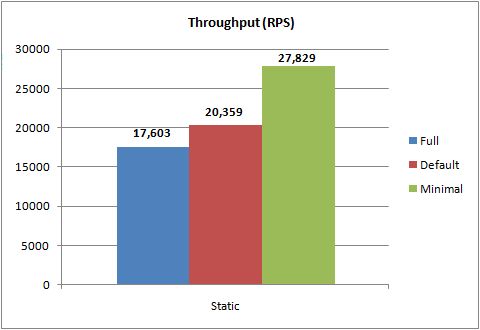
A 58% RPS improvement. I also got a 22% footprint reduction (private bytes), which is perhaps
less meaningful given a total 5Mb footprint for a static workload per worker process. But, it could be meaningful if you have a lot of worker processes.
Tweaking it
If you are totally adventurous, you can yank all but AnonymousAuthenticationModule and StaticFileModule and still serve static files, although you’ll lose compression, and performance.
Or, you might want to add back some functionality. For example, if you need logging, you’ll need to add back the HttpLoggingModule.
Disclaimer: this is for the static workload only. You WILL DEFINITELY need to add a number of modules if you want dynamic content, including Request Filtering and Custom Errors. In the absence of a very clear understanding of what removal of each module has on your app, I recommend to go with the Server Manager defaults. You can also find some basic coverage of common workloads here: http://learn.iis.net/page.aspx/136/install-typical-iis-workloads/. Pick up the IIS 7.0 Resource Kit and head for the Managing Web Server Modules chapter to learn about the security impact of removing modules.
In a future post, I’ll do this for ASP.NET and PHP workloads where it gets a bit more interesting.
So, for your next IIS 7.0 web server, make sure it’s a lean one (but don’t forget to know what you are doing to avoid a bullet-hole in your favorite pair of shoes).
Thanks,
Mike
Among IT circles, IIS 7.0’s modularity is definitely one of its most welcomed traits. It promises a significantly
great post! what about using server core?
Thanks. Server core doesnt significantly impact the throughput and footprint of the IIS workload, because that workload is virtually identical in both cases.
However, it does make a giant difference in the overall footprint of the server. In my tests, I run the minimal static workload on Windows Server 2008 with 508 Mb of memory used, and on Server Core with 228 Mb.
So, with Server Core, you can support the minimal workload with significantly less memory, which also makes it a great candidate for lower-powered hardware or virtualized environments that are memory bound.
Thanks,
Mike
Hi Mike, I have a question, How can I add application to IIS 6.0 programatically in ASP.NET? Is there any solution for this?
Thanks,
Hi Reza,
You’ll have to have Administrative rights on the server, and use either WMI (see http://msdn.microsoft.com/en-us/library/ms524972.aspx) from .NET. You can also use the ADSI provider.
I wouldnt recommend doing it from an ASP.NET page, since it means granting Administrative rights to your IIS worker process or the ASP.NET application.
In IIS 7.0, this is a lot simpler with the Microsoft.Web.Administration namespace.
Thanks,
Mike
Great article. I wish there was a IIS 7.0 guide for dumbies, showing specific modules needed for different kinds of websites. One of my big complaints with IIS 6.0 is how everything seems to be co-dependent on each other. For example no way to remove SSL if you don't need it. I run websites that use asp.net 2.0, and MySQL. Along with SmarterMail and SmarterStats. I could really use a guide for what each module does.
Thank you for submitting this cool story – Trackback from NewsPeeps