So you just moved your application to an IIS7 server, and now you are getting an error when you make a request to it. This seems to be a popular theme on IIS.NET forums these days, and after answering a hundred or so of these posts, I figured I should do something to help people track down and fix their issues with a little less frustration.

It can be very hard to link generic IIS errors to underlying issues that you can fix. Head over to LeanSentry to get a comprehensive application checkup. We’ll find your actual IIS and ASP.NET issues, and even show you how to fix them in code.
Server software, and web servers specifically, are very complex and highly configurable systems that support multi-tier applications using a variety of technologies and subsystems, and endure further complexity due to security, performance, and reliability demands, so it’s a wonder it all works as well as it does in the end. IIS7 strives to improve the experience of diagnosing and solving problems when they do occur, so knowing how to use the new IIS7 diagnostics features can come a long way in helping you become a pro at troubleshooting server problems.
First things first – what’s the problem?
I often find myself asking this question on the forums when someone posts something like “Help, I moved to IIS7 and now my application doesn’t work!”. Huh, what doesnt work? When your site stops working, the first thing you need to do is determine what the error actually is before we can move any further. IIS7 has much better error messages that will often tell you exactly what the problem is, and help you fix it.
Unfortunately, sometimes getting to this error is the main challenge. Let’s look at a few things you may need to do to get there:
1) Disable IE “Friendly HTTP error messages”
IE will by default replace the actual error messages coming from the server with a “friendly” error message, which hides the error contents we need to see. For example, for a 404 Not Found error, you may instead see the following:
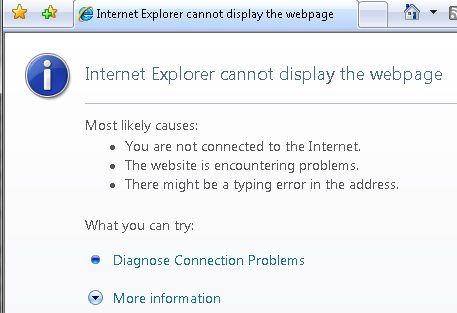
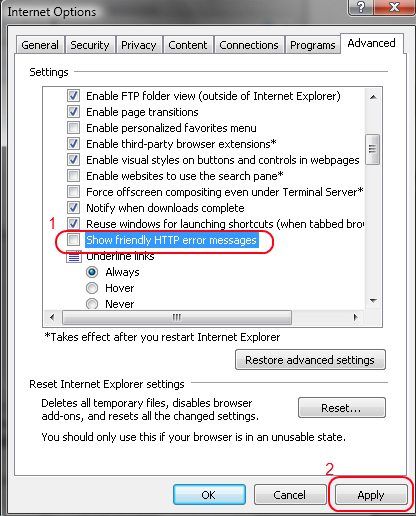
To disable this and see the real error coming from the server, you need to go to “Tools > Internet Options”, choose the Advanced tab, and clear the “Show friendly HTTP error messages” checkbox. Then, close the browser, open it again, and re-request the page.
Now, suppose you are still seeing the generic “cannot display the webpage” or “page not found” error. This is typically caused by IE failing to connect to your website, so there is no server error message to look at here. I have a detailed guide to troubleshooting this condition here: Where did my IIS7 server go? Troubleshooting “server not found” errors.
An aside: If you don’t want to mess with IE for troubleshooting (especially if you suspect you are getting cached pages, due to IE’s super- aggressive caching), the best thing to do is break out a trusty simple http tool of choice and make the request with it. I recommend WFETCH, which is included in the IIS6 Resource Kit tools (you can install on XP/Windows 2003 only, and can either run it from there or copy wfetch.exe to your Vista/LHS box).
2) Enable IIS7 detailed errors
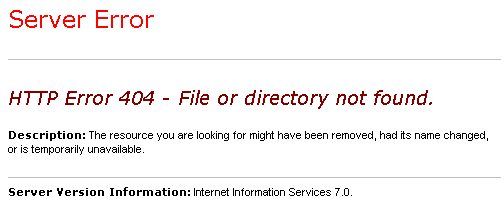
IIS7 introduces a new custom errors feature, which by default hides the error responses issued by the server to remote clients, replacing them with a basic error message. This is critical for security of your site, as errors frequently contain sensitive information that you don’t want others to see, but makes getting to the bottom of the problem harder since you cannot see those very error details. So, if you are requesting your site from another machine, you may still get a basic error that looks like this:
You have two options here:
1) Make the request locally from the server machine.
By default, you will get the detailed error.
2) Enable detailed errors for remote clients.
First, if your error is an ASP.NET exception (you can tell if it says “Runtime Error” and has the framework version), please be aware that ASP.NET overrides the IIS custom error mechanism with its own implementation of custom errors, so you should turn the ASP.NET custom errors off to see detailed ASP.NET exceptions. You DO NOT have to configure IIS7 custom errors for ASP.NET exceptions (it would be silly to have to do it in two places). To turn off ASP.NET custom errors, place the following in your web.config:
<system.web>
<customErrors mode=”Off” />
</system.web>
If the error is not an ASP.NET error, turning off IIS7 custom errors will allow error responses from your application to be sent to remote clients without being censored by the IIS7’s custom errors module.
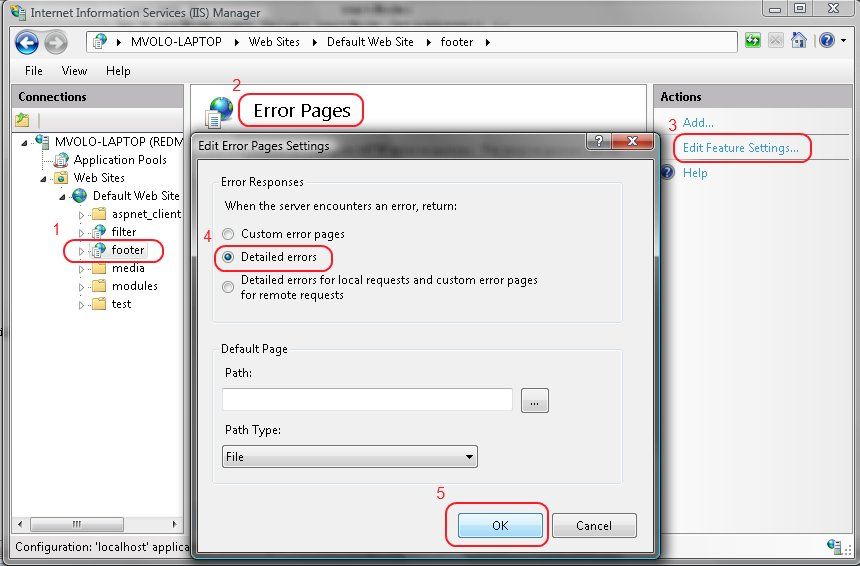
You can do this from the IIS7 Admin tool by running “Start>Run>inetmgr.exe”, selecting your website/application/virtual directory in the left-hand tree view, clicking on the “Error Pages” icon, clicking “Edit Feature Settings” action, and then selecting “Detailed Errors”.
You can alternatively do this from an elevated command line prompt (Run as Administrator):
> %windir%system32inetsrvappcmd.exe set config “Default Web Site/yourapp” /section:httpErrors /errorMode:Detailed
Where “Default Web Site” should be replaced with your site’s name if different, and “/yourapp” with the virtual path you’d like to enable detailed errors for.
NOTE: When you are done debugging, please return the settings back to custom errors for remote requests, or the security of your website may be compromised. Here is how to do it with AppCmd:
> %windir%system32inetsrvappcmd.exe set config “Default Web Site/yourapp” /section:httpErrors /errorMode:DetailedLocalOnly
Now, you should be getting detailed errors back – for example, the error I was getting before now looks like this (this is the Vista error page – Longhorn Server and Vista SP1 error pages will look much nicer, see this for an example):
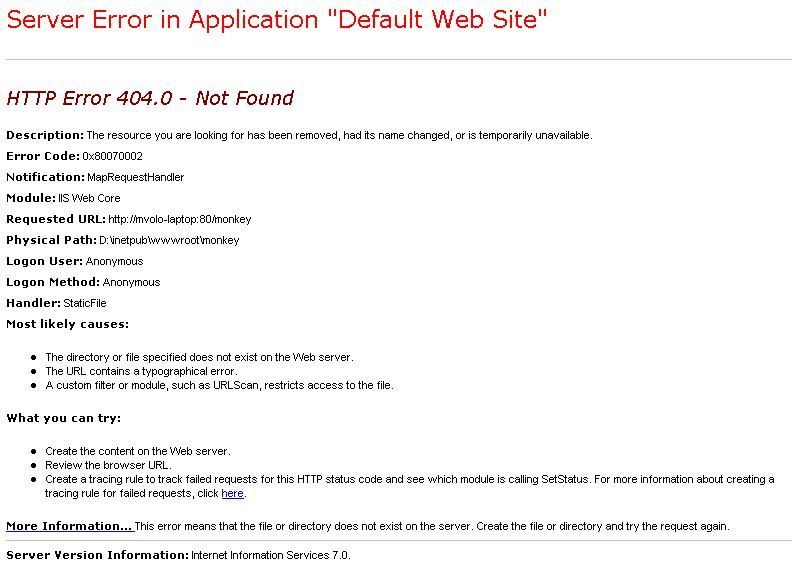
Notice that this error contains quite a bit of useful information:
1) The heading contains the substatus code, 404.0, which is an IIS specific code that further describes the problem. The majority of common errors has a unique <status_code>.<substatus_code> combination that you can easily google for additional information.
2) The page indicates what module (IIS Web Core), and in what notification (MapRequestHandler) an error occurred. This information is critical whenever you are debugging server problems, especially on the IIS7+ world when most of them occur in one of the modules that take part in the processing of the request.
3) The page shows you some useful request information, such as the requested url and the physical path to which it resolved. Most 404 errors will be resolved right here, by seeing that the request is being made to a wrong url or resolving to a wrong physical path due to incorrect virtual directory mapping.
4) The “most likely causes” and “what you can try” sections offer the most likely explanation for the error and what you can do about it. They are dead on for the majority of common IIS7 errors.
NOTE: When you are coming to the forums with an error, we expect you to have gotten this far and that you will provide the detailed error to help us with your problem. For more information about the custom errors support in IIS7, check out http://www.iis.net/articles/view.aspx/IIS7/Managing-IIS7/Diagnostics-in-IIS7/Deciphering-Error-Messages/How-to-Use-HTTP-Detailed-Errors-in-IIS7.
3) Detour – the 503 “Service Unavailable” error
Sometimes, you will get an error that looks like this:

This error most likely either indicates a critical misconfiguration of the server that is causing IIS to fail to start a worker process/process your request, or a system overload condition that is causing requests to be rejected early, so no further error information will be available in the response. If you are getting this error, please follow my detailed guide: Where did my IIS7 server go? Troubleshooting “service unavailable” errors.
Deeper diagnostics with Failed Request Tracing (formerly known as FREB)
If the error alone is not sufficient to diagnose the condition, or more information is needed to determine what lead up to the error occurring, or, there is no error (for example, request times out), you can take advantage of the wonderful IIS7 feature called “Failed Request Tracing”.
This feature can be used to generate a detailed trace of events leading up to the failure, much like ETW, but now with more/more useful events and significantly easier to turn on and use for troubleshooting.
More importantly, you can configure Failed Request Tracing to only trace requests that encounter a specific failure condition, such as a specific response status/substatus codes, an event of specific verbosity, or a timeout.
To do this, you are going to need to install it first (if you haven’t already):
On Vista: Control Panel, Programs, Turn Windows Features on or off, check Internet Information ServicesWorld Wide Web ServicesHealth and DiagnosticsTracing.
On Windows Server 2008: Start>Run>Server Manager, Roles, Web Server(IIS), Add Role Services, check Web ServerHealth and DiagnosticsTracing
Then, to enable IIS to generate these logs, you need to do two things:
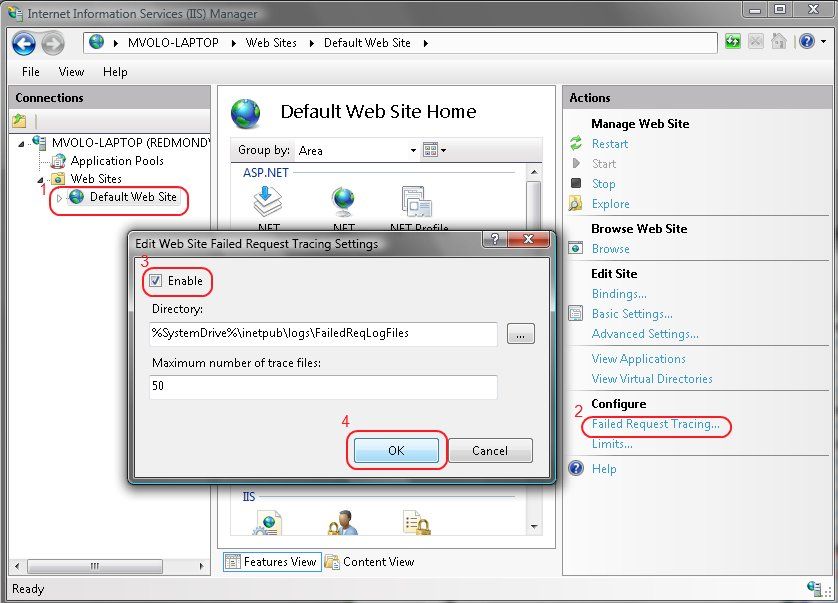
1) Enable Failed Request Tracing for the site you want to trace
In InetMgr, select your site in the left-hand tree view, then under Actions on the right click “Failed Request Tracing …”. There, select the Enable box.
2) Create a Failed Request Tracing rule with the events and failure definition of choice
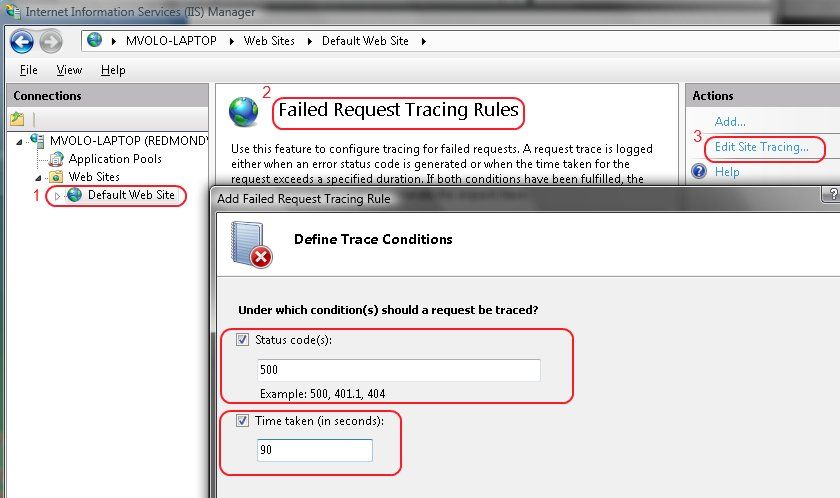
In InetMgr, select the site/application/virtual directory that you’d like to trace in the tree view, click the “Failed Request Tracing Rules” icon, click the “Add…” action, and follow the wizard to create the rule.
You will be asked what content you’d like to trace (based on an extension), when to consider the request as failed (a list of response status codes, and in Longhorn Server, also event verbosity) or a timeout, and finally the events you’d like to trace. I recommend to leave all events selected by default, unless you are sure you know what you are looking for.
Now, when you make a request, if it meets the failure definition, the detailed trace will be logged as an XML file that you can inspect (or send to us for inspection).
You can by default find this file in %systemdrive%inetpublogsFailedReqLogFilesW3SVC<ID> folder.
If you double-click this file, it will open with the provided XSL stylesheet that shows the trace events. In Longhorn Server, this stylesheet has gotten a major overhaul to highlight the important information better – for more information, see this: http://blogs.iis.net/bills/archive/2006/10/19/Making-Failed-Request-Tracing-More-Approachable.aspx. You can download the new stylesheet and use it today for your Vista machine.
The Failed Request Tracing log provides verbose execution information for the request, that can be used in a number of ways to further diagnose more complex problems that may result from the operation of more than one module. For example, if a url rewriter module changes a url in the request, which later leads to the static file handler failing to find the file, the SetUrl event can provide the needed information. The log also provides such key info as the times taken by each module to execute, the outcome of each of the built-in module’s operation (often including the reason why something didn’t work), and any times when a module fails a request by setting an error response status code.
Finally, one of the main strengths of Failed Request Tracing is that you do not have to be the client to receive the error information. As an administrator, you can configure it to monitor for errors and log the forensic trace when they occur, allowing you to just leave the feature on in production. Think of it as request logs on steroids. To learn more about Failed Request Tracing, see http://www.iis.net/articles/view.aspx/IIS7/Managing-IIS7/Diagnostics-in-IIS7/Using-Failed-Request-Tracing/Troubleshooting-Failed-Requests-using-Tracing-in-I.
I will post more specific strategies on how to troubleshoot with Failed Request Tracing logs in a future post. In the meantime, you should now be a lot more prepared to deal with errors when they occur, and resolve them before you type that first forum post. And if you do make a post (which you are welcome to do), you’ll be able to provide us with the key information to help you solve your problem.
Thanks,
Mike
Dealing with server errors can be frustruating. Thankfully, IIS7 comes with many improvements to help
Dealing with server errors can be frustruating. Thankfully, IIS7 comes with many improvements to help
Dealing with server errors can be frustruating. Thankfully, IIS7 comes with many improvements to help
Mike I'm developing an ASP.NET application and I've just moved over to Vista. I' developing using the local server. Under XP It connected to IIS quickly and my web application came up quickly. Since moving to Vista it takes 2-3 minutes to pull up my app on the local server.
Any ideas: [email protected]
Robert,
Your best bet is to set up a Failed Request Tracing log with failure definition being a timeout of 1-2 minutes, and inspect it to see where the time is being spent.
Please use the instructions above to do this.
Thanks,
Mike
Yesterday, I chatted with John Weston for TechNet Radio, which targets IT Pros as an audience. We talked
Yesterday, I chatted with John Weston for TechNet Radio, which targets IT Pros as an audience. We talked
Hi
I get an error when I try to run a classic asp website on vista:
HTTP Error 500.0 – Internal Server Error
Description: Calling GetProcAddress on ISAPI filter “C:Windowssystem32inetsrvasp.dll” failed
Error Code: 0x8007007f
Notification: Unknown
Module: IIS Web Core
Requested URL: http://scapatchi:80/ssri
Physical Path: C:inetpubwwwrootssrissri
Logon User: Not yet determined
Logon Method: Not yet determined
Failed Request Tracing Log Directory: C:inetpublogsFailedReqLogFiles
Handler: StaticFile
Most likely causes:
The ISAPI Filter has dependencies that are not available on the Web server.
IIS received the request; however, an internal error occurred during the processing of the request. The root cause of this error depends on which module handles the request and what was happening in the worker process when this error occurred.
IIS was not able to access the web.config file for the Web site or application. This can occur if the NTFS permissions are set incorrectly.
IIS was not able to process configuration for the Web site or application.
The authenticated user does not have permission to use this DLL.
What you can try:
Try running Reskit tool “depends” on the ISAPI DLL.
Ensure that the NTFS permissions for the web.config file are correct and allow access to the Web server’s machine account.
Check the event logs to see if any additional information was logged.
Verify the permissions for the DLL.
Create a tracing rule to track failed requests for this HTTP status code. For more information about creating a tracing rule for failed requests, click here.
What can I do?
Dmitrios,
You have added the ASP.dll ISAPI extension as an ISAPI filter, which is incorrect. You shouldnt need to manually create this mapping – simply install ASP from the Turn Windows features On/Off UI, and it will automatically create the handler mapping.
Thanks,
Mike
I have been trying to run ASP & ASP.NET websites, but I keep getting the following error:
*******Start******************
HTTP Error 500.0 – Internal Server Error
Description: The page cannot be displayed because an internal server error has occurred.
Error Code: 0x800700aa
Notification: ExecuteRequestHandler
Module: IsapiModule
Requested URL: http://localhost:80/test1.asp
Physical Path: C:inetpubwwwroottest1.asp
Logon User: Anonymous
Logon Method: Anonymous
Handler: ASPClassic
Most likely causes:
IIS received the request; however, an internal error occurred during the processing of the request. The root cause of this error depends on which module handles the request and what was happening in the worker process when this error occurred.
IIS was not able to access the web.config file for the Web site or application. This can occur if the NTFS permissions are set incorrectly.
IIS was not able to process configuration for the Web site or application.
The authenticated user does not have permission to use this DLL.
The request is mapped to a managed handler but the .NET Extensibility Feature is not installed.
*************END************************************
I could run them before but as soon as I enable UAC it all got messed up and now i cant run anything.
I have disabled it now but still cant run anything.
I have Vista Home Premium OS and IIS7.0
Please help me get thru this asap.
Thanks,
Mahesh
You may find solutions for:
HTTP Error 500.19 – Internal Server Error,
HTTP Error 500.0 – Internal Server Error,
HTTP Error 401.3 – Unauthorized
in my blog post: http://www.bloggingdeveloper.com/post/Creating-IIS7-sites-applications-and-virtual-directories-using-Internet-Information-Services-Manager.aspx
Cheers,
Blogging Developer
Everyone seems to be coming off vacation and my book is done so now to list the resources to make us
Mike,
I’m hoping you can help me.
I’ve installed ServletExec 6.0b1 into my IIS 7 (on Win 2008 RC0).
It works fine and I am able to request simple Servlets and JSPs.
The issue I have is when I request a JSP which returns a 500 status code (on purpose) with a custom response body. In this case the custom response body is configured inside ServletExec (the Servlet/JSP engine which is “hooked into” IIS as an ISAPI Filter).
I want to see that custom response body.
But instead IIS 7 is being fancy and “stomping on” my custom response body.
IIS 7 is returning a preconfigured 500 response body.
I removed the error page mapping for the 500 status code (did this in the IIS Manager) for my IIS website. But while doing that *did* change the behavior slightly, it did not fix the issue.
Now when I request my JSP, IIS 7 returns this response body:
The page cannot be displayed because an internal server error has occurred.
No… I know and expect that an internal server error occured (remember that my JSP sets the status code to 500 on purpose). So I actually want an error to “occur”. But I want to see the response body that my JSP built… not the response body that IIS 7 “inserts”.
I’ve also removed the IIS 7 error page mapping for the 500 status code at the “global” level of IIS (not just the level of my specific IIS website) but that did not have any effect.
Can you help me?
Thanks.
-Matt McGinty
Hi Matt,
I answered your question on the forums, available here: http://forums.iis.net/p/1146653/1858027.aspx#1858027.
Thanks,
Mike
hi every one
i have some problems installing IIS7 extensions (asp, asp.net, ISAPI and the rest of applications) it give me and error (the applications are not installed successfully) Iam using vista home premium. when want to view the asp page it gives me server error 404.3. i don’t know what to do. i reinstalled iis servel times but it doesnt work please some one help me!!
Hi Mike,
We are having some issues with our production enviornment. It seems that the web servers stop responding when the worker processes are recycled. The only way we can get it to respond again is to reset IIS. We’ve currently set the worker process idle time down to 0, and the recycling to happen every hour, and sure enough, every hour we have to reset IIS. We’ve got an IIS module to do some basic URL rewriting, and on load test it performed fine. Additionally, we didn’t see anything like this during our load tests, but it started happening as soon as we went live. We’re also not getting any exceptions being raised, and the CPUs look relatively idle (< 5% utilisation) and memory usage is OK, too (~ 60%) when the servers stop serving requests. There doesn't seem to be anything significant in the event log either. What we do get in the event log is a message stating tha the worker process had requested a recycle as the wp reached its allowed processing time limit, and this is followed by a message saying that the wp exceeded time limits during shut down.
Hi Zack,
You’ll need to look at your problems one at a time. Typically when you get a 404.3, it means that you havent installed the correct handler mapping for your resource type, and therefore IIS refuses to serve your (script) file as a static file. When you install ASP.NET, or ASP from Windows Setup, they create the handler mappings by default. If you have other ISAPI extensions or modules, you need to create the handler mappings manually.
Run:
> %windir%system32inetsrvappcmd list config -section:handlers
To see if it contains handler mappings for your desired extensions. If it doesnt, thats your problem.
For a more detailed investigation, please post the detailed error and the result of the above command on the IIS.NET forums and we’ll help you.
Thanks,
Mike
Hi Kyri,
Is there anything in the “System” Event Log that indicates that a worker process failed to start, or failed, causing WAS to disable your application pool?
Re: wp exceeded time limits during shut down
Something in your worker process may be taking a long time to shut down, so WAS ends up killing it. it can be a request that has hung. You can check the currently executing requests to see if any requests have been executing for a really long time for a clue.
Additionally, you can try attaching a debugger to the process after it is scheduled to go away and dump the thread stacks to see what threads are doing.
Another thing you may want to try is extend the shutdownTimeLimit to see if a little bit of additional time will help the process go away. You can set it as follows for any apppool:
> %windir%system32inetsrvappcmd set apppool “” -processModel.shutdownTimeLimit:
Also, be sure that your apppool is set to allow overlapping recycles so that a new worker process can be started to handle requests while the other one is shutting down:
> %windir%system32inetsrvappcmd set apppool “” -recycling.disallowOverlappingRotation:false
Thanks,
Mike
摘要
本期共有6篇文章: VS2008和.NET3.5Beta2发布
IronRuby初探
脚本类型浏览器小程序
关于jQuery的一本新书
最新的一些ASP.N…
I can not run any ASP classic pages on my Windows Vista Home Premium machine. IIS 7 would display the following error message
*****************
HTTP Error 500.0 – Internal Server Error
Description: The page cannot be displayed because an internal server error has occurred.
Error Code: 0x800700aa
Notification: ExecuteRequestHandler
Module: IsapiModule
Requested URL: http://localhost:80/test.asp
Physical Path: C:InternetServicesWebsitesJapanAnimationtest.asp
Logon User: Anonymous
Logon Method: Anonymous
Failed Request Tracing Log Directory: C:inetpublogsFailedReqLogFiles
Handler: ASPClassic
********************
The FailedReqLogFiles says:
MODULE_SET_RESPONSE_ERROR_STATUS
Warning
ModuleName=”IsapiModule”, Notification=”EXECUTE_REQUEST_HANDLER”, HttpStatus=”500″, HttpReason=”Internal Server Error”, HttpSubStatus=”0″, ErrorCode=”The requested resource is in use. (0x800700aa)”, ConfigExceptionInfo=””
In IIS, the Application pool’s Process Model Identity is LocalSystem
How can I get ASP classic to work on IIS 7? Please help!
Thank you!
Ivan
Umm, my computer said 404.4 error when i tried to go to localhost, and it said something about a handler, how do i fix that?
Qebafhzn,
This error means IIS couldnt find a handler for your request extension and verb. Check that you have the extension and verb mapped to a handler in InetMgr, by selecting your application in the tree view and clicking the “handler mappings” feature. There should be an entry for your extension mapping it to the appropriate handler, or there should be a * mapping that will serve all other requests as static files. The fact that you are not getting a 404.3 error means that you’ve either removed the * mapping for the static file handler, or your handler mapping is preconditioned incorrectly preventing it from being used in your application.
If this doesnt help, post to forums.iis.net and we’ll walk you though it.
Thanks,
Mike
I can’t get to InetMgr, that’s the problem, I did Run > inetmgr.exe, but apparently it’s not there.
Qebafhzn,
Dont forget to install IIS first.
Thanks,
Mike
I’ve looked all over for and I can’t figure it out. My css files seem to be blocked by IIS7. My site displays them when I use the ASP.NET Development server, but when I browse to the applicaiton, the styles are not applied.
Is there a setting somewhere in IIS7 that is preventing the css files from being downloaded by anonymous users?
My css files are located in /App_Themes/Default/Default.css I’ve given permission to NetworkService to view this area.
I could go on with all the trouble shooting steps I took, but I’m hoping this may be a simple issue.
Thanks.
Hello. I am a java/j2ee programmer, and when I have an error I simply consult the goddamn logs, without clicking in all possible windows like a mad man. Microsoft it’s simply not programmer friendly.
Hi Victor,
You do not have to “click in all possible windows”. IIS 7.0 provides lots of diagnostical information, but it also must strike a balance between accessibility of this information, security, and performance in generating and storing it.
I generally dont respond to nonsensical blanket statements like “Microsoft is simply not programmer friendly”. If you have a question about troubleshooting IIS 7.0, or a specific suggestion for what we can do better, do post back.
Thanks,
Mike
Hi Jason,
The best bet is to request one of the .css files directly in the browser, or using a tool like WFETCH, and see what happens. You will need to turn on the detailed errors as I describe in this post, and possibly obtain a failed request trace log.
If I were to guess, you are missing the MIME Type entry for .css which results in the static file handler rejecting the request with 404.3.
If you still need help after you follow these steps, please post on forums.iis.net and we’ll help you further.
Thanks,
Mike
Keep getting this error (500.19) – is it to do with the web.config file?
Greg,
You need to look at the details of the configuration error to see what is causing it. It could be malformed XML, insuficient permissions to the web.config file, or many other causes.
Thanks,
Mike
hi Mike,
I could swear that I read pre-release information that said IIS 7.0 would allow a custom error response (page) similar to the custom.html in IIS 6.0.
While I know we need to find the source of this in our application, this error is directly impacting a customer so we are trying to "mask" it while we find the issue.
Is this available and if so, could you be so kind as to point me int he direction of MSDN or other appropriate documentation.
Thank you kindly for your time and assistance.
-Stephen
Hi Steph,
While I definitely recommend that you get to the bottom of the issue, you can do the following:
1) configure a custom redirect for all errors in the application or that specific error
2) configure a Failed Request Tracing rule to capture the log of any requests that result in this error (using a statuscode/substatuscode based failure condition), so you can analyze them later.
You can configure both from IIS Manager.
Thanks,
Mike
I have the same problem (I think).
My 2K8’s x64 IIS7 is running normally – all ASP pages can be seen and run.
HOWEVER – if I want to use any classic ASP COM/DLL objects, I get this error:
Microsoft VBScript runtime error ‘800a01ad’
ActiveX component can’t create object
I haven’t changed anything to these pages since I ran my 2K3 box. I have:
– successfully registered the same components.
– made sure that IIS users / network service has access to the files
– checked with process Sysinternals Process Monitor that no files can’t be accessed (I don’t see any errors)
– checked DLLs with “dependency walker”, gpsvc.dll copied to C:Windowssystem32
All…to no avail. So why Have the IIS team made life difficult for the people who spent $ in order to upgrade from 2K3r2?
Klaus,
If I was to guess, this is most likely because you are running the app in an application pool using syswow64 (emulated 32 bit mode) and your COM DLL accesses are being redirected to the syswow64 directory.
This would happen if you copied your COM object DLLs into the %windir%system32 directory.
For more info on what other issues it could be, see http://support.microsoft.com/kb/194801.
Thanks,
Mike
How do you cope with complicated people at work?
Hi Mike, I’ve just posted a thread on msdn regarding an ASP classic / SQL Server 2005 / II7 issue I am facing, any chance you could take a look when you have a sec.
http://forums.microsoft.com/TechNet/ShowPost.aspx?PostID=3184803&SiteID=17
Best regards,
Tim
Email : [email protected]
Hi Volodarsky
I am having Windows VIsta Home Premium . Now I configured the website and it is running perfectly in my PCon IIS7 . Now I want to Browse the application from another PC in my INtranet , please tell me how to confgure to browse the application from other PC in Vista Home Premium.
Hi
i get 500 – Internal server error.
There is a problem with the resource you are looking for, and it cannot be displayed.
i’am running php-nuke platimum
When i try http://192.168.6.10/ then i can see my webpage (The login meny is missing)
and when i try my domainname the i get the error-message
i’am running windows server 2008
HI
we are unable to reset IIS ,since the domain account has been added into local admin group “Access Denied”
only builtin administrator can reset IIS
need your suggestions
I want to reset IIS 7 to default settings.Simple installing and reinstalling dosent’t work.
So that I mean I need to delete some files which stores config files. Can you please tell me how to do it.
I am wondering how to set a JSP as the default document for IIS7. Simply specifying idex.jsp as default document does not work, even though a plugin is configured to pass all JSPs to Websphere. http://localhost/index.jsp works, but http://localhost/ gives me a 404.3 error.
Well, I’ve read through all the posts and no one seems to have the same error message I’m getting. I followed all of the steps to set up IIS7 for ASP, it’s enabled in mapper handling, etc, but I get this error message:
Description: An unhandled exception occurred during the execution of the current web request. Please review the stack trace for more information about the error and where it originated in the code.
Exception Details: System.InvalidOperationException: The application instance cannot be changed.
Hi,
Im using Sybase Datawindow.net 2.5 My development platform is XP SP2 using VS2008 – and all is fine BUT then my application gets deployed to the server (The server is running Server 2008 and IIS 7) and I get an error. The Server is complaining about required dll files. the files are PBDWN110.dll /atl71.dll/msvcp71.dll/msvcr71.dll . The files that it is complaining about do exist, but for some reason IIS does not have access to them. Is there something i need to set in the IIS in order for it to see the files?
Hi,
I have an ISAPI filter that works with IIS6 (both server level and site level). On IIS7, the same ISAPI filter only works at site level. At server level, the ISAPI filter is not even loaded into w3wp.exe.
I tried failed trace which does not give me any clue. There is no eventlog entries to explain the reason why it is not loaded either.
Any suggestions? Thanks.
Hi kong,
Do a
%windir%System32inetsrvappcmd list config MACHINE/WEBROOT/APPHOST -section:isapiFilters
Do you see your ISAPI listed? What is the value of the preCondition attribute?
Thanks,
Mike
Hi, Mike, yes, the appcmd indeed shows my isapi filter. By looking at the applicationHost.config file, I found out there is a in isapi filter section under each web site (Do not know how it got there). I think this effectively removes the inheritance from server level down to web site level. Once I removed the and restart iis, my isapi filter at server level now works fine. Thanks.
Thank you, thank you, thank you. Excellent article, it helped me solve the problem in a flash.
I had installed 5 web sites, but not without a few alterations including physical path names, pool names, etc. I was getting 404’s, the wrong site would come up when browsing from IIS manager, it was crazy. But I got my clue when all sites worked from the internet. IPConfig /flushdns fixed it all
Ok guys hopefully I have come to the right place! I have 2 duplicate site that are hosted on 2 different servers, one is on a paid host and the other is on my windows 2008 server. The problem I have is I did an update to one of my sites which worked fine on my local machine (laptop). I then uploaded the updated files to my paid hosting space and updated the files on my own server. The problem I’m now having is the updated part of my site flags an http 500 error on my server, but works perfectly fine on the paid hosting site. Im in need of serious help before I go nuts!!!!!
Hi Paul,
Please get the detailed error message and post back or to forums.iis.net to get more help (see this post for instructions on getting the detailed error).
Your issue most likely has to do with some configuration conflict between the base configuration on your own server, and the new configuration you added (for example, specifying web.config configuration for a section that is locked at the server level). Or, you may have differences in installed features or the application layout or permissions.
In any case, without knowing the detailed error, there is no intelligent way to move forward.
Thanks,
Mike
Hi Mike,
I followed your advice above just after I had posted the problem I was having and the advice you gave helped me solve the issue.
I'm not quite sure why the files worked on one server but not the other, it was perhaps as you say a difference in configuration between the two. I
ts turns out there was a php parsing error in a line of code which my server didn't seem to like too much and when I removed it (wasn't really required anyway) my page displayed again.
Thanks for the advice,
Paul.
I installed IIS7 on our x64 server, and installed the role for Tracing, but the icon for Failed Request Tracing Rules is not present in IIS manager. I can turn FRT on and off, but cannot configure any rules.
I need to be able to track down a 500.19 and not being able to turn on FRT (a rule has to be entered) is very frustrating.
See
http://nzschooltech.blogspot.com/2009/01/installing-moodle-19-on-ws2008-x64-iis7.html for the context.
Hi Mike,
I am continuosly getting below error, while access our sight.
My site name is http://avani.hosteras.it
Login credentials are below
UserID: H262359
Password: P84217239
after login please click SandeepProperty in left Menu.
I am getting below error. Please guide us.
HTTP Error 500.19 – Internal Server Error
The requested page cannot be accessed because the related configuration data for the page is invalid.
Module IIS Web Core
Notification BeginRequest
Handler Not yet determined
Error Code 0x800700b7
Config Error Cannot add duplicate collection entry of type ‘add’ with unique key attribute ‘name’ set to ‘ScriptHandlerFactory’
Config File ?UNCfsvs02target02366921378013avani.hosteras.itwebcontentHotelExtranetWebweb.config
Requested URL http://avani.hosteras.it:80/hotelextranet/dashboard.aspx
Physical Path fsvs02target02366921378013avani.hosteras.itwebcontentHotelExtranetWebdashboard.aspx
Logon Method Not yet determined
Logon User Not yet determined
Config Source
107:
108:
109:
This error occurs when there is a problem reading the configuration file for the Web server or Web application. In some cases, the event logs may contain more information about what caused this error.
View more information » <http://go.microsoft.com/fwlink/?LinkID=62293&IIS70Error=500,19,0x800700b7,6001>
Regards,
Sandeep
Having migrated a few servers over to IIS7 I have started to realize the power of IIS7. I have debugged
Hi,
Are you still there? If you could be so kind, please, bring some light here.
Thansk in advance,
RIcardo
Ricardo,
What did you need?
Mike
Mike, I have installed IIS 7 on a Vista machine and get a 404 error (The requested resource is not found) when I try to run a simple ASPX file. In IIS, if I click on the “Browse *:89 (http)” option on the right of the virtual directory page, I get the same error. ASP was checked during the IIS installation. Symantec Endpoint Protection is running on the machine.
hi
Recently our server migrated from windows 2000, MS SQL Server 2000 to windows 2008/sql2008/iis7, I am facing problem while connecting database from my classic asp code, IIS 7 throws error 80040e4d
As per your suggestion i enabled Failed Request Tracing, error log as below
Url http://83.244.197.221:80/e2m/index.asp
App Pool DefaultAppPool
Authentication anonymous
User from token NT AUTHORITYIUSR
Activity ID {00000000-0000-0000-3100-0080000000F2}
Site 1
Process 4652
Failure Reason STATUS_CODE
Trigger Status 500
Final Status 500
Time Taken 47 msec
ASP_LOG_ERROR
LineNumber 24
ErrorCode 80040e4d
Description
WARNINGS
ModuleName IsapiModule
Notification 128
HttpStatus 500
HttpReason Internal Server Error
HttpSubStatus 0
ErrorCode 0
ConfigExceptionInfo
Notification EXECUTE_REQUEST_HANDLER
ErrorCode The operation completed successfully. (0x0)
for more details, my data base connection code as below
Dim rsUSERSESSIONEXISTS
set rsUSERSESSIONEXISTS = Server.CreateObject(“ADODB.Recordset”)
rsUSERSESSIONEXISTS.ActiveConnection = “Driver={SQL Server};Server=” & Request.ServerVariables(“LOCAL_ADDR”) & “;Database=e2mdev”
rsUSERSESSIONEXISTS.Source = “SELECT * FROM userinfo_userinfo”
rsUSERSESSIONEXISTS.CursorType = 0
rsUSERSESSIONEXISTS.CursorLocation = 2
rsUSERSESSIONEXISTS.LockType = 3
rsUSERSESSIONEXISTS.Open()
rsUSERSESSIONEXISTS_numRows = 0
websites in previous server uses same database connection code, here forcibly i have to use the same code help me out please
Hi sampath,
You most likely have a permission issue. Make sure that IUSR has access to your database, if you are using Windows Authentication, or use sa authentication with credentials in the querystring.
For additional troubleshooting, post on forums.iis.net.
Thanks,
Mike
Thank you for your suggestion ..
i created login user for e2mdev data base, data base connection working fine by giving uid and pwd while connecting data base from code, how can i connect without giving UID and PWD from my code as a anonymous user because i have to migrate all previous websites there database connection done without using PWD and UID.
http://mvolo.com/blogs/serverside/archive/2007/07/26/Troubleshoot-IIS7-errors-like-a-pro.aspx
for IIS 7 have a redirect that when I try to enable directory browsing, inidcates cant write to web.config
and lists as ?e:escweb.config… which is odd..
i checked permissions and my user should have access
hi i am new to having my own sever .i just want to ask for bit help .can my sever stop showing ad on my website if the setting are wroung my ads come up on my local host but not on my website .can this be down to my sever settings ? thanks for your help as am new to this
hi
am getting this message , i have 2008 server , installed iis 7, with php5, mysql .
am getting this message when i got to my travel portal development developed in php
500 – Internal server error.
There is a problem with the resource you are looking for, and it cannot be displayed.
Here's one that's not listed here.
IIS stopped responding to requests to localhost, 127.0.0.1, and [::1]. These used to work, but recently they stopped working. Using the local pc's actual ip address works, such as 192.168.0.123.
In firefox I get: Firefox can't establish a connection to the server at localhost.
In IE8 I get: Internet Explorer cannot display the webpage. — And clicking the Diagnose Connection Problems button results in "localhost" is not set up to establish a connection on port "World Wide Web service (HTTP)" with this computer.
I have restarted the pc, done an iisreset, ensured that the web site binding is set to *:80. I also temporarily tried adding 127.0.0.1:80 as a binding, but that had no effect.
My hosts file looks like:
127.0.0.1 localhost
::1 localhost
When I run SysInternals tcpview command line I see:
[TCP] System
PID: -1
State: LISTENING
Local: 192.168.1.123:80
Remote: 0.0.0.0:0
Shouldn't that be 0.0.0.0:80?
I CAN successfully ping localhost AND I have an application called SqueezeCenter installed that has a built in web server on port 9000, and it works fine with localhost, 127.0.0.1, and [::1] requests.
As a side note, the same issue applies to WCF in .NET 3.x regardless of the listening port #. It no longer responds to localhost requests.
This started a couple weeks ago and I'm not sure what has changed to cause this.
Any ideas?
Thanks,
Johnny
I solved the problem I posted earlier, but it might be helpful to others.
I ran across the following command line that apparently lists all the ip addresses that IIS is listening on (but I’m not sure how this differs from the IIS web site bindings):
netsh http show iplisten
This showed one ip address, which was my machine’s ip address…. and I have no idea how it got set.
Once I removed the ip address so the list was empty (which is what I have on another vista machine for comparison), localhost started working again.
Johnny
The failure of new applications HTTP/1.1
hi Mike
am having a probem with running inetmgr on vista home basic it just wount run please help me as am supposed to use it for my developement web applications
I have server 2008 and Sharepoint 2007 MOSS as a home based web site. My problem is that no one can see my site from outside. I think it has to do with something in IIS7, but don’t know where. Any ideas? My router is set for DMZ for the server so all traffic can pass.
Thanks,
[email protected]
500 – Internal server error. There is a problem with the resource you are looking for, and it cannot be displayed.
I am getting error 404.4. It says “The resource you are looking for does not have a handler associated with it.”
In the “things you can try, it states,
“If the file extension does not have a handler associated with it, add a handler mapping for the extension.”
However, it doesn’t explain how to do this.
Config of System:
OS: Windows Vista Home Edition.
Browser: IE 7.0
The system has Visual Studio 2008 installed on it. So the application runs on local host.
But it does not have an IIS server installed.
This error cropped up after I tried to run Spike Proxy (Web Application Security Testing tool) on my system, for which I had to change my browser settings. But after using it I changed the settings back to wht they were.
But I am still getting the error.
Please help me with this…..
Hi Mike,
I am running PHP5 and MySQL 5 on IIS 7 on Windows Server 2008 R2. When I run any php file with database activity from the server it throws HTTP Error 500.0 – Internal Server Error, but when I try it from the command line it works absolutely fine. Can you guide me on what might be causing the problem. all other php scripts just fine (without any database connection)..
Module IsapiModule
Notification ExecuteRequestHandler
Handler PHP-ISAPI
Error Code 0x00000000
Requested URL http://192.168.126.48:80/db/testdb.php
Physical Path C:inetpubwwwrootdbtestdb.php
Logon Method Anonymous
Logon User Anonymous
Hi Mike,
I am getting an error message 404.4….
May u plz help me on this….
Regards
Subhasis
Ok, adding the solution to my error so that others dont have to lose the 5 hours I did 🙁 .
I have vista business and I was adding IIS7 so I can start to learn to develop ASP.NET stuff.
My book (and some other sites) said to add “.NET extensibility, ASP.NET, ISAPI Extensions and ISAPI Filters” in the turn on/off features window. I did this and when i tried to hit “http://localhost/” all i got was a blank screen. wfetch.exe (1.4) was telling me HTTP 200 but 0 bytes transferred.
The solution: I had to goto the turn on/off windows features again and turn on both of the two options “Internet Information Services” –> “World Wide Web Service” –> “Common HTTP Features” –> “HTTP Errors” and “Static Content” . It was probably the static content option that made it work, but I turned them both on, then tried and it worked for me. (Getting the default IIS7 welcome in many languages page).
Now to see if I can learn ASP.NET 🙂
We are experiencing a problem in uploading files to web server using the WEBCLIENT interface in Windopws 2008. Our application code was working perfectly when our IIS server was running in Windows 2003 but when we ported it to Windows 2008, it started throwing “(404) Not Found” exception. This happens on the “GetResponse()” method of webrequest
Folowing is the code we are using:
// The WebRequest
oWebrequest = (HttpWebRequest)WebRequest.Create(oUploadURL);
oWebrequest.ContentType = “multipart/form-data; boundary=” + sBoundary;
oWebrequest.Method = “PUT”;
// This is important, otherwise the whole file will be read to memory anyway…
oWebrequest.AllowWriteStreamBuffering = false;
// Get a FileStream and set the final properties of the WebRequest
oFileStream = File.OpenRead(vsLocalPath);
iLength = oFileStream.Length;
oWebrequest.ContentLength = iLength;
oWebrequest.KeepAlive = false;
oWebrequest.Timeout = 4 * 60 * 60 * 1000; //4 hours; //20 * 60 * 1000
oRequestStream = oWebrequest.GetRequestStream();
// Stream the file contents in small pieces (4096 bytes, max). [changed to 65536, 262144]
bFile = new Byte[iChunkSize];
//Upload the file
while ((iBytesRead = oFileStream.Read(bFile, 0, bFile.Length)) != 0)
{
oRequestStream.Write(bFile, 0, iBytesRead);
iProcessedSoFar += iBytesRead;
}
//Get response of transfer
oWResponse = oWebrequest.GetResponse();
oResponseStream = oWResponse.GetResponseStream();
oResponseReader = new StreamReader(oResponseStream);
rsErr = oResponseReader.ReadToEnd();
I am going to add this website to my diggs!
Excelent, this helped get me my errors to the screen again. I needed a stack trace to the screen and this allowed me to kill that generic 500 error.
Hi Mike
We are migrating to IIS 7.0 windows 2008 development environment. The application works fine when accessed from the server. But when accessing from our desktops (local), it is giving 500 internal server error while executing a Oracle stored procedure. Please suggest what permissions are required to be granted to make the application work fine from remote systems as well.
Thank you.
How do I enable detailed errors on custom error pages? For example, if someone requests a ‘page not found’ 404 error and I send them to ‘error.asp’ and that page has a coding error, how can I display that error message?
In general, a 500.19 error happens due to invalid configuration data. The IIS configuration system will
Server Error in Application “Default Web Site”
——————————————————————————–
HTTP Error 500.0 – Internal Server Error
Description: The page cannot be displayed because an internal server error has occurred.
Error Code: 0x80070003
Notification: ExecuteRequestHandler
Module: IsapiModule
Requested URL: http://localhost:80/
Physical Path: C:inetpubwwwroot
Logon User: Anonymous
Logon Method: Anonymous
Handler: AboMapperCustom-24377840
Most likely causes:
IIS received the request; however, an internal error occurred during the processing of the request. The root cause of this error depends on which module handles the request and what was happening in the worker process when this error occurred.
IIS was not able to access the web.config file for the Web site or application. This can occur if the NTFS permissions are set incorrectly.
IIS was not able to process configuration for the Web site or application.
The authenticated user does not have permission to use this DLL.
The request is mapped to a managed handler but the .NET Extensibility Feature is not installed.
What you can try:
Ensure that the NTFS permissions for the web.config file are correct and allow access to the Web server’s machine account.
Check the event logs to see if any additional information was logged.
Verify the permissions for the DLL.
Install the .NET Extensibility feature if the request is mapped to a managed handler.
Create a tracing rule to track failed requests for this HTTP status code. For more information about creating a tracing rule for failed requests, click here.
More Information… This error means that there was a problem while processing the request. The request was received by the Web server, but during processing a fatal error occurred, causing the 500 error.
Microsoft Knowledge Base Articles:
294807
——————————————————————————–
Server Version Information: Internet Information Services 7.0.
Hi, I have question regarding .Net 2.0 on IIS 6.0. We have a program running on two mirrored server, they are all Win2003 and and IIS6. But if we update objects.dll, on one server, website coming up no error; on the other server, website will time out, I have to either reboot whole server or just restart web service. IIS setting are same on both server, and I didn’t find anything strange from event view.
I appreciate if any clue you can point to me.
Thanks,
Steven
[email protected]
408-732-8200
Sir,I have a problem regarding IIS 7.5 on WIN7. I enter the following three command, seach on a single line in CMD, pressing return at the end of each line.
1.cd %systemroot%system32inetsrv
2.AppCmd set config “Default Web Site/” -section:system.webServer/security/requestFiltering -requestLimits.maxAllowedContentLength:4294967295 -commit:apphost
3.AppCmd set config “Default Web Site/” -section:system.webServer/handlers -[name=’CGI-exe’].responseBufferLimit:0 -commit:apphost
I encounter a error when I run third command:error(message:can’t find the requested aggregation of elements )why?pls tell me how can I do next?
Sir,I have a problem regarding IIS 7.5 on WIN7. I enter the following three command, seach on a single line in CMD, pressing return at the end of each line.
1.cd %systemroot%system32inetsrv
2.AppCmd set config “Default Web Site/” -section:system.webServer/security/requestFiltering -requestLimits.maxAllowedContentLength:4294967295 -commit:apphost
3.AppCmd set config “Default Web Site/” -section:system.webServer/handlers -[name=’CGI-exe’].responseBufferLimit:0 -commit:apphost
I encounter a error when I run third command:error(message:can’t find the requested aggregation of elements )why?pls tell me how can I do next?([email protected])
2010-04-01 Notes for the day
Migrated this BlogEngine.net Blog to Windows Server 2008… Not Bad
Thank you very much. Excellent article, it helped me solve the problem in a flash.
To start the year off right, just as every year, getting your business goals planned out is top priority. If this is the first time reading something about this or you personally don’ t care to set up goals or a plan of action, read this post and reconsider
Migrated this BlogEngine.net Blog to Windows Server 2008… Not Bad
Thank you very much Mike. I was tearing my hair to resolve HTTP 500… The minute I turned on detailed error, I knew what to do
Mike
Long story short, IIS7 is no longer displaying either custom error pages OR default error pages, and error page settings cannot be reset.
All errors, even 404 errors, display just this text: “The page cannot be displayed because an internal server error has occurred.”
Do you have any advice on troubleshooting this error? I think we will need to reinstall IIS from scratch, but wondering if you have any suggestions.
I have a question regarding IIS7.0
Client Side validations were not working for .Net MVC Application Hosted on IIS7.0 ?
However ,Client Side validations are working on the Visual Studio Development Server.
Let me know any settings that i need to do for IIS7 Or any Patches were required that needs to be installed.
My Mail ID : [email protected]
Thanks MikeGraf!!! =) I only wasted 1h finding the solution thanks to you (instead of 5h).
Hi Mike,
I have a question. Is it possible to get tcp (net.tcp wcf activities) in to the IIS logs? I am know about System Diagnostic but this to “expensive” for just normal status logs or if I just want to see what client accesses what over tcp.
I installed Advanced Logging 1.0 but if I perform a service call over net.tcp the only thing I see is:
2010-09-01 19:34:03.276 /WcfService/debugattach.aspx – “C:WcfServicedebugattach.aspx” 401 “CSCGA014C-780” – 0 242 394 “HTTP/1.1” “http” ::1
but nothing about net.tcp. I guess if I run it in release mode, even these entries will disappear.
What am I missing?
thx
Igor
Thanks so much for the error 500 solution!!!
Perfekt!!!
I have an application that works perfectly in production environment under IIS6., we attempted to move it another box with Win2008 and IIS 7.
I am getting an exception., input string not in correct format. I can vouch that there isnothing wrong in the code as the same set of bin works like champ in IIS6
Nice comments.. Keep it up
Holy crap, thanks for this!!! I have been searching for the past hour and a half trying to figure out why my exceptions were returning as HTTP 500 errors in my .NET 1.1 Web Service.
I found it odd that remoting in to the server and using IE to hit the service directly would reveal the exception. However, hitting the service on a client would always return a 500 error or System.InvalidOperationException.
This was recently migrated to IIS7 and the hint to Enable IIS7 detailed errors worked like a charm!
HTTP Error 500: An internal error was encountered
The server encountered an internal error
Usually this means that a resource required to fulfil this request was unexpectedly unavailable. The resource might have been a socket or a file open on a remote unavailable system. keeps coming up what do i do
Using IIS7
I cant fix the error:
HTTP Error 500.19 – Internal Server Error
for blogengine
Hi
I have successfully configured IIS7 on A Windows Server 2008 to use Apache Tomcat 6.0.29 as a worker, IIS7 directs jsp pages to Tomcat which processes them and servers the result to IIS.
Everything works just dandy when i run a local browser on the server to test the site. But when i reach the server externally i get a "500 – Internal server error.
There is a problem with the resource you are looking for, and it cannot be displayed. "
The weird thing is that the error message does not show up on all pages, only on pages where the Tomcat app really should show the apps own error message, for example when someone types in the wrong username or password, then instead of the applications own errormessage i get the 500 error.
Any ideas on where to start looking?
Mikael
Thanks for posting this, helped quite a bit!!
Hello, When I try to install IIS 7 from Turn Windows features on or off, everything goes OK but after I do that and go in the Administrative Tools, I dont get IIS installed there, also when I try to run localhost I get an 404.4 error something like “The resource you are looking for does not have a handler associated with it.”.
I have tried all the stuffs but its not working for me. Please Help, Thanks in advance.
Hello,
Locally i have a Windows Web Server 2008 machine on which I have installed IIS7, PHP5.3, etc (using Windows Web Platform Installer – http://www.microsoft.com/web/downloads/platform.aspx). When I test a PHP file in which there is only phpinfo() it works fine. When I try to include files from within my php files (using include(), require(), etc), I get the HTTP 500 Internal error. After trying several recommendations from forums (like this one), i’ve find a solution.
I’ve downloaded PHP5.3.5 from http://www.blumentals.net/download/php.php and replaced the contents of the existing PHP (installed using Windows Web Platform Installer) with this one. Problem solved.
nadim attari
alienworkers.com
From server manager, try to connect a remote server. It exists and I can log on to the server and run IIS 7 and start web site. However, from remote servers in the same domain, I got connection error that “Unable to connect to remoe server”. I ma sure my user role is administraotr on these servers. What do you think the problem that I got this error and how can I resolve the issue?
Thanks
John
> Make the request locally from the server machine.
Thanks! That saved a few hairs…
I just replaced our IIS server from 2003 to 2008. I’m having problems with pages that are set (NTFS) so the Anonymous IIS account does not have access but some users do have NTFS permissions. I have “Windows Authentication” enabled but it gives everyone (including myself, an administrator) a dialog box asking for a UserID/Password. Regardless of what you enter, it fails after the third time with a 403.1, Error Code 0x80070005. I turned on tracing but that didn’t seem to give any useful information. Any help?
Very good article. It helped me to solve problem. I was having problem of not getting detailed error msg from clients. Now its working cool..
Is it possible to connect IIS7 with a Sharepoint 2007 list? I am getting an error: error at data flow task [sharepoint list source [1]]: system.servicemodel.protocolexception: the content type text/html;
any help is appreciated,
Thanks
You are a life saver. Our CTO recently switched us over to IIS7 without any warning or training and all of our classic ASP sites then only gave generic warning messages instead of specific messages while in developement. Was like troubleshooting blind. Your instructions under SERVER ERROR for DETAILED ERRORS was spot on.
Note for us, we also had to delete the 500 error page to get this working. Even when “Send errors to browser” was set to true and the redirect to the error pages was turned off, and detailed errors was selected, as long as the 500.htm error page directive was still there (though not in use), it wouldn’t show the messages.
This was a huge time saver, thank you!!!
Thanks, a very useful guide!!!
I recently installed IIS 7.0 on a windows server 2003 which i g=have gotten the IIS6.0 runing but i couldnt get the IIS7.0 to connect to the localhost
hai i follow this procedure..
but my system display error that map handler is not there
what to do
I’ve configured IIS 7.0 with ISAPI and Tomcat 6. URL launches successfully via Tomat, but gives 404.0 errors via IIS. It doesn’t write an isapi.log so I’m wondering if it’s not seeing it.
Here’s the results from the command you suggested in another commend which seems to indicate it doesnt’ see my ISAPI filter (but I do have it defined):
C:Windowssystem32>%windir%System32inetsrvappcmd list config MACHINE/WEBROOT
/APPHOST -section:isapiFilters
Any suggestions to get my ISAPI filter to show up when I run that command? Thank you!
you are a star, cracked a problem I was having, perfectly, many thanks
I have set up a new website on IIS 7 ,binded with port number 8095.
On accessing the appliction using an alias it hits the default site on port number 80 and not the port 8095. Can somebody pls help?
Pls note if I specifically mention port number 8095 in the url with the alias name , it works fine..
Akshi – your DNS record for the alias – the HOST(A) record – does that point to a port also, or are you simply point to the ip with no port?
I have paid so much money on quick fixes that I could have bought an new computer by now. None of these so called ‘Get rid of HTTP Errors..3 Easy Steps’ do not work and you can’t get your money back either. I really need to search the Web but since this is impossible to do, I suppose I will go back to faxing in my material and sell every computer I own. I never get a 404 Error Message when I fax.
I HATE THIS WED SEE
I just migrate from server 2003 to server 2008. I’m having problems when logging to my site. the error is ……….
HTTP Error 500.19 – Internal Server Error.The requested page cannot be accessed because the related configuration data for the page is invalid.Detailed Error Information.IIS Web Core Notification BeginRequest Not yet determined Error Code 0x80070032 Config Error The configuration section ‘system.web.extensions’ cannot be read because it is missing a section declaration D:abcdReleaseabcdBusinessweb.config Requested URL http://localhost:80/abcdbusiness/Access.asmx Physical Path D:abcdReleaseabcdBusinessAccess.asmx Logon Method Not yet determined Logon User Not yet determined Config Source Links and More Information This error occurs when there is a problem reading the configuration file for the Web server or Web application. In some cases, the event logs may contain more information about what caused this error.
can any one help me???????????
Mike,
I have a asp 3.5 web app on IIS 7.0 (backend is SQL 2008 R2).
Site runs great but at certain random times during the day site becomes extremely slow the time taken to process requests (execution time) goes very high sometimes to 117 secs. This is not dependent on Traffic or on worker process recyles as they recycle at diff times. The CPU usage and mem are fine when the site is slow. Any directions or help pls?
Rod
Hi There,
We have a C# 32 Bit DLL (Let’s say Foo.dll ) which is exposed as COM via
[ComVisible(true)]
[Guid(“xxxxxxxx-xxxx-xxxx-xxxx-xxxxxxxxxxxx”)]
[ClassInterface(ClassInterfaceType.None)]
We using this DLL in Classic ASP Page – Object being created as Global Object in Global.asa file via–
Now call the methods by g_fooObject.Method1()
This was working fine on Win 2003 Server, IIS6.0, now we recently moved our service to Win2008 Server R2, IIS7.5, ASP Component Added via Feature Install in IIS7.5. Also in App pool settings 32 bit is enabled in IIS and Managed pipeline mode is classic [2 requirements to use classic ASP in IIS7.5]
We have following settings on Win 2008 Server R2 –
– App Pool Identity is Network Service.
– NetWork Service and IIS_WPG accounts have permission on Registry [Registry Path for foo.dll] is OK.
– NetWork Service and IIS_WPG accounts have Permission On Folder where Foo.dll placed OK.
– ProgId related to Foo.dll present into Registry.
– ASP Component Installed Correctly.
– App pool settings 32 bit is enabled in IIS and Managed pipeline mode is classic (2 requirements to use classic ASP in IIS7.5)
As soon as we put our servers in production things work normally but after 10-12 hours we start seeing below error in one of our ASP page,
Active Server Pages< font face="Arial" size=2>error ‘00000000’
Create object failed
An error occurred while creating object ‘g_fooObject’.
We are able to reproduce it in our Integration environment, issue starts occurring when there are approx 600 connections/sec and apppool recycles, Once the issue starts occurring then its unpredictable and keeps coming until you restart the IIS.
CPU usage goes beyond 90% at this time.
In IIS failed tracing we can see:-
ErrorCode ASP 0177 : 80131534
Description Server.CreateObject Failed
Any help or pointer would be really appreciated.
Thanks
In IIS 5 I was able to do Custom Error Handling quite Eaily for Our Classic ASP application. With the new IIS7 its seems very difficult. I have tried all the suggestions on out on the web I could find and and finally decided to post a comment here. Things I have tried are as follows.
1. Under Error Pages Feature I tried to add a custom error page for the 500.100 error pointing to my customized 500 error handler
2. I tried set the Custom Error pages using Path and Execute URL under Edit Feature Settings for Error Pages, both at the application level and Server level
3. Set all the debugging settings under the ASP Feature to True
The only thing I get when an ASP script error occurs is a Blank white page. If I view source from the browers I can see sometimes the HTML to the point of failure. Nothing else, no redirect to my custom error handler which I need.
Any Help would be appreciated. Thanks
Imran
I installed application on 2 different IIS7 server one IIS does not load the pages and the other works. I compared apples to apples but not able to pinpoint the cause of this issue. The graphics just wont load…
I have been reading web posting and tried suggested solution but no luck!!
Please help!!
I installed application on 2 different IIS7 server one IIS does not load the pages and the other works. I compared apples to apples but not able to pinpoint the cause of this issue. The graphics just wont load…
I have been reading web posting and tried suggested solution but no luck!!
Please help!!
I’m having problems with IIS 7.
I can’t expand the sites tree.
The IIS will forever serching for sites.
Is there anything I can do?
When use browser to access the sites, it will forever waiting for reply.
Kindly, please help.
Thank you.
Intégrer une application ASP.Net MVC 3 sous un site Web IIS hébergeant SharePoint Server 2010 « Frédérick Samson
[…] […]
rec error msg java.com is not set up to establish a connection on port world wide web service (http) with this computer
Hi,
I have configured my website in IIS.I have done the binding configurations also .But wen i tried to browse from IIS its mnot leading to the corresponding aspx page.Its going to http://www.website unavailiable.com.
i donno i am not able to solve the issue .Please help me.
I used to read you blog religiously, I”m sorry I ever stopped! Now I remember what got me captivated in the first place.
Recette améliorée: Intégrer une application ASP.Net MVC sous un site Web IIS hébergeant WSS 3.0 / SharePoint 2007 | Frédérick Samson
[…] […]
Hello,
I”m now at around 24 hours spent trying to configure IIS with php. This is my detail error I”m getting. I get my page but no css, js or images.
ModuleName
IIS Web Core
Notification
16
HttpStatus
404
HttpReason
Not Found
HttpSubStatus
0
ErrorCode
2147942402
ConfigExceptionInfo
Notification
MAP_REQUEST_HANDLER
ErrorCode
The system cannot find the file specified. (0x80070002)
Thanks for a very useful blog. It is appreciated.
I have Detailed Errors set (both command-line and GUI) but I”m not getting anything as detailed as the error above. All I get is
Access is denied.
Description: An error occurred while accessing the resources required to serve this request. You might not have permission to view the requested resources.
Error message 401.3: You do not have permission to view this directory or page using the credentials you supplied (access denied due to Access Control Lists). Ask the Web server”s administrator to give you access to ”D:HTTPwwwrootfooLogonaspx”.
I”ve give the ASP.NET v4.0 app pool identity access to the folders, and the application is using that app pool identity.
The punctuation was removed from my posting somehow. The slashes and periods are gone.
Wow that was strange. I just wrote an very
long comment but after I clicked submit my comment didn’t show up. Grrrr… well I’m not writing
all that over again. Anyhow, just wanted to say fantastic blog!
On production website performance goes down after few hours due to w3wp.exe * 32 IIS worker process consuming high memory, plz suggest what to do for stable performance of my website.
using IIS 7, application pool in integrated mode, Frame work is 2.0, Application pool Identity is Network Service, OS is 2008 R2.
Thankx in advance for resolving my problem
Network Service, OS is 2008 R2.
Thankx in advance for resolving my problem
503 “service unavailable” error? | Milton Karimbekallil's Blog
[…] If that’s not the case start with http://mvolo.com/troubleshoot-iis7-errors-like-a-pro/ […]
My programmer is trying to persuade me to move to .net
from PHP. I have always disliked the idea because of the expenses.
But he’s tryiong none the less. I’ve been using WordPress on
several websites for about a year and am concerned about switching to another
platform. I have heard fantastic things about blogengine.net.
Is there a way I can transfer all my wordpress posts into it?
Any help would be really appreciated!
The configuration you describe does not apply to ASP.NET in IIS7. It fails silently.
It would be great if you could update this with some information about how to get detailed errors from an ASP.NET page in IIS7.
Or just find the responsible cretinous incompetents in Redmond and beat their heads in with a hammer, that’d be nice too.
Dear Mike,
My application shows an error message which leaks the physical directory path, which attacker can use the error information as an aid for conducting further attacks. So, how can I turn off the display for the error message information from IIS’s configuration?
Any help would be really appreciated!
I am migrating website (asp+asp.net+html pages) from 2003 to 2008 R2 IIS 7.5. I am able to browse the website using IP address in 2008 R2 but not with website name. I have given site name in website–>Bindings properties and selected IP address in this window. How to browse website with name eg: http://www.abc.com.
Thanks in advance for your help.
I have setup a website in 2008 R2 IIS 7.5 web server. When browsing it is prompting for windows login credentials, after entering the credentials it is working fine other wise it is not. Please tell me how can I fix this i.e it should not ask login crendentails when browsing the website.
Any help is very much appreciated.
Thank you for creating this page. It’s helped me with the set up of dotnetnuke. One thing I would add is making sure the etc/hosts file is updated.
I recently installed URL Rewrite to IIS 7.0 and now none of my https connections work from any web browser. Any suggestion as to what could be causing the issue? Prior to the activation of URL Rewrites in IIS everything worked perfectly.
http pages all display fine but as soon as any page is https, I get a Error code: ERR_CONNECTION_RESET in Google Chrome or in Firefox a “Connection was reset” error message. In Internet Explorer I get: “This page cannot be displayed”. Any advice would be much appreciated.
How To Fix 0x800700aa Asp 500 Error Errors - Windows Vista, Windows 7 & 8
[…] Troubleshoot IIS7 errors like a pro « Mike Volodarsky’s … – Update: We recently launched a service that significantly helps you understand, troubleshoot, and improve IIS and ASP.NET web applications. If you regularly …… […]
I have a asp.net project in visual studio 2013 and I use asp.net identity .I made project with individual authentication .when I host project in iis ,login page does not appear and default page appears.
I change web config to” form authentication” …..and host it when I press login ,default.aspx appears ,but when I close the page and browse my websit .the login page comes but after entering user and passw and pressing login ,nothing is done and login page appears again.
When I try to view Worker Processes on IIS7 i get the error: Input string was not in a correct format. I changed the setting to 32 bit , but the error still persists. Please help
Just run the following command
lodctr /r
The above command will restore performance counter from the system backup
Following the above command run “IISRESET”
Thats it, you are through!
Hi —–
i have one issue in my Windows Server 2008 R2 Enterprise.
IIS 7.5. Whenever i add new web site in Server other and Default application pool Service Stop working.and Getting error service unavailable HTTP Error 503.
The link
http://mvolo.com/blogs/serverside/archive/2006/10/19/Where-did-my-IIS7-server-go_3F00_-Troubleshooting-_2200_service-unavailable_2200_-errors.aspx
Leads to a ‘Forbidden’ page. Very useful.
Andrew, thanks for the note. Still struggling to fix up all the posts after moving the blog to wpengine.
The correct link is:
http://mvolo.com/where-did-my-iis7-server-go-troubleshooting-503-quotservice-unavailablequot-errors/
Thank you Mike,
it helped a lot and quick step by step solution..
The year is late 2017.. nothing anyone does can get IIS to provide meaningful information when it throws a 500 internal server error anymore.
No suggestions found Anywhere online work anymore, at all, for this problem.
Hurray!
Your link to the 503 error returns a 404!
We recently upgraded to IIS 8 and Windows Server 2012 R2 encountered a few issues
On Main page of the website can move from page 1 – page 16……
However if you Click on a Sub menu on the website the opening of pages do not work ,
sometimes a quick double click will open another page
We not sure where to start looking for the issue
Any help will be appreciated
The url is https://www.esquireshop.com ( if it not permitted the MOD can remove with my apologises)
HTTP Error 500.19 in IIS 8 when system.web configuration is present in apphost config – inneka.com
[…] Hi I found this youtube video helpful IIS 7 Tutorial which could also help you on your problem. Or perhaps this links could help you.Troubleshooting HTTP 500.19 Errors in IIS 7, Error message when you visit a Web site that is hosted on IIS 7.0: “HTTP Error 500.19 – Internal Server Error”. Troubleshoot IIS7 errors like a pro […]