One of the key improvements granted by the ASP.NET integration in IIS 7.0 is a unified authentication model. Instead of the two-stage model in previous versions of IIS, where IIS executed its own authentication methods before ASP.NET processing began, in Integrated mode IIS and ASP.NET authentication modules participate in a single authentication process as equals. With this, it becomes very easy to write custom authentication methods using .NET (that previously required ISAPI filters and C++ code), and use these solutions in a way that integrates seamlessly into the IIS security model.
Update: We recently launched a service that significantly helps you understand, troubleshoot, and improve IIS and ASP.NET web applications. If you regularly troubleshoot IIS errors, manage Windows Servers, or tune ASP.NET performance, definitely check out the demo at www.leansentry.com.
Popular example – everyone’s favorite Forms authentication, backed by a Membership credential store and login controls, being used to secure access to your entire Web site including your images, PHP pages, CGI applications, and so on.
The problem: using ASP.NET Forms authentication and IIS Windows authentication in the same application
Unfortunately, one of the limitations of a single-stage authentication model is that it is done in a single stage (imagine that!). Because of this, certain authentication schemes that relied on the two-stageness of the authentication process used by ASP.NET applications in the past no longer work.
Consider the following example:
You have a login.aspx page which allows your users to log in using Forms authentication. But, all of your users also have Windows accounts on the server (or Active Directory). For some reason, you want all users to first log in using their Windows credentials, and then log in using their Membership credentials and Forms authentication. You could do that by enabling Windows authentication and disabling Anonymous authentication in IIS, which would cause the request to be rejected by IIS before it would arrive in ASP.NET, thereby making sure that your users were first authenticated by Windows auth.
This works on IIS 6.0 and on IIS 7.0 in Classic mode. But, in Integrated mode, both Windows and Forms authentication run during the single stage authentication process, which makes it impossible to first authenticate with Windows authentication, and second authenticate with Forms authentication. Additionally, because Forms authentication is enabled for the entire application, there is no way to enable it for a part of your app and not for another – which presents a problem, because Forms authentication’s 302 redirect challenge is incompatible with the 401 “WWW-Authenticate” challenge used by Windows authentication. Forms auth will always convert unauthorized requests to the application to a 302 redirect, thereby breaking Windows authentication.
Here is how to do it …
After posting the list of ASP.NET breaking changes for IIS 7.0, a number of people contacted me asking for a way to accomplish this.
The answer lies in separating the windows authentication and forms authentication transactions into two separate pages – one page will be the gateway page that requires Windows authentication, and the other page (or pages) will require forms authentication. Luckily, this maps well into the Forms Authentication model of having a separate login page which will become our gateway.
Secondly, using a wrapper module, we will disable Forms authentication for the gateway (login) page. This way, our Windows authentication challenge will work correctly.
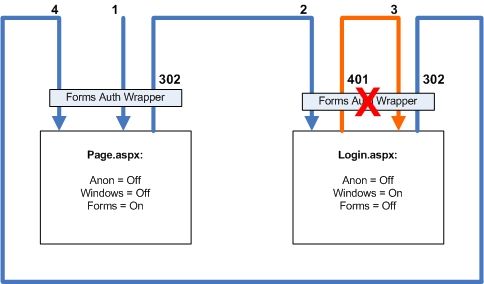
This works as follows (as shown in the diagram above):
1) Anonymous request to page.aspx (a protected page in your app)
a. Access is denied (anonymous is disabled, or, authorization rule denies anonymous user)
b. Forms authentication issues a 302 redirect to login page
2) Redirected anonymous request to the login page
a. Access is denied (anonymous is disabled)
b. Forms authentication is disabled using our wrapper, so it doesn’t issue a 302 redirect
c. Windows authentication issues a challenge
3) Request with windows credentials to the login page (this may actually be several requests as part of the NTLM/Kerberous handshake)
a. Windows authentication authenticates the request
b. The page either displays a login control for the user to log in using forms, or automatically logs in using forms equivalent of the windows user
c. Issues a 302 redirect back to the original page
4) Forms-authenticated request to page.aspx succeeds
Setting it up
Download the attached application for an example of setting it up. You’ll need to:
1. Unlock the <anonymousAuthentication> and <windowsAuthentication> configuration sections before you can use them in web.config:
> %windir%system32inetsrvappcmd unlock config /section:anonymousAuthentication
> %windir%system32inetsrvappcmd unlock config /section:windowsAuthentication
2. Register the forms authentication wrapper configuration section in your web.config:
<!– FormsAuthsModule configuration section –>
<configSections>
<sectionname=“formsAuthenticationWrapper“
type=“Mvolo.Modules.FormsAuthConfigurationSection“ />
</configSections>
3. Replace the built-in Forms Authentication module with the wrapper:
<system.webServer>
<!– Replace the built-in FormsAuthenticationModule with the FormsAuthModule wrapper –>
<modules>
<removename=“FormsAuthentication“ />
<addname=“FormsAuthentication“type=“Mvolo.Modules.FormsAuthModule“ />
</modules>
</system.webServer>
4. Set the required settings for the gateway page:
<!– Disable Forms Authentication for this URL –>
<locationpath=“login.aspx“>
<!– Disable Forms Authentication –>
<formsAuthenticationWrapperenabled=“false“ />
<system.webServer>
<security>
<!– Enable IIS Windows authentication for the login page –>
<authentication>
<windowsAuthenticationenabled=“true“ />
<anonymousAuthenticationenabled=“false“ />
</authentication>
</security>
</system.webServer>
</location>
That should do it.
Some caveats:
– The wrapper uses reflection to invoke the real forms authentication module. This means that it must either run in applications in Full trust, or be in the GAC.
– This is for Integrated mode applications on IIS 7.0 only. Previous versions of IIS or Classic mode applications dont require this as they use two-phase authentication.
Downloads:
1) Sample application and FormsAuthModule wrapper v1.0.
2) Source code for FormsAuthModule wrapper v1.0.
NOTE: Released under Microsoft Permissive License, and supported exclusively through this blog.
Thanks,
Mike
PingBack from http://mvolo.com/blogs/serverside/archive/2007/12/08/IIS-7.0-Breaking-Changes-ASP.NET-2.0-applications-Integrated-mode.aspx
The integration of IIS and ASP.NET authentication stages in Integrated mode applications brings a lot
Hi Mike, I have followed your instructions but I receive HTTP 503, the service is unavailable, I’m I missing something?…
Hi Claudiov,
Please follow http://mvolo.com/blogs/serverside/archive/2006/10/19/Where-did-my-IIS7-server-go_3F00_-Troubleshooting-_2200_service-unavailable_2200_-errors.aspx and see whether you are getting an error message in the event log.
Thanks,
Mike
will this approach work with web services?
Is it possilbe to use one url which allows integrated authentication + user name password to be passed via soap header properties. The if the caller is not a windows user, use passed in credentials?
Hi Steve,
You wouldnt use this exact approach, but something similar. If you can extract the credentials in AuthenticateRequest, you can run after the WindowsAuthenticationModule and authenticate as that user. Otherwise, let the request go forward and be rejected with the NTLM / Negotiate challenge to authenticate with Windows credentials.
If you cannot extract credentials until later when WCF has processed the request/SOAP payload, then just authenticate as special “interim” user in AuthenticateRequest to avoid the request being rejected, then in your web service either authenticate with the SOAP credentials or reject the request with 401 to allow Windows authentication to take place.
Just a note: this information is intended for WCF web services hosted in IIS 7.0 running in Integrated mode.
Thanks,
Mike
Mike what if you wanted to add to this module for x509cert authentication and SecureID. What happens if your internal users don’t have passwords and you don’t want to distribute another ID. So your users that may use windows auth when they are logged onto your network are hitting the same site from the internet and have the same certificate they would use when they log onto their workstations. Or some of your users have secureID cards.
Hi Andrew,
Theoretically, you would configure the the required authentication (cert auth or secureId) for the gateway page, and flow their authenticated identity to the forms ticket the same way I do it here using Windows Auth.
The way you determine the identity in the gateway is completely up to you, so it should support any authentication protocol you’d like to use. As long as you then take that identity and issue a forms auth ticket to represent it.
Keep in mind though that Forms Authentication is a ticket-based scheme, which has inherent security limitations. Using it to represent a stronger authentication scheme (like x509) is essentially downgrading the security of that scheme – if someone manages to exploit the forms auth ticket.
For more info on ticket security, search “client ticket security” in my old article, http://msdn.microsoft.com/en-us/magazine/cc163702.aspx.
Thanks,
Mike
[原文:http://mvolo.com/blogs/serverside/archive/2007/12/08/IIS-7.0-Breaking-Changes-ASP.NET-2.0-applic…
Hi Mike,
My project requires windows Authentication and if user do not provide correct credentials or don’t have valid credentials, then to display login page and use ADAM (Form authentication). I tried your sample application. Challenge response dialog appears but if i cancel it then HTTP Error 401.2 appears.
I need to display login page instead. Let me know how can i override 401.2 Unauthorized error page with my login page. Your help is highly appreciated.
Regards,
Neeraj Tomar
What if you wanted the reverse of this.
You have a web page that may be internally or externally accessed. You’d like the internal users to be automatically recognised by their window id, with no data entry at all. You want external users to be directed to a forms login page.
Presumably you can set it to windows login, and then recognise that there is no user auth, but how do you surpress the username/password box if you can’t detect a windows user?
Hi Mike.
There is this button called “Log on To” in Active Directory where an admin can specify which machines a user can log on to.
My situation is that the admin sets all the users to be able to log on only to their own desktop PCs.
It seems that Forms authentication doesn’t work in this case unless I’m accessing the web application from my own PC.
Is there any way around this without needing the admin to allow the server as one of the computers the user can log on to?
hi Mike. I was working on web application on .net 2.0 , deployed into win server 2003 and IIS 6.0 , and after i moved it to windows server 2008 and IIS 7.0 , the form based authentication didn’t redirect correctly like the way you describe in the article above, so i decide to change the Application Pool from integrated to Classic , even through it didn’t work, so are there away other than using a wrapper module you,ve create.
Is the “Login.aspx” page stated in the web config file mandatory? I created a new page (LoginNext.aspx) and replaced “Login.aspx” with that in the web config file. Now when I direct IE to “Login.aspx” the code module does nothing. Meaning that it doesn’t redirect to “LoginNext.aspx” (I was under the impression the module redirected to whatever page was specified in the within the “location” tag.
The reason I’m doing this is because we have many existing sites that need to be converted to this hybrid login scenario. If someone is attempting to login from within the network, they should be redirected to the requested page, or at least a default “authenticated” page, if not, they should be shown the login page. Since most of our users have our various login pages already saved as favorites, I wanted apply this so that it was seamless to them (thus leaving the existing “Login.aspx” under forms Authentications so that it would redirect to “LoginNext.aspx” and be handled accordingly).
Any suggestions?
Thanks
fuzzlog,
You can change the login page url in the configuration element.
Thanks,
Mike
Mike,
Thanks for the response. In your code (web.config), the "Login.aspx" file was only mentioned in the "path" attribute of the "location" tag that contained the "" tag. Why wouldn't just replacing the new file name in that "path" attribute work accordingly?
Below are the changes I've done to the web config file. The result after those changes is that all pages act as if Authentication had been set to "None". I'm using IIS 6.0, integrated authentication plus anonymous (to prevent the credentials request popup). This setup works just fine with your code unmodified.
Thanks again for any input.
fuzzlog,
You’ll need to change both the location path and set the loginUrl in the element to the new login url. See http://msdn.microsoft.com/en-us/library/1d3t3c61.aspx for the latter.
Thanks,
Mike
Darn,
some tags were stripped. Anyhow, what I did was to add the “LoginNext.aspx” path to the “forms” tags as well as replace “Login.aspx” with “LoginNext.aspx” in the “location” tag.
This produces the “Authentication mode=’None'” behavior described in post above.
Mike,
The problem I was having was due to the following, “FormsAuthentication.SetAuthCookie(wi.Name, true);”. Setting the second parameter to “true” saved a cookie in the my system. This authentication cookie persisted even after I made the changes to the web.config, so when I ran it again, I was already authenticated and would always go directly to any page a chose.
After I cleared the cookies in IE and changed the parameter to “false” the code works correctly.
Thanks for your willingness to share you knowledge.
Mike,
Many thanks for sharing your knowledge. You won't believe how much time you have saved me. I developed our intrant on server 2k3 with iis6 for the school I work in which takes advantage of student and staff AD logins, but also uses forms authentication for their parents to login externally (we didn't want to create AD logins for the parents because that would just be silly to manage!).
We have recently just bought a brand new server for the intranet and as we are in the process of upgrading our servers to 2k8 the intranet server was subsequently installed with this version. This article has helped me tremendously in getting the application migrated to the new server quickly.
Thanks again.
Nick ([email protected])
I tried to follow the example. I had some success.
The authentication types it switched between were windows integrated, and http-auth (not sure what the current term of the firefox/ie popup authentication challenge). Is there some configuration I have to adjust to get it to switch between windows integrated and forms.
Thanks
I am getting an error when I am trying to add the location the system.webserver complains it is not a valid child element of location. Any help would be great…
L’authentification par formulaire – également appelée authentification par cookie – est aujourd’hui énormément
Hi Mike.
Thanks for providing this solution. We have implemented your solution and it works. But, my question is, Why not enable both forms and windows authentication in IIS7. Then in the location element for login.aspx only have
Thanks,
Will
Mike,
This sounds very close to what we are wanting to implement. We have multiple domains and want to connect to our web applications using forms authentication. We would like to use Active Directory as the data store for the forms authentication and we need our web applications to impersonate the domain user that logged on through forms authentication. The catch is the users may or may not be logged on to the domain at the time they connect to our web application. Is there a way to use forms authentication to authorize a user and “convert” to windows authentication once inside the application?
Here’s my scenario, when a page needs to make changes to the file system, instead of giving access to the IIS user I use impersonate to get the page to run under a different account that does have write access. This prevents things like the folder getting recreated loosing the permission changes given to the IIS user.
Would there be a better way of achieving that or will your solution be the only way.
Hi,
I followed this sample, but my login page images are not displayed even though I have given them in the location attributes. Please help.
Thanks
Hi Saiangu,
Please check the logfiles or get a failed request trace to identify why your images arent loading.
See http://mvolo.com/blogs/serverside/archive/2007/07/26/Troubleshoot-IIS7-errors-like-a-pro.aspx.
Thanks,
Mike
mcm, we do the same thing. It is unfortunate that MS never considered this as an option, which you can see from the article:
"For some reason, you want all users to first log in using their Windows credentials"
I think that this is a really good reason. It limits damage to the site in the event that there's a flaw in the anonymous portion of the site.
Note that this config works just fine in the Classic Pipeline mode. You just have to ignore the error/warning message that the IIS manager gives you.
I would also like to know if there is another way to achieve this w/o having to keep it running in Classic mode, which I'm assuming will go away at some point in the future.
One possibility is to set up a second site with the same webroot, in a different app pool and with a different app pool user, but you do then run into some problems with the shared config files.
MacDue provide complete turnkey production lines and really do have the most technologically advanced machinery of it’s type
Hello Mike,
I had a look at your coding.
There is a function
public static void EnableFormsAuth(HttpContext context, bool enable)
but I do not see any call to this function.
Can you please tell me in which situation this function is called.
Thanks,
Wim.
Hi Mike,
Actually i am usnig custom authentication in my application and i also want to use windows authentication at application level. But after enabling windows authentication i am getting error on all my pages. Need your help
Great post!
Is there anyway to avoid the user getting a dialog box when there AD user credentials are not passed or authenticated? I would like to be able to fallback to a custom login form if the credentials are not authenticated. Any ideas?
Hi Mike,
Is it possible to use the same windows authentication to use in Windows Application.
Thank you
Sri
Great post!
When I try this workaround, if the user cannot be authenticated through windws auth, they get the browser prompt to enter username and password. After the third time they are redirected to an error page. Instead of the browser prompt, I want my users to get the login form. I thought that is what this solution did. Is there something I am missing?
This looks great and thanks for including the source code. Is this solution limited to IIS7 or can it be used as well with IIS6 (or IIS7 in classic mode)
This great for me and can it be used on Windows Identity Foundation in part of Security Token Service Web Site
How do I impersonate a Actice Directory user from code?
I have asp.net web service supposed to run in IIS 7 on windows server 2008. The user is already authenticated using custom authentication method. I need the code to be executing with a AD user that is logged on and authenticated.
Hi Mick,
After implementing the above mentioned dual mode authentication, I published it to IIS7. In the site binding I specified the IP address to the same machine rather having ‘all unassigned’. Then when I try to access this using the url (http://192.168.1.54:8123/page.aspx or http://192.168.1.54:8123/login.aspx) it always promts a window to enter windows credentials. It says authentication required.(Enter username and password for http://192.168.1.54:8123). I know this is due to: configuration. So… how can I get ride of this promting window when I publish to IIS7?
Thanks in advance.
Hi Mike,
Thanks for this really helpful article. With a little modification, I have used the technique to implement auto-login for windows users and forms auth for external users.
regards,
Geoff
We have always used an external facing directory (originally NT, then AD) for public users since that security needs to be at least as robust as internal security. Folks wanted Forms Auth too for some contexts, but that loses the Windows token and enterprise enforced access security. We tried ADFS, which can generate a Windows credential from a Forms Auth logon page, and that worked for basic requirements but did not allow a server access context hop like Basic Auth (pretty critical actually unless everything accessed is on the web server). Question for Mike – Can the Forms based logon page workflow be configured to also auto-generate an individual Windows token for the user and their AD group rights, like ADFS, without triggering a Windows logon prompt? Can the generated Windows token be made equivalent functionally to Basic Auth, for use with impersonate, and allowing server and access context hops?
What a painful amount of chaos to go through to simply wrap what should be a 2-second password around your web site. This is 1 aspect of IIS7 that is totally over-engineered. There should be a super-simple button called “Add crappy cheap popup password across whole site in 2 seconds” because this is a hugely common requirement that millions of webmasters use all the time. It shouldn’t be so convoluted and I shouldn’t be needing to edit several XML files and creating special, custom wrappers to do it.
Total IIS7 fail. ASP.Net MVC is absolutely awesome, yet why have they managed to forget such a simple/core function within IIS. It should be a special one-off hardcoded button that is easy to find and only wastes 2 seconds of your life.
Mike – great article, thanks for posting (even if it took me two years to get to it.) Before downloading the sample and checking it I just wanted to sanity check my idea / situation with you. I have a website that uses Forms auth, and works as required. The problem for me is that the site is not yet “live” on the web, and I would like to allow users to view it. I can’t use IP restrictions (tried already), and I don’t want to apply Forms auth to the entire site. What I want to be able to do is use Basic/Windows auth to prevent access to the entire website (as set up in IIS), but once users authenticate themselves that way, they then appear to the ASP.NET (MVC) site as anonymous users, and can browse around (and login) as if they were unauthenticated. Does that make sense and will you library enable that?
Hi Mike, great article. I am running into issues with the sample app (“web”). I keep getting HTTP Error 500.19 – Internal Server Error Module WindowsAuthenticationModule
Notification AuthenticateRequest
Handler PageHandlerFactory-Integrated-4.0
Error Code 0x80070021
Config Error This configuration section cannot be used at this path. This happens when the section is locked at a parent level. Locking is either by default (overrideModeDefault=”Deny”), or set explicitly by a location tag with overrideMode=”Deny” or the legacy allowOverride=”false”.
Config File ?C:inetpubwwwrootwebweb.config
Using VS2010 and IIS7 on Win2008
Any idea?
Thanks,
San
Hello Mike, I have a question about this article “Two-Level Authentication” please. For a WebApplication we are trying to use NTLM authentication for IE internal clients, but forms authentication for other (external) clients. That means a request comes in, if NTLM works Windows Integrated Security will be used, if it fails redirect to Forms Authentication. Any ideas how we can get this working using IIS 7.5 Classic mode (ASPNET 2.0) ? Thanks very much for your help.
Hi Mike,
How can I make this work using the
Hi Mike,
Great article, thanks for posting it !
I just tried to deploy your material on IIS 7 in a Windows Server 2008, and I just cannot login:
2011-03-09 13:27:16 ::1 GET /TestLogin/Page.aspx – 80 – ::1 Mozilla/4.0+(compatible;+MSIE+7.0;+Windows+NT+6.0;+SLCC1;+.NET+CLR+2.0.50727;+.NET4.0C;+.NET4.0E) 302 0 0 0
2011-03-09 13:27:16 ::1 GET /TestLogin/login.aspx ReturnUrl=%2fTestLogin%2fPage.aspx 80 – ::1 Mozilla/4.0+(compatible;+MSIE+7.0;+Windows+NT+6.0;+SLCC1;+.NET+CLR+2.0.50727;+.NET4.0C;+.NET4.0E) 401 2 5 0
So if I understand well, ‘Page.aspx’ redirects to ‘login.aspx’ as expected, but then the latter sends a ‘401.2 Unauthorized’… Do you have an idea why ?
Many thanks for your help and for sharing your knowledge !
I can get to the login page which has a login button, and my domainusername already populated. When I click login it want’s to go to default.aspx. It should be going to page.aspx, correct? I can’t figure out where it is pulling default.aspx, where do I make the change to direct it to the page.aspx page? Assuming that is what I have to do. Thanks for the help!
Have implemented this, but it’s only been somewhat successful. Within the login page, I want to check who the actual end user is so that I can present them with customised options to proceed. What happens is that User.Identity and Request.LogonUserIdentity return the account that the application pool is running under.
I can save the situation by checking Request.ServerVariables[“LOGON_USER”] which will return the correct end user account by name, but this is less than ideal. Is there any way to get the expected behaviour where the authenticated windows client account is returned? Without a proper WindowsIdentity, I can’t do Impersonation.
Also, within IIS 7 the authentication tab for my application carries the warning “Challenge based and login redirect based authentication cannot be used simultaneously”. This would be because both Forms and Windows authentication are enabled. However, disabling Windows authentication may remove the warning but it breaks the application.
I have tried your app and am still getting 401.2 error. I am using Windows 7.
OK I need some more info. If i go to a page with anonymous access, (my main Forms Auth page), everything works fine. I authenticate and a forms ticket gets created. But I have another page CSRLogin, that I substituted for login.aspx. When i load that page, I get the 401.2 error.
I’d tried implementing this in my MVC 3 site, but it’s simply shut down access to everything including my login page. I’d like to find a solution like this for MVC 3 as I’m required by my current client to have Intranet users logged in automatically and Internet users log in uses a form. I need to associate roles with each too, which just adds to the complexity.
Hi Mike,
I’m having trouble with your solution as do these people
http://forums.asp.net/t/1608289.aspx/1
I really need this to work!!! It seems so elegant. Please, can you help me with a fix?
Answer to San’s issue is in the article, section “Setting it up”, point #1, if anyone else is facing the same issue.
Answer to San’s issue is in the article, section “Setting it up”, point #1, if anyone else is facing the same issue.
Hi Mike,
Firstly thankyou for your contribution, it saves a lot of effort and research. The question reverberating around my head ,though, during the time I have been looking for a solution to the problem is that the requirement to have authentication in the domain and external to a domain in the same solution is apparently a common requirement, why is this not supported out of the box in ASP.NET? Given that the techonology is still evolving, it’s not like these problems can’t be addressed in future releases of the framework, surely?
Hola Mike, tengo un problema con la Request.LogonUserIdentity.Name
Los usuarios habilitados puede utilizar la aplicación(WEB-INTRANET), hacer login via usuario de dominio y todo funciona, Pero el usuario de solo una persona falla, probé mi usuario en la maquina de él y funciona, pero el usuario de él no. Incluso desde otra compu el usuario de él no funciona. Windows7 IIS 6.1
This solved 2 days worth of issues. Cheers mate.
I am runnning an old application on IIS 7 in classic mode with forms authentication with a custom HTTP handler. HTML goes through authentication while .ASPX files do not get prompted for authentication via forms. Any ideas and suggestions would he helpful.
This is most useful, but my company chiefs are concerned to include your module in our applications as it is ‘closed’ and may pose a security risk
Is it possible to post the code for the module so we can create dll ourselves?
Excellent website. A lot of useful information here. I’m sending it to some buddies ans also sharing in delicious. And of course, thank you to your sweat!
What a great idea for a post! Thanks for sharing I really enjoyed it.
I’m only getting “NT AUTHORITYIUSR” as my userName.
Idea’s on where I can look to solve this?
I have this option trneud off in my admin panel, I think, because otherwise my readers get a prompt about every 20 seconds. Without this option on, the RSS in internet explorer doesn”t show the protected entry but in firefox it does whether they”re logged in or not.Any way to fix my problems?
I have two questions regarding the FormsAuth Module implementation.
– I didn’t know you can write in Request.ServerVariables (I thought they were readonly). Can you please explain how you could why you have chosen this way and not e.g. the Application collection.
– The mehtod EnableFormsAuth is never called, so why did you include it?
Besides this questions I found you article very usefull and I’m using it for some kind of SSO mixed case.
Thnak you!
sir, good day. i”m a noob asp.net developer here. just want to ask for a help regarding AD connection. i always get this value. Is Authenticate: False.. i dont know why…
i got this web config.
what else am i suppose to do??? please help.. thank a lot in advace..
best regards,
andrew
Mike,
Any down-sides to using .NET 4.0 Classic mode and reverting to the two-phase authentication? I guess my real question is are there any advantages of doing it this way, or something that we might miss out on later in the development of our application. Thanks in advance.
I have used your solution (works great except….) IE 8.0.6001 (latest version for XP) all other browsers works great. with 6001, the Request.Form is null on postbacks. by duplicating the tab (go figure) it fixes the problem and works. any ideas????
thanks,
Barry
comment
Dear Mike,
I need to implement this mixed mode authentication on ASP.net MVC4. I tried to implement your method but i could not achieve that. Could you be kind enough to help me out to resolve this.
Regards,
Desmond
Hi All,
I currently don’t have the project code files and have only the deployed files for the application in which I need to make these changes. Is it possible to make the make authentication changes in the deployed(published) files ?
Thanks & Regards,
Yamini
So I”ve got this up and going on my end and when I go to the login page it should pickup my windows auth. but for some reason it”s poping up the login dialog wanting me to enter my windows credentials. I”m I have a problem in IIS with the bindings, or DSN?
Mike,
Excellent tool and advice. having a problem unlocking the config sections on Server 2102 due to insufficient permissions. Any advice? Thank you very much in advance.
Mike,
Silly me…I was successful unlocking the config sections AFTER I ran command prompt as an administrator…man…
Again, thank you for the excellent tools and process for getting forms and windows authentication working together; absulutely wonderful for my company”s intranet!
Mike,
ViceVersa scenario:
We have a forms authentication for Login page where all users have common username and pwd to login to the application.
But Admin pages in the application are restricted to only few users. Users are identified by their windows ID or Active Directory ID which used to be available in ServerVariables LogOnUSer on IIS6.0.
But when configured in IIS 7.0 ServerVariables LogOnUSer contains the common username instead of user AD ID.
This scenario is someways viceversa of what you have explained on this page.
Is there a way to configure the application on IIS 7.0 using common usernam and pwd on login page and determine the user AD ID to access other pages.
IIS 7.5 and 2 Level Auth | Sometimes Words Mean Something
[…] […]
Mike,
Firstly thank you for providing this post we have used it to successfully implemented this on a Windows Server 2008r2 box running IIS 7.5.
I have just created an exact copy of the site we have this working on, on a Windows Server 2012 box running IIS 8 and it”s not working.
Do you have any suggestions as to how to get this working in IIS 8?
Many thanks
Dan
Hi! I”ve been following your website for some time now and finally got the courage to go ahead and give you a shout out from Porter Texas! Just wanted to say keep up the excellent job!
Worked great…..Until iis7/7.5 with asp.net 4.5 and IIS8 (with asp,net 4.5 preconfigured)…..Something is not quite right…….
Any update on doing this with what colin mentioned above using asp.net 4.5 on IIS 7/7.5?
Haven”t implemented the solution yet but still trying to find one.
TIA
Here’s another request for information on making this two-level authentication work for ASP.NET MVC 4 on IIS7.5/8.
The browser-based intranet-only web site/app we’re needing to build needs to handle a mixed mode of authentication. That is, if a user goes to the intranet site using a mobile browser, IIS and ASP.NET will route the user to a login form to enter credentials (forms authentication). However, if a user goes to the intranet site using a desktop browser, the user will be authenticated via Windows authentication. And if Windows authentication fails (e.g., the user is logged on as a local user), IIS and ASP.NET will route the user to a login form to enter credentials.
Using IIS7.5/8 and ASP.NET MVC4, is such a scenario possible? If so, how do we set everything up?
What is the IIS App Pool like? Integrate Managed Pipeline Mode or Classic? And what app pool identity?
For the web app in IIS, do we have Anonymous Authentication enabled or disabled? ASP.NET Impersonation? Forms Authentication? Windows Authentication?
For the ASP.NET MVC 4 app, what goes in Web.config for the , , and elements? Forms authentication? Windows authentication? Impersonation or not?
TIA
A thousand thank you!! Superb. It works well with your example! That’s two days I’m looking for an equivalent on the web. Your example is the only one that works the first time and alone.
My partner and I stumbled over here coming from a different website and thought I should
check things out. I like what I see so now
i am following you. Look forward to checking out your web page again.
For those who want it on IIS 7.5 for local addresses use Method 2 as described in http://support.microsoft.com/kb/896861 and set DisableLoopbackCheck to 1 on regkey HKEY_LOCAL_MACHINESYSTEMCurrentControlSetControlLsa
then it should also work on your local machine
Hello There. I found your weblog using msn. That is an extremely well written article. I’ll be sure to bookmark it and return to read extra of your helpful info. Thank you for the post. I’ll definitely comeback.
Hi,
I did the code setup by following the setup,
But I am blocked in the following scenario. My requirement is that if the user is from out side the domain that hosts the application then the user is asked for windows login prompt. I want a solution where this prompt will not be displayed to users who are not in the same domain where the application is hosted.
Please help.
I enjoy what you guys are usually up too. This kind of clever work and coverage!
Keep up the superb works guys I’ve incorporated you guys
to blogroll.
Hi, I downloaded your application, and run it in Visual Studio, it works well, but when I deployed it in IIS, it gives me error..
“This configuration section cannot be used at this path. This happens when the section is locked at a parent level. Locking is either by default (overrideModeDefault=”Deny”), or set explicitly by a location tag with overrideMode=”Deny” or the legacy allowOverride=”false”.”
at line
Could you please help me about this., please…
thanks.
Good morning —
Newb .NET programmer here. I inserted your code into my application but the class doesn’t like FormsAuthConfigurationSection. It’s in my web.config but the class says it’s undefined. Any advice you might give is greatly appreciated.
Thanks,
Michael
P.S. I did check to see if FormsAuthConfigurationSection is a member of a Microsoft class I failed to include and it’s not.
Anyone managed to to this in .NET 4.5 and IIS8??
Hi Mike. This was a great post about using windows auth then going to forms auth. I’d like to do the reverse. I have a vanilla forms auth site (default.aspx and login.aspx). The userid and pwd are verified against the domain via LDAP (LdapAuthentication.IsAuthenticated(, , )) in the login.aspx. Then I want the default.aspx to use Windows Auth against data sources and other netwotk resources. What would you suggest is the right development path/solution?
Thanks in advance for your time.
Paul Goldy
pgoldy@whitecloudanalytics
+1.208.283.7407
Hi Mike,
My scenario :
I have multiple Active Directories, a user can be in any of these AD’s.
Also a Custom Forms Authentication, i.e if user is from none of the AD’s available; then go to Login page.
I am using MVC 5 and IIS 8.
Can you please help me on how i can use your code for MVC project?
Your help would be greatly appreciated.
Thanks.
Is it a hack to use the line below?
C:WindowsSystem32inetsrvappcmd.exe unlock config /section:anonymousAuthentication -commit:apphost
I would not have the permission to do that in production. Is there an alternative?
For those who experience error:
“This configuration section cannot be used at this path. This happens when the section is locked at a parent level. Locking is either by default (overrideModeDefault=”Deny”), or set explicitly by a location tag with overrideMode=”Deny” or the legacy allowOverride=”false”.”
As mentioned by Mike “1. Unlock the and configuration sections before you can use them in web.config”. His commands are for IIS. If you already executed the commands, likely you are using IIS Express with VS.
For Windows 7, open the IIS Express configuration file at C:Users(you account name)DocumentsIISExpressconfigapplicationhost.config
It should read:
Two sectionGroup should be “Allow”.
Cheers,
ASP.NET Identity + Windows Authentication (Mix mode – Forms + Windows) | DL-UAT
[…] http://mvolo.com/iis-70-twolevel-authentication-with-forms-authentication-and-windows-authentication… […]
Hi,
I’m trying to download the two samples you have provided above but get a 403 error … where can I download your code from?
http://mvolo.com/assets/pre-migration/formsauthwrapper_source_v1.zip
and
http://mvolo.com/assets/pre-migration/twolevelauth_v1.zip
are both broken links. Are these up on codeplex or anywhere I could access the source?
Hello
I’m trying to download the two samples you have provided above but I have a 403 error..
Could you send me the samples ?
Thx
I am trying to download the two samples you have provided above but get a 404 Not Found error …
where can I download your code from?
Hi,
Can you please post the code for this article? Existing links don’t work.
Thank you!
dead link…
Wrapper class not available. Please advise
The logic above is exactly what I am looking for in my web/forms application, but not fully getting how to properly implement it with MVC5 without access to the source (bad redirect).
Any help implementing this logic into MVC5 with user accounts would be immense.
Very good article.
But I can’t download files, as the link is broken.
Can you please provide me your solution files?
I will be very thankful to you.
For those who are unable to download the wrapper or the source – the wayback machine has it all archived:
https://web.archive.org/web/20130401065757/http://mvolo.com/iis-70-twolevel-authentication-with-forms-authentication-and-windows-authentication/
Mix Windows and Forms Authentication | 希言堂
[…] (1) http://mvolo.com/iis-70-twolevel-authentication-with-forms-authentication-and-windows-authentication… […]
Great article, I also cannot download your source, but I finish it with asp.net MVC3 finally.
Anyone who need please download from here: http://pan.baidu.com/s/1jGfHTOy
Great article, It is what I want to do in my asp.net mvc project, and finally I done it according your article, thanks again.
BTW, your sample is blocked, and so I also write a asp.net mvc sample file: http://pan.baidu.com/s/1jGfHTOy
Download links are not working. Can you please email me the files for this setup/configuration?
Thanks,
Krishan
IIS7: Setup Integrated Windows Authentication like in IIS6 | ASK AND ANSWER
[…] this example (old link) of how to fake two-stage authentication with IIS7 integrated […]
Hi,
this is another request for the source files, as the links in your post are broken…
Thx in advance an best regards
epsilon
Is that still works for IIS 7.5?
For those looking for the source code, here is a GIT repo that has it https://github.com/SergeySorokin/MixedAuthWebApplication
Hi,
Can you please post the code for this article? Existing links don’t work.
Thank you!
Here’s an approach I found that works similarly, but doesn’t require a wrapper:
http://world.episerver.com/blogs/Dan-Matthews/Dates/2014/8/Mixing-Forms-and-Windows-Authentication/
Be sure to check out my comment, which makes a few useful improvements.
Hey the download links wont work Can you please help!! I know its a very old post but this might actually help us to resolve an issue we are facing
混合窗体认证与Windows身份验证 – CodingBlog
[…] Challenge-based and login redirect-based authentication cannot be used simultaneiously leads to IIS 7.0 Two-Level Authentication with Forms Authentication and Windows Authentication which is a module that allows you to selectively change the auth for different […]
The attachments are not downloadables, could you please provide updated links to download the resources.
Thanks
Hi Mike,
Thank you for the POST. it’s really exhaustive and explanatory. Please I have a very serious Issue. I am trying to get the Client Machine name for an ASP.NET application. But I keep getting IISUSR. if i can get the name of the User, then we can authenticate and sign him in using Active Directory. I’m able to get the name in my Local Machine, but I cannot get it in the Production Server. I’ve tried Windows Authentication and Forms authentication but it seems Im getting something wrong. How do I go about it please?
any Help?
Iis Custom Error Page With .aspx
[…] IIS 7.0 Two-Level Authentication with Forms. – One of the key improvements granted by the ASP.NET integration in IIS 7.0 is a unified authentication model. Instead of the two-stage model in previous versions of. […]
Please could you provide me the code on my email. The download links donot seem to work.
The sample project links
Sample application and FormsAuthModule wrapper v1.0.and
Source code for FormsAuthModule wrapper v1.0.return page not found.
Is there a way to get the sample projects/
The code given in description is not available. The web page throws an error
c# - La mezcla de Formas y la autenticación de Windows .Net 4.5
[…] Si buscas en google para una solución de todos los caminos parecen conducir a este blog/solución: http://mvolo.com/iis-70-twolevel-authentication-with-forms-authentication-and-windows-authentication… […]
c# - Le mélange des Formes et de l'authentification Windows .Net 4.5
[…] Si vous faites une recherche google pour trouver une solution tous les chemins semblent mener à ce blog/solution: http://mvolo.com/iis-70-twolevel-authentication-with-forms-authentication-and-windows-authentication… […]
.net - Mescolando Forme e l'autenticazione di Windows in .Net 4.5
[…] Se hai google per una soluzione di tutte le strade sembrano portare a questo blog/soluzione: http://mvolo.com/iis-70-twolevel-authentication-with-forms-authentication-and-windows-authentication… […]
Mixing Forms and Windows authentication in .Net 4.5 – inneka.com
[…] username and domain. If you google for a solution all roads seem to lead to this blog/solution: IIS 7.0 Two-Level Authentication with Forms Authentication and Windows Authentication However when upgrading to .net 4.5 and IIS8 it breaks, Always forcing a 302 redirect to the login […]
Is there any way you can make the sample applications available again? I’d like to see how you accomplished this.
Thanks!
IIS7: Setup Integrated Windows Authentication like in IIS6 – Fix Code Error
[…] this example (old link) of how to fake two-stage authentication with IIS7 integrated […]
IIS 7 – “Internet Explorer cannot display the webpage” when anonymous access is turned off - Boot Panic
[…] UPDATE: According to this: http://mvolo.com/iis-70-twolevel-authentication-with-forms-authentication-and-windows-authentication… […]
where can I find the attachments ? links are out dated
Mixing Forms authentication with Windows authentication – w3toppers.com
[…] Challenge-based and login redirect-based authentication cannot be used simultaneiously leads to IIS 7.0 Two-Level Authentication with Forms Authentication and Windows Authentication which is a module that allows you to selectively change the auth for different […]
Mixing Forms authentication with Windows authentication
[…] Challenge-based and login redirect-based authentication cannot be used simultaneiously leads to IIS 7.0 Two-Level Authentication with Forms Authentication and Windows Authentication which is a module that allows you to selectively change the auth for different […]
Mezcla de la autenticación de formularios con la autenticación de Windows - Fallosweb.com
[…] y en redireccionamiento de inicio de sesión de IIS7 no se puede usar simultáneamente conduce a la autenticación de dos niveles de IIS 7.0 con autenticación de formularios y autenticación de Windo…, que es un módulo que le permite cambiar selectivamente la autenticación para diferentes […]
Hi
Can you tell me how to download source code
it’s not working…
Thanks
is there an IIS10 version?